Email Preferences 03/06/2026
Your Inbox, Your Way: Admin Email Preferences & One-Click Unsubscribe
What's New
You love the weekly Generosity Snapshot. Your executive pastor lives for the Pastoral Care Report. But your office administrator? She just needs the feature announcements — and nothing else.
Or maybe it's the other way around.
Maybe your pastor doesn’t want to see every feature update or weekly platform announcement, but your team members do. Everyone’s role is different — and so is what they want in their inbox.
Admin Email Preferences puts every administrator in control of exactly which emails they want to stay opted out of. A simple set of checkboxes in each admin's profile lets you choose which reports to skip.
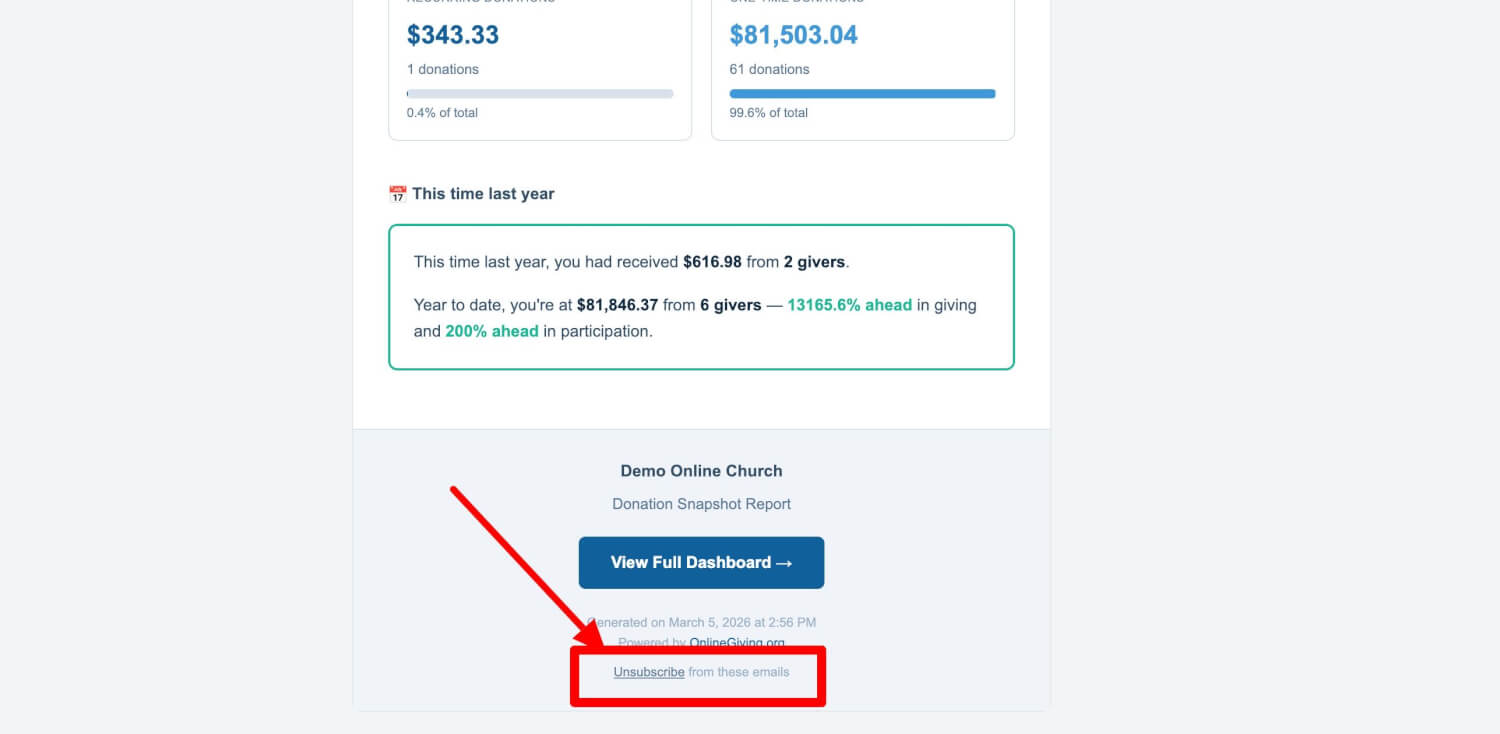
And every email we send now includes a one-click Unsubscribe link right in the footer, so anyone can opt out instantly — no login required and no extra steps.
Because the right information should reach the right people — without cluttering everyone else's inbox.
Note: This feature provides opt-out control for administrators who want fewer emails. Reports still provide control to staff to configure who gets which reports but opt-outs in admin email preferences allow a global optout by category.
Where to Find It
Admin Email Preferences is in your control panel at:
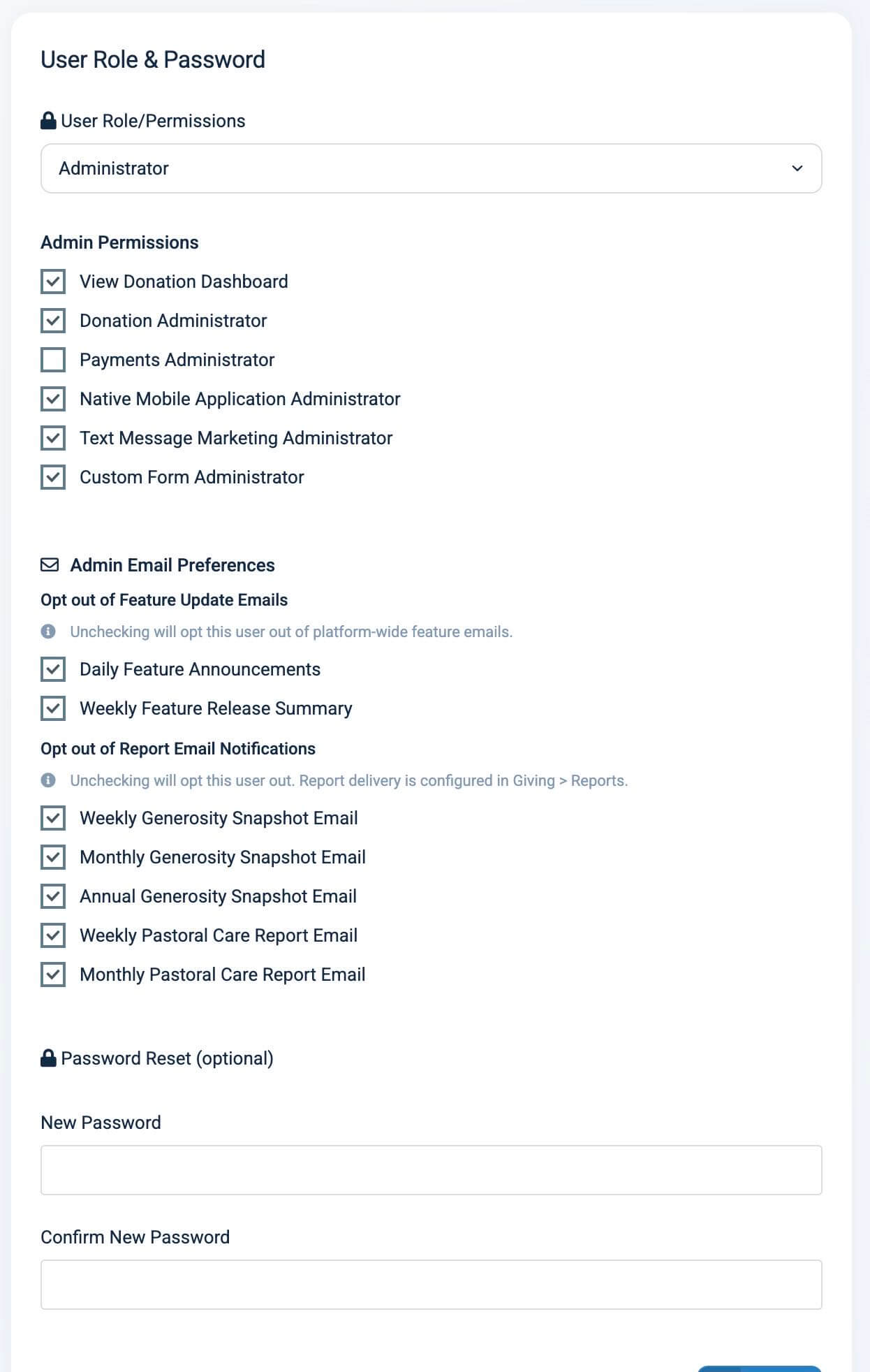
Users > Edit User > scroll to Admin Email Preferences
Any administrator can manage another admin's email preferences from this panel. The section appears automatically when the user's role is set to Administrator.
Choose Exactly Which Emails You Receive
The preferences panel is organized into two clear groups so you always know what you're managing:
Feature Update Emails — platform-wide announcements about new features and improvements:
- Daily Feature Announcements
- Weekly Feature Release Summary
Report Email Notifications — your organization's scheduled reports:
- Weekly Generosity Snapshot Email
- Monthly Generosity Snapshot Email
- Annual Generosity Snapshot Email
- Weekly Pastoral Care Report Email
- Monthly Pastoral Care Report Email
Every checkbox starts checked — meaning everyone stays opted into the possability to recieve to everything by default. Uncheck the ones you would like to optout from. It's that simple.
Unsubscribe from Any Email in One Click
Every report email and feature announcement now includes a small Unsubscribe link at the bottom. One click and you're opted out of that specific email type — immediately, no login required.
Changed your mind? The confirmation page includes a Re-subscribe link that brings you right back. No need to dig through settings or ask someone to fix it for you.
Why it matters: It's Wednesday morning. You open your inbox and see the Weekly Pastoral Care Report. You appreciate it, but you've already talked to your care pastor about it and you'd rather not receive it anymore. Instead of making a mental note to "go change a setting later" (and forgetting), you just click Unsubscribe at the bottom of the email. Done. Five seconds. You still get every other email you care about — just not that one.
Manage Preferences for Your Team
As an administrator, you can also manage email preferences on behalf of other admins. Open any admin user's profile, scroll to the Admin Email Preferences section, and adjust their checkboxes. This is especially helpful when onboarding new staff or cleaning up after a role change.
Why it matters: When your new children's ministry director comes on board, you can set up their profile with only the emails relevant to their role. When someone moves from stewardship to missions, you can update their email preferences along with their permissions — all in the same screen.
At a Glance
- Per-admin email preferences: Each team member controls exactly which emails they receive
- One-click unsubscribe in every email: Opt out instantly from any email footer — no login needed
- One-click re-subscribe: Changed your mind? Re-subscribe from the confirmation page
- Two organized categories: Feature updates and report notifications are separated for clarity
- Default: everything on: No disruption — existing admins keep all their emails unless they opt out
- Admin-managed preferences: Manage email preferences for any admin user on your team
Try It Now
- Go to Users in your control panel and click Edit on any administrator
- Scroll down past Admin Permissions to the Admin Email Preferences section
- Uncheck any email type you'd like to stop receiving — and save