The following document outlines how to use Express Donations on your website. Express Donations are included free of charge with every account and specifically designed for church web developers who have a need to handoff a gift with the donor to be returned back their website for further processing. An example of this might be a split form scenario where a church collects specific information, then sends the donor to complete their gift and finalizes the collected information upon return of the donor.
Please do not use Express Donations as your primary donation method on your church website. Although it's very possible to use Express Donations as your primary donation form we do not recommend it as you will be omiting valuable features such as text giving sign-up and recurring gift conversion. For primary giving please use direct linking or embedded giving.
Getting Started
- Express Donations require an Online Giving account. If you have not already signed up, please visit our sign-up page to get started today.
- Got a question or issue? Drop us a line at support@onlinegiving.org. We shall be happy to guide you with the process.
Prerequisites
- Active Account - If you have not already signed up for Online Giving, please visit our sign-up page to get started today.
- Basic HTML Skills - Requires basic knowledge of HTML. If you are having trouble please do not hesitate to contact us.
Express Donations Flow

Supported Methods
- GET - You may supply the fields below as HTTP GET form request or link
- POST - You may supply the fields below as HTTP POST form request
Link & Form Generator
For your convenience a link and form generator for Express Donations is located in the Online Giving Control Panel > Giving Settings > Express Donations. Below you will find a list of supported fields. These same fields are included in our link/form generator located in the control panel. We recommend taking advantage of this feature when getting started as it makes it easy to generate various types of forms.
Supported Fields
redirect_urlredirect_labelstateamountdescriptionfundsub_fundtypeSupported Gift Type Values:
one-timemonthlyweekly2weeksquarterlyyearlyfirst_namelast_nameemailaddressadministrative_area_level_2administrative_area_level_1postal_codecountrycustom_form_idChurch Landing Page
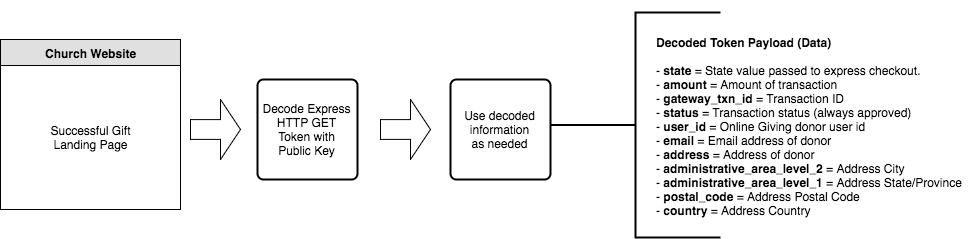
Once a gift is successfully completed the donor is redirect to the church landing page supplied in the Express Donation request (see redirect_url above). Along with redirecting the donor, Online Giving will send a signed JSON web token containing important information about the completed donation. In the sections below we will outline the data included in the payload and how to verify the signed token.
JSON Web Token
JSON Web Tokens are an open, industry standard RFC 7519 method for representing claims securely between two parties. Online Giving returns a HTTP GET param named "token" that is a signed JSON web token. JSON web tokens are not designed to be encrypted. Instead they are signed based 64 encoded JSON payload and can be decoded using your Online Giving public key. Online Giving will return a token that has been signed specifically for your church. The signed aspect is important as it provides means for your church website to verify the JSON web token is authentic (not fake or spam). No post back is required as verification can be achieved by validating the signature of the JSON web token using your church public key.
Express Donations Public Key
As noted above you will need your Express Donations public key to verify the signed token returned as a HTTP GET "token" param. You can access your church public key directly in your Online Giving control panel > Giving Settings > Express Donations > Public Key.
Token Decoding
Along with your church's public key you'll need an JSON Web Token open source library to verify and decode the returned HTTP GET "token" param. Fortunately there are an amazing amount of JSON Web Token open source libraries designed specifically for this purpose. You can find a library in almost any coding language at the website JWT.io.
In the example below we use Google's firebase/php-jwt library. However, you can easily perform the following example using any of the open source libraries as noted above.
Token Payload
stateamounttransaction_idgateway_txn_idstatususer_idemailaddressadministrative_area_level_2administrative_area_level_1postal_codecountryWeb Hook Alternative
Although we recommend using the return "token". You may also configure a JSON web hook payload to a private URL on your church website. You can set the web hook URL directly in your Online Giving control panel > Giving Settings > Web Hook.
Getting Support
Having trouble or got questions? Drop us a line at support@onlinegiving.org. We're always happy to assist you.