Feature Updates 01/24/2025
New Feature: Microsoft Dynamics Donation Export Now Available!
We’re thrilled to announce that OnlineGiving.org now supports exporting donations directly to a Microsoft Dynamics-compatible CSV spreadsheet! This new feature streamlines donation management and reporting for churches using Microsoft Dynamics.
How to Use the New Export Feature
-
Navigate to the Export Tool
Log in to your OnlineGiving.org Control Panel, then go to:
Control Panel > Donations -
Filter Your Donation Transactions
Before exporting, we recommend filtering transactions to ensure accurate data:- Status: Filter donations by selecting "Approved" only.
- Date Range: Apply a date range to include only the desired transactions.
Any filters applied to the transaction list will be reflected in the export.
-
Export to Microsoft Dynamics
- Click the down arrow on the export button.
- Select "Export Microsoft Dynamics" from the dropdown menu.
Important Notes
- The Donor ID in the export corresponds to the OnlineGiving.org User/Donor profile field "Donor Envelope ID."
- The Camapign IDs is based on the "External Fund Number" from the fund or sub-fund associated with each donation.
That's it! Your donations will be exported in a format ready for Microsoft Dynamics, making your workflow more efficient than ever.
Annotated Screenshot Showing How to Filter & Export to Microsoft Dynamics (click for larger image):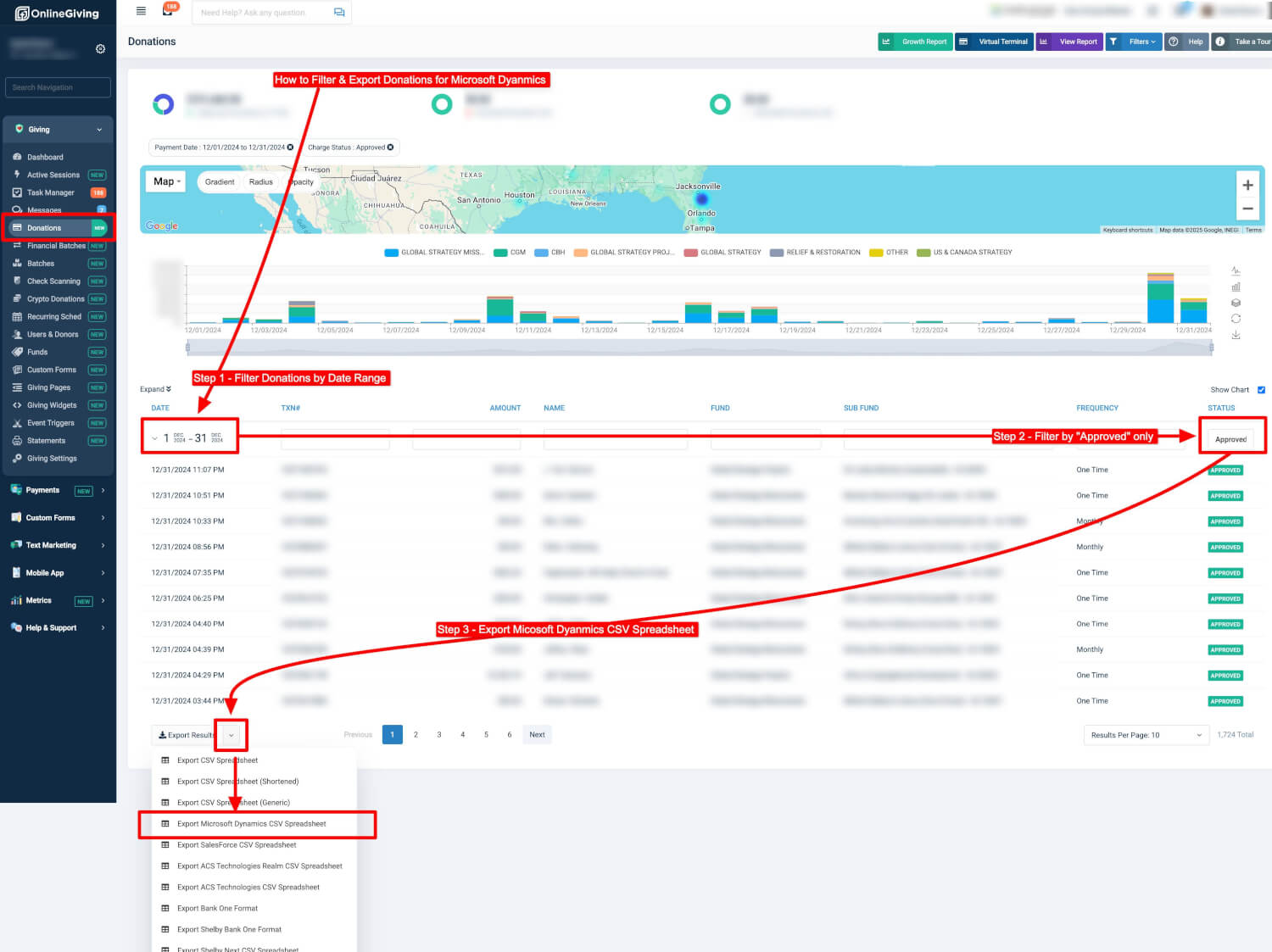
OnlineGiving.org MinistryPlatform Widgets Payments Integration Enhanced
We’re excited to announce a significant update to the OnlineGiving.org MinistryPlatform (MP) Widget Payments integration! This enhancement strengthens the checkout process, safeguarding against abnormal user activity and improving auditing capabilities.
Key Updates:
-
Enhanced Tracking of Inbound Payment Requests
- The inbound MP Widgets payment request token is now saved alongside the existing MP Invoice Snapshot.
- This change enables OnlineGiving.org to maintain a long-term record of payment requests originating from MinistryPlatform Widgets, supporting extended auditing beyond the standard 30-day internal log window.
-
Improved Post-Payment Redirect and Delivery Process
- The post-payment process has been updated to use the newly saved inbound payment token from the MP Invoice Snapshot instead of the previous session-stored token.
- This design ensures a robust audit trail by preventing session-based overwrites caused by edge-case user behaviors.
Addressing Edge-Case Scenarios:
This update specifically resolves an issue where a user could initiate multiple registration payment requests in separate tabs or windows, complete payment on one tab, and then proceed to complete payment on another. Previously, this behavior could overwrite session data, resulting in inaccurate MinistryPlatform records. With this update, the saved snapshot token is used for validation, eliminating these inconsistencies and preventing misuse.
Impact on Churches:
- This update is now live for all MinistryPlatform churches.
- No action is required by your church—the update is automatically applied to improve your integration experience.
This enhancement demonstrates our commitment to ensuring secure, reliable, and accurate payment processing for your church's needs.
OnlineGiving.org QuickBooks Online Deposit Integration Update
We're excited to introduce an enhancement to the OnlineGiving.org integration with QuickBooks Online, specifically for deposit slip creation.
The updated integration now intelligently detects situations where a financial batch deposit slip cannot be created in QuickBooks due to a closed accounting period. When this occurs, the system will automatically mark the batch as "skipped" for QuickBooks recording, ensuring compliance with QuickBooks policies and preventing errors.
This update is particularly useful for church administrators working with backdated QuickEntry batches where the corresponding accounting period is already closed. It helps maintain consistency in your financial records without disrupting workflow. For any necessary adjustments, QuickBooks allows direct handling of skipped entries.
Please note: This enhancement only affects financial batches linked to closed accounting periods. Deposit slip creation for transactions within the current QuickBooks accounting period remains unchanged.