Feature Updates 01/29/2026
Introducing the Generosity Snapshot
Your Weekly Giving Intelligence Report
What Is the Generosity Snapshot?
The Generosity Snapshot is an automated weekly report that delivers a clear, complete view of your organization’s giving health—directly to your inbox.
Each week, Donor Admins receive a professionally formatted email that summarizes donations, giver activity, fund performance, and year-over-year trends. No logins. No manual reports. No last-minute prep before leadership meetings.
Think of it as your giving dashboard—delivered.
Key insights arrive already organized, interpreted, and ready to share with staff, boards, or ministry leaders.
What Makes It Powerful
Every Generosity Snapshot includes an AI-powered executive summary that translates your data into plain, leadership-ready language.
The summary:
-
Highlights wins worth celebrating
-
Flags trends that may need attention
-
Interprets giver behavior in a thoughtful, pastoral tone
-
Is generated fresh each week using your actual data
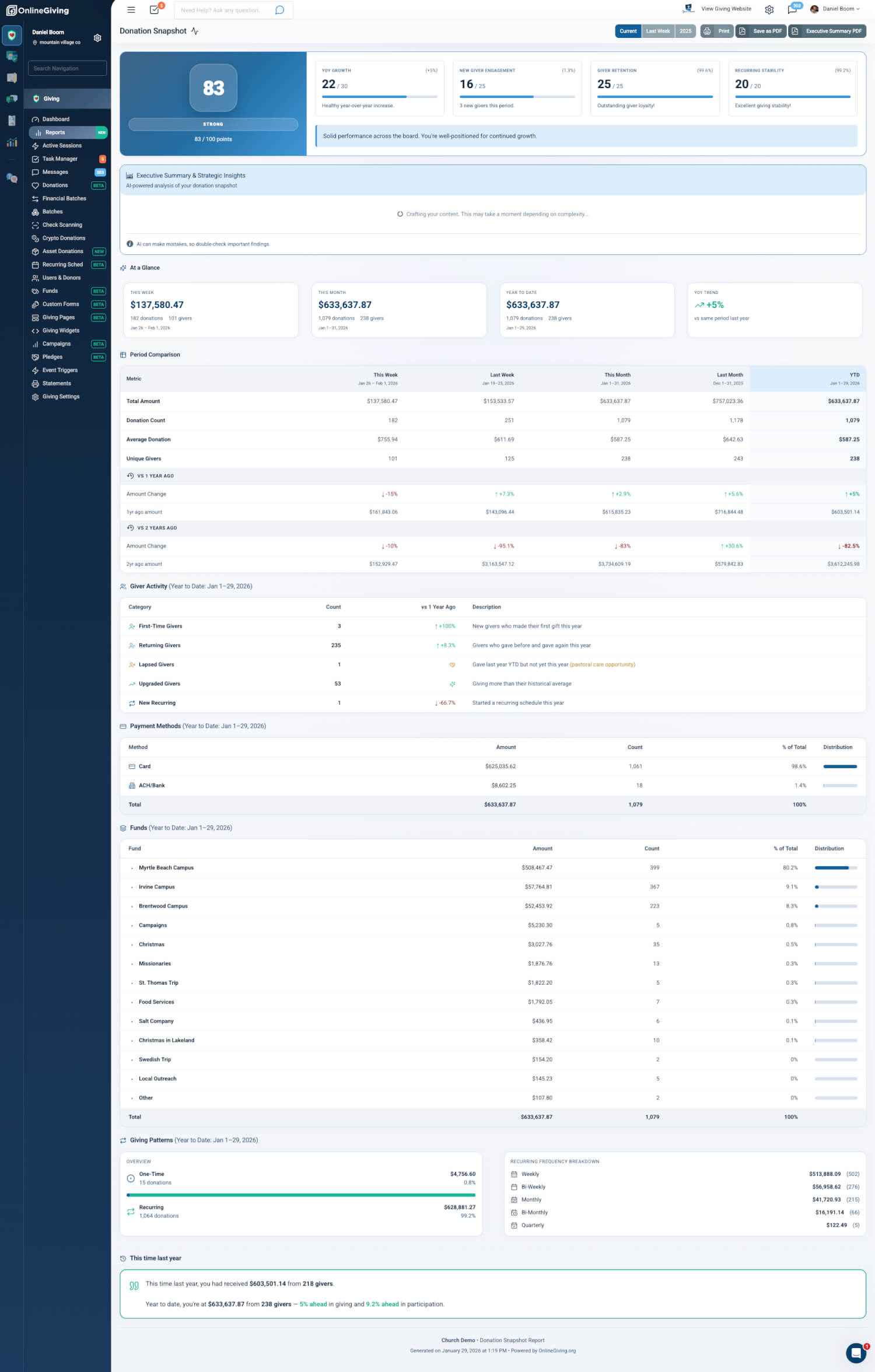
Beyond the AI insights, the report delivers a comprehensive—but approachable—view of giving performance, including health trends, comparisons across time periods, giver lifecycle movement, fund distribution, and recurring giving patterns.
When you want to explore further, every section links directly to the full interactive dashboard in your Control Panel—so you can move from insight to action in seconds.
What’s Included in Every Report
Giving Health Score
A 0–100 assessment of your organization’s giving patterns, including:
-
Overall health status (Thriving, Healthy, Establishing, etc.)
-
Data maturity indicators
-
Trend direction over time
AI-Powered Executive Summary
Intelligent, leadership-ready analysis including:
-
High-level executive overview
-
Key metrics and movement
-
Wins to celebrate
-
Watch items that may need follow-up
-
Giver lifecycle highlights
Formatted in encouraging, pastoral language appropriate for boards and leadership teams.
At-a-Glance Metrics
Quick visual summary cards showing:
Weekly Views
-
Last Week
-
Week Before
-
Last Month
With week-over-week trends
Annual Views
-
Full-year comparisons across three years
-
Year-over-year trend indicators
Each view includes dollar totals, transaction counts, and unique giver counts.
Period Comparisons
Side-by-side breakdowns across multiple time periods, including:
-
Total amounts
-
Transaction counts
-
Unique givers
-
Year-over-year change indicators
Giver Lifecycle Activity
Track how people are engaging over time:
-
First-time givers
-
Returning givers
-
Lapsed givers (ideal for pastoral outreach)
-
Upgraded givers (increased commitment)
-
New recurring givers
Payment Methods Breakdown
Understand how people prefer to give:
-
Credit/Debit
-
ACH / Bank Transfer
-
Check
-
Cash
-
and more...
Fund Distribution
See how giving is allocated across your designated funds, highlighting which ministries and causes are receiving support.
Giving Patterns
Insights into one-time vs. recurring giving, including frequency breakdowns:
-
Weekly
-
Bi-weekly
-
Monthly
-
Quarterly
-
Yearly
This Time Last Year
Built-in year-over-year comparisons for immediate historical context.
Drill-Down Links & Interactive Navigation
The Generosity Snapshot is designed for action—not just information.
Each email includes a View Full Dashboard button that opens the interactive report with the exact same date range applied.
From the Dashboard
Nearly every metric is clickable and links directly to filtered, actionable views:
Giver Lifecycle Activity
Click any category to open a pre-filtered giver list:
-
First-Time Givers – Givers who made their first gift this year
-
Returning Givers – Givers who gave previously and again this year
-
Lapsed Givers – Givers who gave last year but not this year
-
Upgraded Givers – Givers who increased their giving above their historical average
-
New Recurring – Givers who started a recurring schedule this year
Fund Breakdown
Click any fund to view all transactions tied to that ministry or cause.
Payment Methods
Click a payment type (Card, ACH, Check, Cash, PayPal) to view matching transactions.
Giving Patterns
Click any giving type to view associated gifts:
-
One-Time
-
Weekly, Bi-Weekly, Monthly, Quarterly, or Yearly recurring
All drill-downs automatically preserve the report’s date range, so you always see the exact data referenced in the snapshot.
Email Schedule & Delivery
Weekly Snapshot Emails
Delivered every Monday morning, covering the previous week’s activity.
Subject line format:Generosity Snapshot: Mon Dec 30 – Sun Jan 5, 2026 – [Organization Name]
Annual Review Emails
Delivered each January, providing a comprehensive year-in-review summary.
Subject line format:Generosity Snapshot: 2025 Annual Review – [Organization Name]
Who Receives the Generosity Snapshot
Recipients
All users with the Donor Admin role automatically receive the Generosity Snapshot emails.
Managing Recipients
To manage recipients:
-
Go to Settings > Users in the Control Panel
-
Add or remove the Donor Admin role as needed
-
Changes apply to the next scheduled send
Why This Matters
For Church Leadership
-
Board-ready insights without extra preparation
-
Proactive pastoral care through clear visibility into lapsed givers
-
Celebrate generosity with confidence and clarity
-
Better decisions grounded in real giving behavior
For Busy Administrators
-
Zero manual effort—reports arrive automatically
-
Consistent weekly rhythm without information overload
-
Mobile-friendly emails that read well on any device
-
One-click drill-downs from insight to action
For Strategic Planning
-
Long-term trend visibility with year-over-year comparisons
-
Ongoing health monitoring through the Giving Health Score
-
Early warning signals for declining engagement
-
Clear success metrics for campaigns and initiatives
Accessing the Full Report Anytime
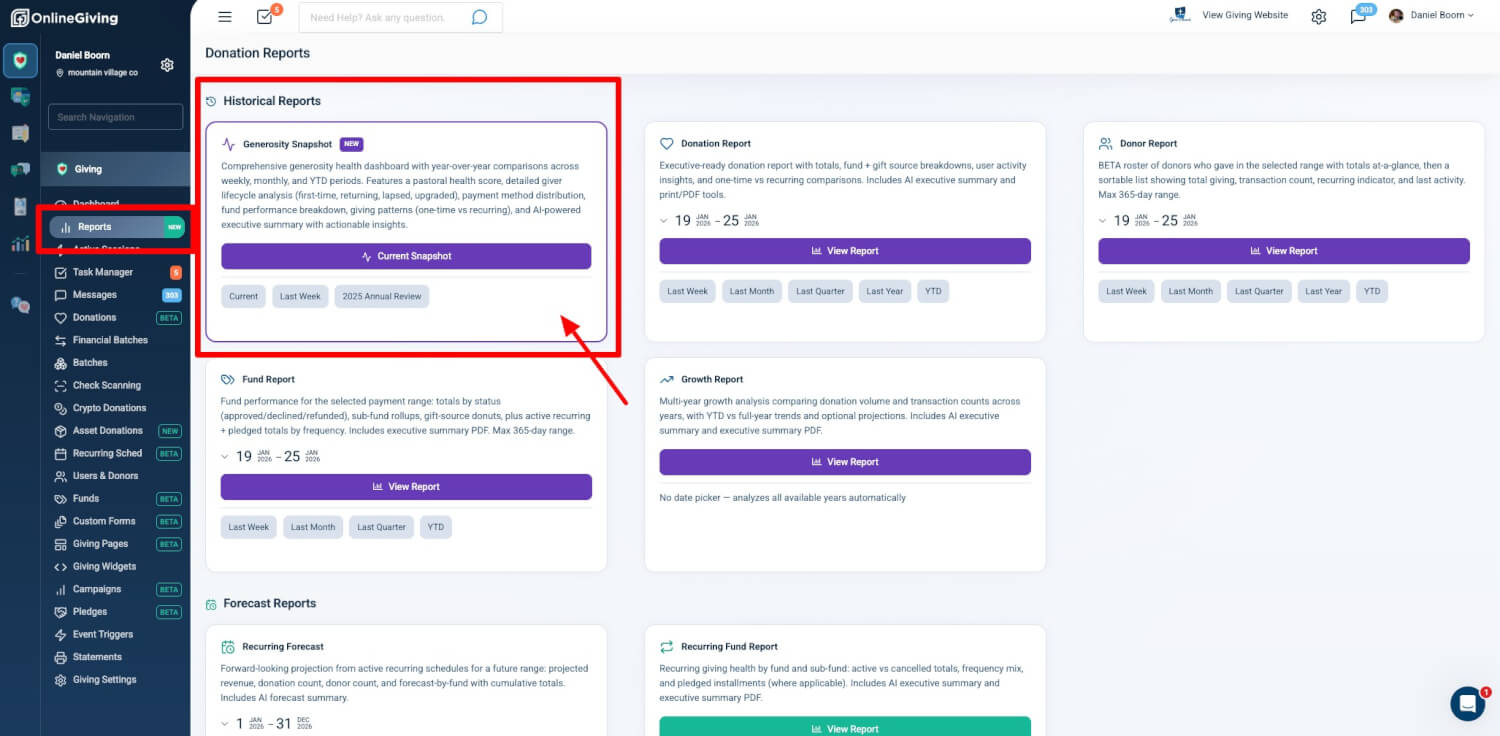
While the email provides a concise snapshot, the full interactive version is always available in the Donations Report Hub:
Control Panel → Donations → Reports
The dashboard includes:
-
Expandable AI executive summary
-
Fully interactive metrics and drill-downs
-
PDF export (full report or executive summary)
-
Period switching (Current, Last Week, Annual)
-
Print-optimized layouts
Generosity Snapshot reports are included with your OnlineGiving.org subscription at no additional cost.