Feature Updates 02/06/2026
Introducing the Payment Reports Hub:
Clearer Insights for Taxable Transactions
Overview
We’ve introduced the new Payment Reports Hub, a dedicated home for understanding how payment activity is performing across your organization.
Now that payment reporting is clearly separated from donation reporting, the Payment Reports Hub focuses exclusively on taxable payment transactions—such as event registrations, fees, merchandise, and tuition—while donations continue to live in the Donation Reports Hub. This separation makes it easier to find the right insights, faster.
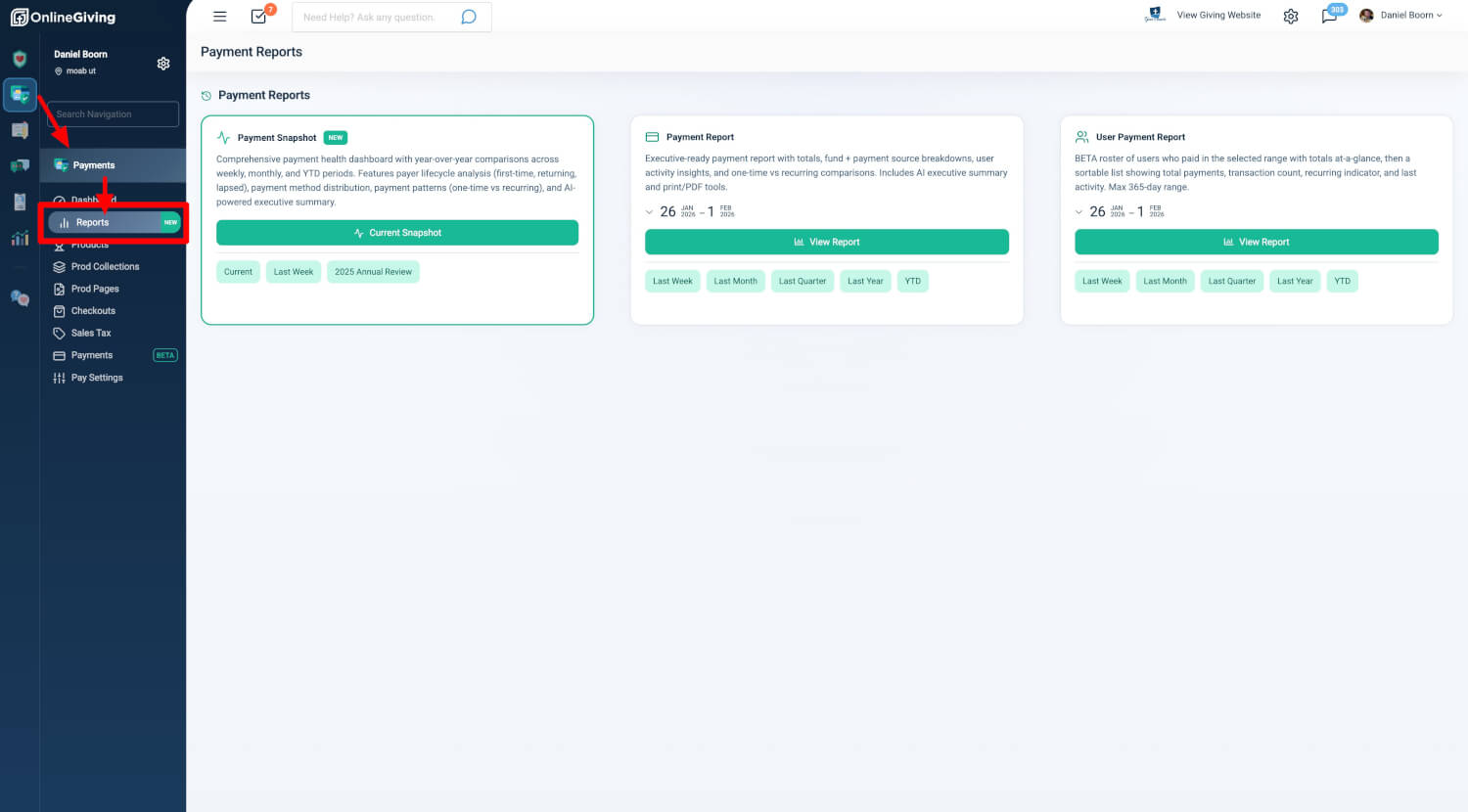
At the center of the hub is the new Payment Snapshot, a ready-to-share summary that highlights payment health, trends, and payer behavior across three essential views: Current (Year-to-Date), Last Week, and Previous Year. From the same place, you can also quickly access the Payment Report and User Payment Report, bringing everything payment-related into one clear, consistent experience.
Why This Matters
Payments and donations serve different purposes—and now your reports reflect that.
By separating payment reporting from donation reporting, you get clearer, more accurate insights into operational revenue without mixing in charitable giving. The Payment Reports Hub helps you quickly understand how programs, events, and services are performing, while keeping donation insights focused where they belong.
With clearer boundaries and purpose-built summaries, you can spot trends earlier, share insights more confidently with leadership, and spend less time navigating reports—and more time acting on what you see.
Payment Reports Hub
You’ll find the Payment Reports Hub under Admin → Payments → Reports. It’s available to users with Donor Admin or Payments Admin access.
From the hub, you can open the new Payment Snapshot, with built-in views for Current, Last Week, and Previous Year. You’ll also find the Payment Report, designed for flexible, executive-ready reporting, and the User Payment Report (Beta), which shows which users completed payment transactions during a selected period. All reports automatically use your organization’s default timezone to ensure consistent results.
Payment Snapshot — At a Glance
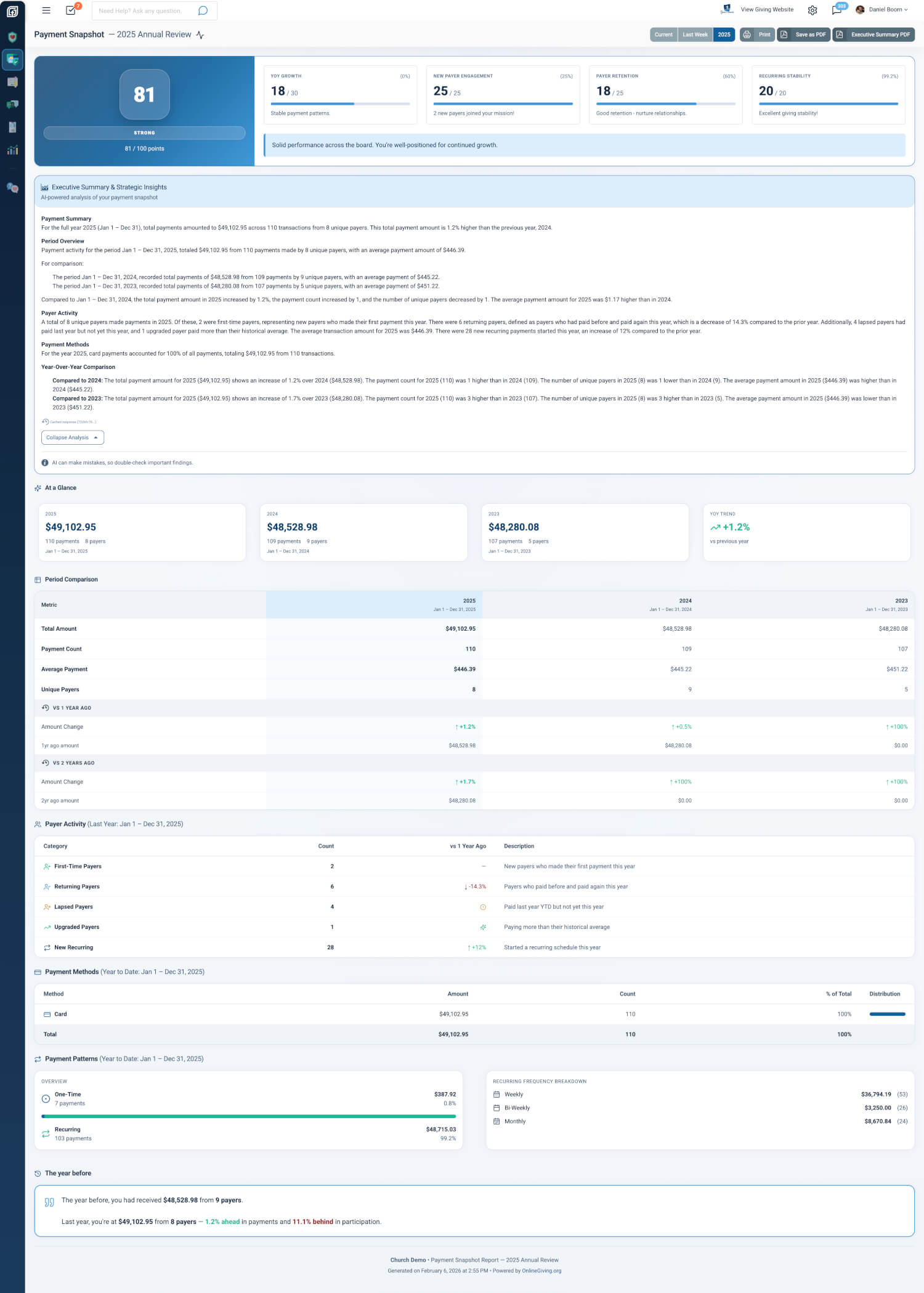
The Payment Snapshot is designed to answer the most important questions at a glance. It focuses exclusively on payment transactions—including event registrations, fees, merchandise, tuition, and similar activity—and intentionally excludes donations.
Each snapshot includes a high-level payment health score that quickly communicates overall performance for the selected period. Key totals and trends show how payments are tracking over time, with clear comparisons to prior periods. You’ll also see insights into payer behavior, including first-time, returning, lapsed, and upgraded payers, helping you understand how engagement with paid programs is evolving.
The snapshot breaks down payment methods to show how people are paying and highlights payment patterns, such as one-time versus recurring activity. When historical data is available, a “This Time Last Year” section provides plain-language context that makes trends easy to understand without digging into raw numbers.
To support sharing and alignment, each snapshot includes an AI-generated executive summary that clearly explains the visible metrics—without adding or inferring data. You can also print the snapshot, save it as a PDF, or export a dedicated Executive Summary PDF for easy distribution.
Snapshot Views
The Payment Snapshot includes three built-in views that you can switch between directly in the report header.
The Current view shows year-to-date payment performance and serves as the default starting point. The Last Week view focuses on payments from the previous calendar week, making it easy to check recent activity or spot short-term changes. The Previous Year view provides a complete review of the prior calendar year’s payment activity, ideal for annual reporting and planning.
Where to Find the Snapshot
You can open the Payment Snapshot directly from the Payment Reports Hub, where quick links take you to the Current, Last Week, or Previous Year view.
You can also access it from the Payments list using the Snapshot dropdown. Each option opens in a new tab with the correct view applied, making it easy to compare periods or keep reports open while you work.
Summary
The Payment Reports Hub provides a clear, purpose-built space for understanding taxable payment activity, separate from donation reporting. With the new Payment Snapshot, built-in time views, and executive-ready summaries, you can quickly understand performance, track trends, and share insights—without mixing payments and donations or digging through multiple reports.