Feature Updates 02/07/2025
NEW OnlineGiving.org App Designer > Category Dash > MP Events Feature in App Designer
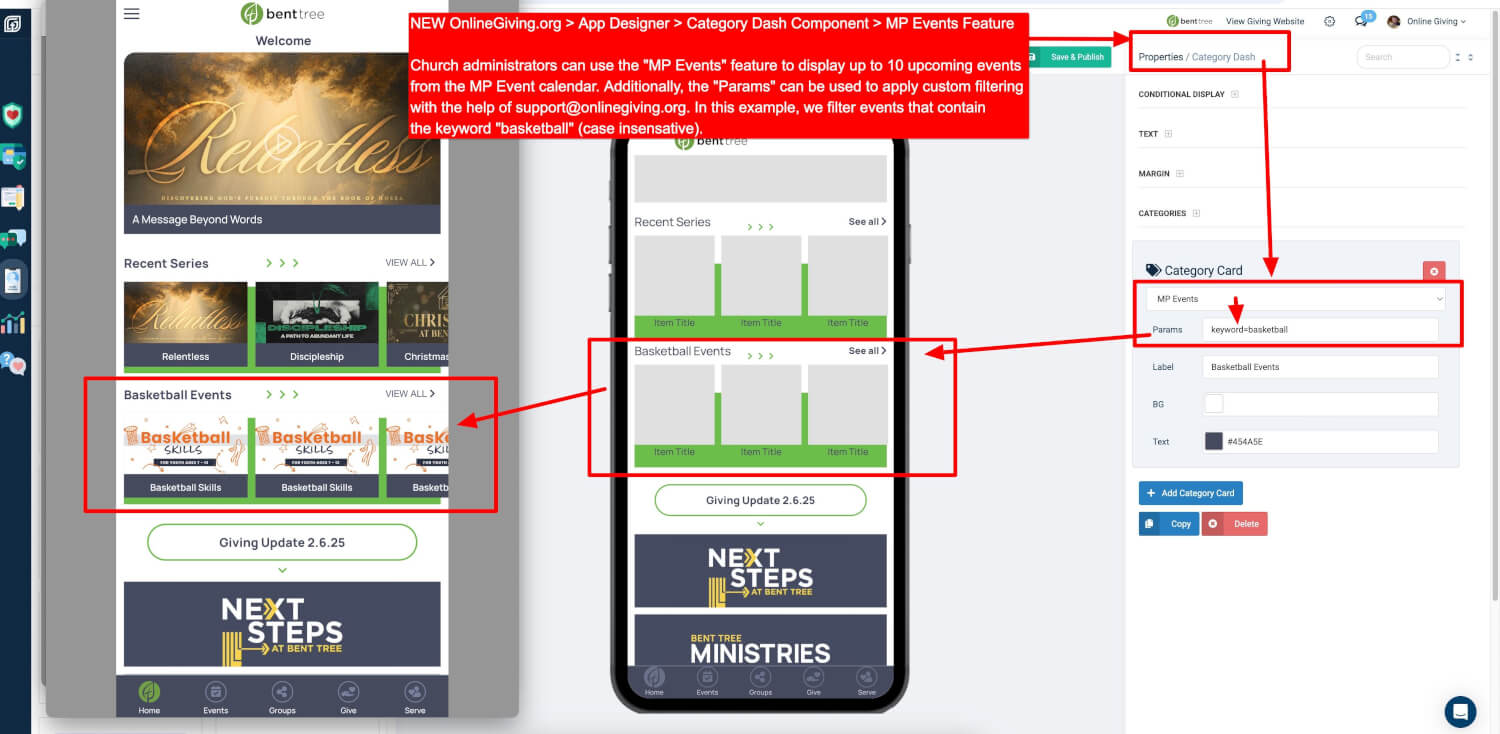
We are thrilled to announce a new enhancement to the OnlineGiving.org App Designer! The Category Dash Component now supports the MP Events Feature, allowing churches to dynamically display upcoming events with ease.
Overview
- Church administrators can leverage the MP Events Feature to showcase up to 10 upcoming events directly from the MinistryPlatform (MP) Event Calendar.
- This feature supports custom filtering by utilizing Params, which can be tailored to meet specific event display needs.
Key Features
-
Dynamic Event Display:
- Automatically pulls events from the MP Event Calendar based on the parameters provided.
- Supports case-insensitive keyword filtering, e.g.,
keyword=basketball, to highlight relevant events.
-
Customizable Interface:
- The event section can be labeled, styled, and configured directly in the App Designer interface to align with your church's branding.
- Background and text colors are fully customizable for seamless integration.
-
Enhanced User Experience:
- Visitors to your app will see a visually engaging, categorized event display that enhances community engagement.
Additional Parameter Filtering
- While the example shows
keyword=basketball, additional parameter filters are available to meet specific needs. - To ensure proper implementation and avoid confusion, we recommend contacting our support team for assistance with customizing your filter settings.
- Email: support@onlinegiving.org
How to Use
-
Access App Designer:
- Navigate to the Category Dash Component within the App Designer panel.
-
Enable MP Events:
- From the Category Card Properties, select
MP Eventsas the source.
- From the Category Card Properties, select
-
Set Parameters:
- Use the Params field to add filters. For instance:
keyword=basketballfilters events containing "basketball."
- For other filter types, please contact our support team for direct guidance.
- Use the Params field to add filters. For instance:
-
Save & Publish:
- Review your settings, save your changes, and publish your updates to make them live in the app.
Support and Customization
Need help configuring the Params or encountering issues?
- Contact support@onlinegiving.org for personalized guidance. Our team is here to ensure your events are displayed exactly as you envision.
This enhancement is designed to streamline event communication and increase engagement within your church community. Try it out and bring your app's event features to life!
NEW OnlineGiving.org App Designer > Category Dash > MP FEATURED Events Feature in App Designer
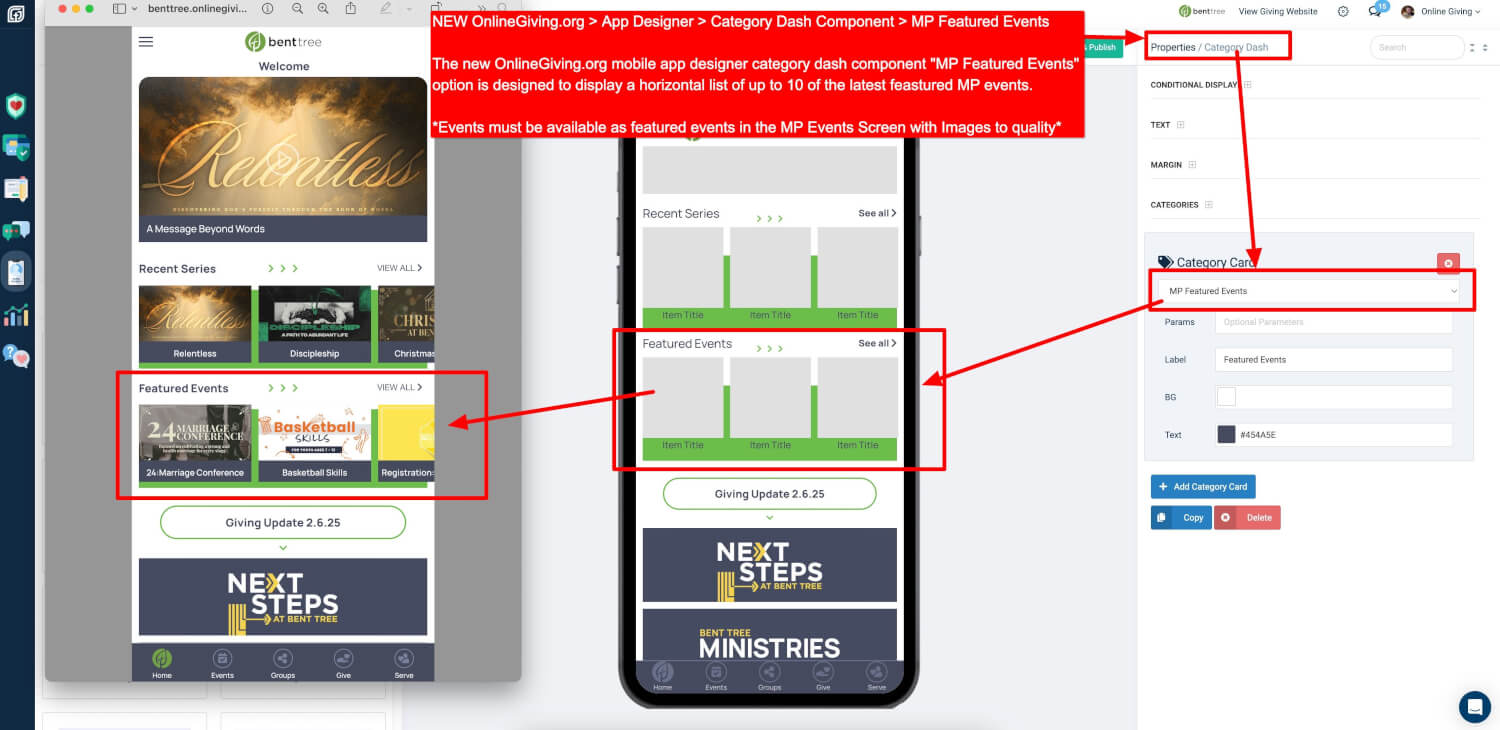
We are excited to introduce the MP Featured Events option in the OnlineGiving.org App Designer! This new addition to the Category Dash Component provides a streamlined way for churches to highlight featured events from MinistryPlatform (MP) with a modern, horizontal layout.
Overview
- The MP Featured Events option allows church administrators to display a horizontal list of up to 10 featured events directly from the MinistryPlatform (MP) system.
- Events displayed must be marked as featured events within the MP Events screen and include images to ensure quality display.
Key Features
-
Display Highlighted Events:
- Automatically pulls events designated as "Featured" in the MP Events module.
- Displays them in an attractive horizontal scroll format, perfect for showcasing key events like conferences, workshops, and more.
-
Customizable Design:
- Administrators can label the section (e.g., "Featured Events") and customize the background and text colors to align with their app's design and branding.
-
Optional Parameter Filtering:
- An additional filtering option is available using the "Params" input field for more granular control over which featured events are displayed.
- To configure or learn more about these advanced filters, contact support@onlinegiving.org for assistance. We recommend reaching out to avoid any configuration errors.
-
Improved Engagement:
- A visually appealing layout ensures your app users can easily browse and engage with important events.
How to Use
-
Access App Designer:
- Navigate to the Category Dash Component in the App Designer.
-
Enable MP Featured Events:
- From the Category Card Properties, select
MP Featured Eventsas the source.
- From the Category Card Properties, select
-
Setup Events in MinistryPlatform:
- In the MP Events screen, mark the desired events as featured and ensure they include high-quality images for optimal display.
-
Optional Filtering with Params:
- Use the Params field for additional filtering options. For guidance on setting up these filters, contact support@onlinegiving.org for direct assistance.
-
Save & Publish:
- Review your settings, save your changes, and publish the updates to make the featured events live in your app.
Important Notes
- Events must be marked as featured in the MinistryPlatform system to appear in this component.
- Ensure all featured events have appropriate images for a visually engaging experience.
- Contact support@onlinegiving.org for help with setting up or refining the filtering options to meet your specific needs.
This new feature is designed to enhance event visibility and engagement within your community. Try it today and bring your church’s featured events front and center!
New Optional Feature: Disable OnlineGiving.org Payment Receipt Emails for OnlineGiving.org Rock RMS Obsidian Event Registration Gateway
We are excited to introduce a new optional feature for churches using the OnlineGiving.org Rock RMS Gateway with Rock RMS Version 16.2+. This update allows churches to request that OnlineGiving.org does not send an additional payment receipt email to the payee when a payment is completed through the Rock RMS Obsidian Event Registration Gateway.
Why This Feature?
Some churches prefer to streamline communication by preventing an additional email from being sent by OnlineGiving.org, as Rock RMS may already be handling payment confirmations.
How to Enable This Feature
To activate this feature for your account, simply contact our support team at support@onlinegiving.org. Our team will assist in configuring this setting based on your church’s preferences.
Important Notes
- This update only applies to payments processed through the OnlineGiving.org Rock RMS Payment Gateway for Rock RMS Obsidian Event Registrations.
- The feature is available exclusively for Rock RMS versions 16.2 and higher.
- This new gateway works seamlessly with your existing OnlineGiving.org account and can be enabled effortlessly in your Rock RMS system.
For more information or assistance, please reach out to our support team at support@onlinegiving.org.