Feature Updates 02/17/2026
Generosity Snapshot: Expanded Automated Notifications, Full Recipient Control & Enhanced Deep-Linked Reports
More control. More flexibility. More insight — delivered automatically.
The Big Picture
The Generosity Snapshot has already been delivering automated weekly and annual email reports to keep your leadership informed.
This update takes that system to an entirely new level.
You now get:
-
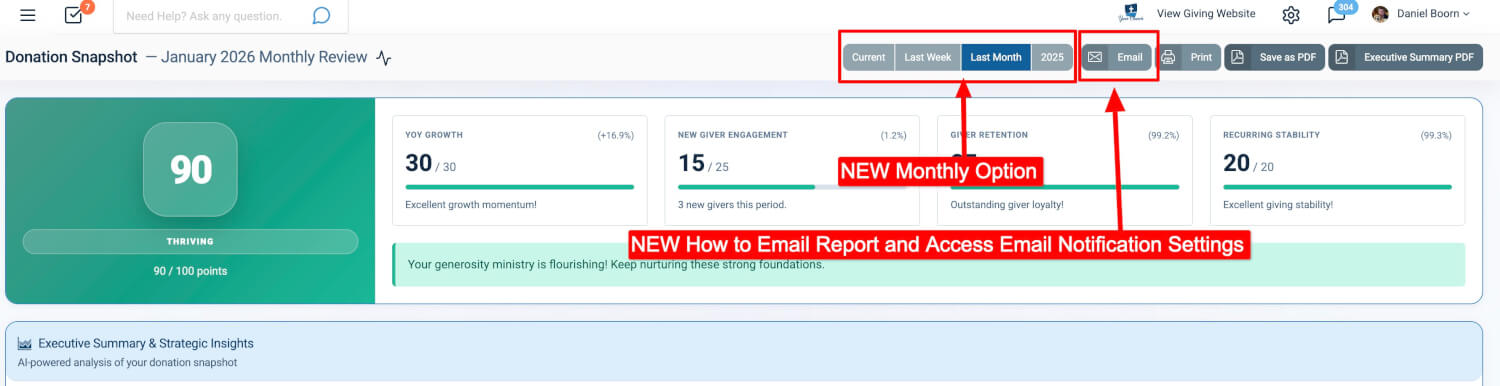
Monthly automated email reports
-
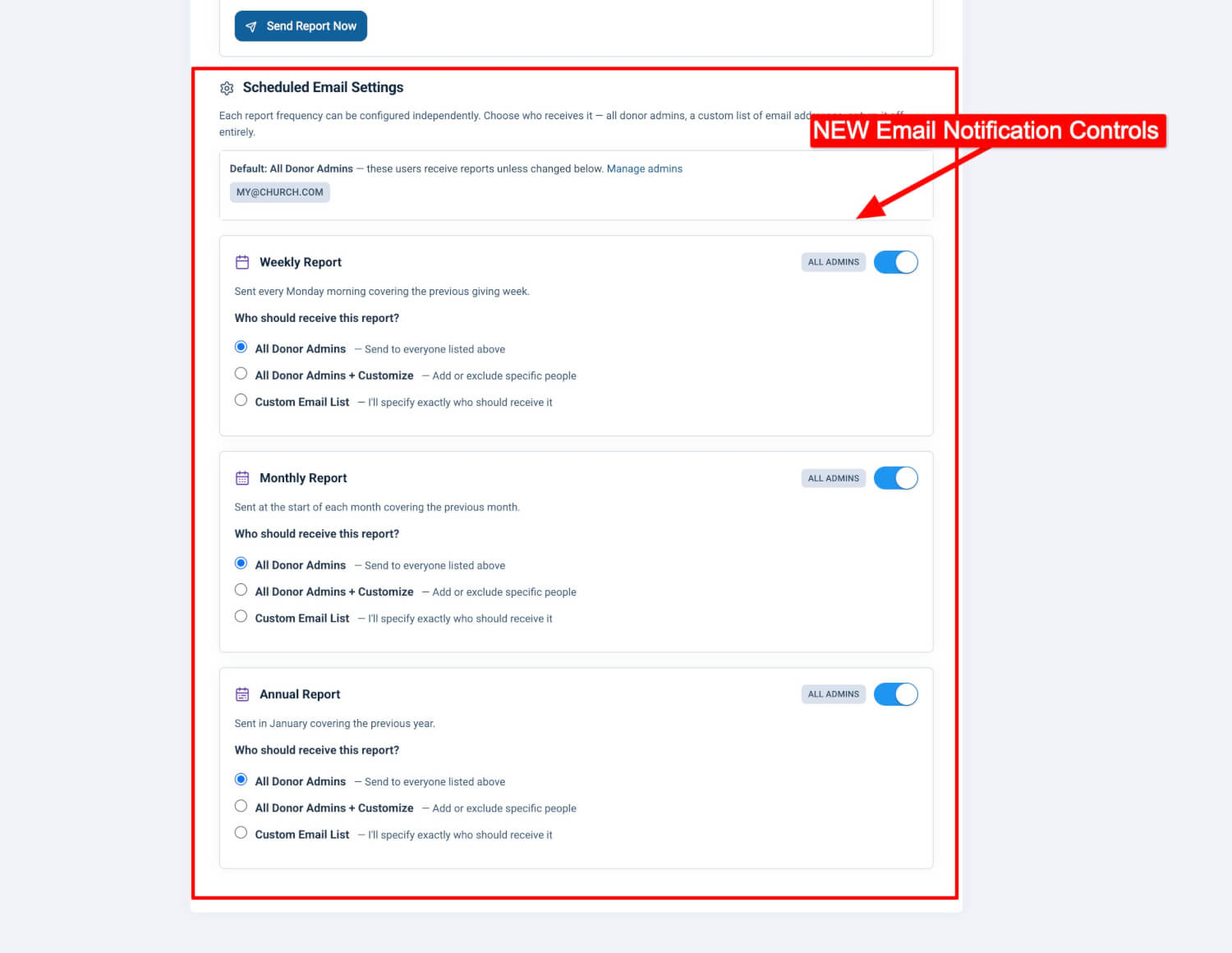
Full control over which frequencies are sent — weekly, monthly, annual, or any combination
-
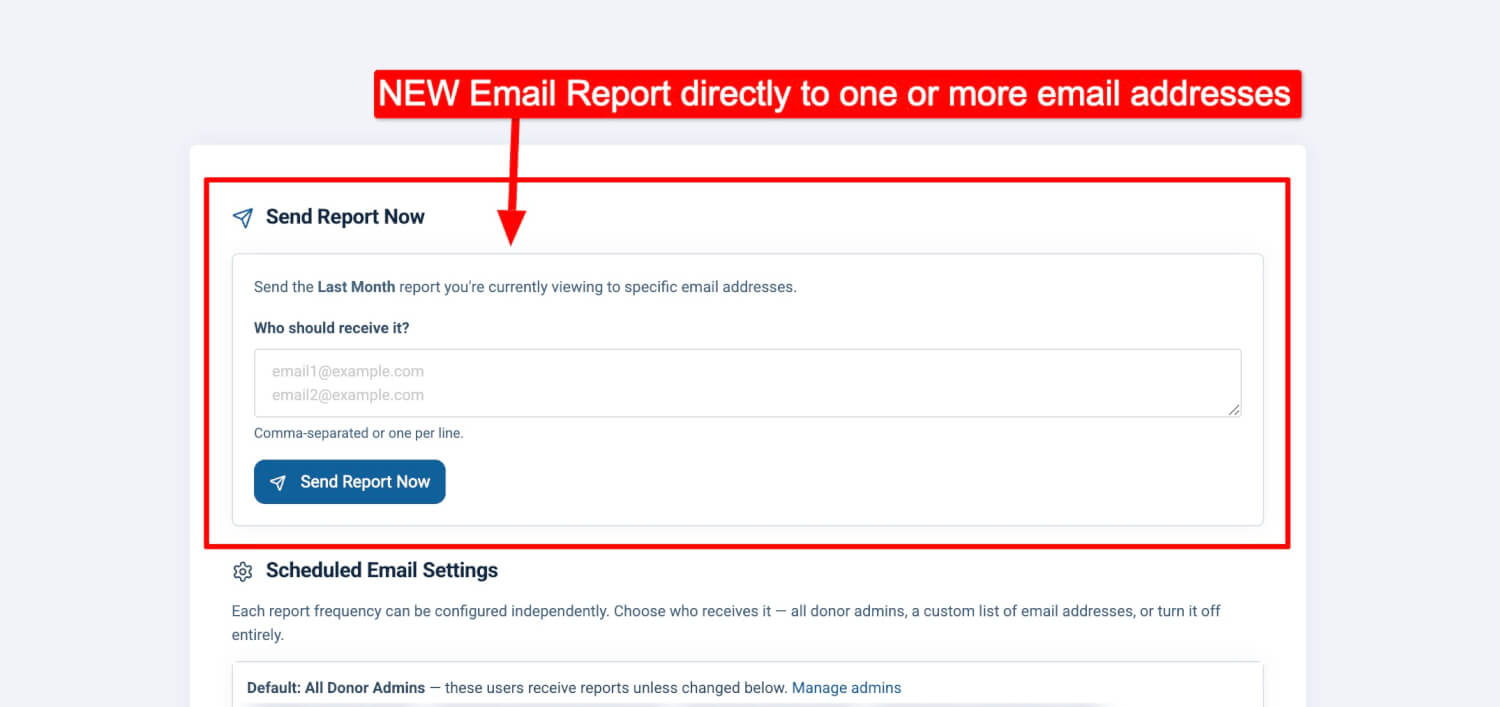
Complete control over who receives each frequency
-
A significantly enhanced email template with more information
-
Expanded report data and deeper drill-down links throughout
In short: more flexibility, more customization, and more visibility — without adding complexity.
 |
 |
 |
Expanded Automated Email Notifications
Previously, weekly and annual Snapshot emails were automated.
Now, automation includes:
-
Weekly
-
Monthly (new)
-
Annual
And more importantly — you control all of it.
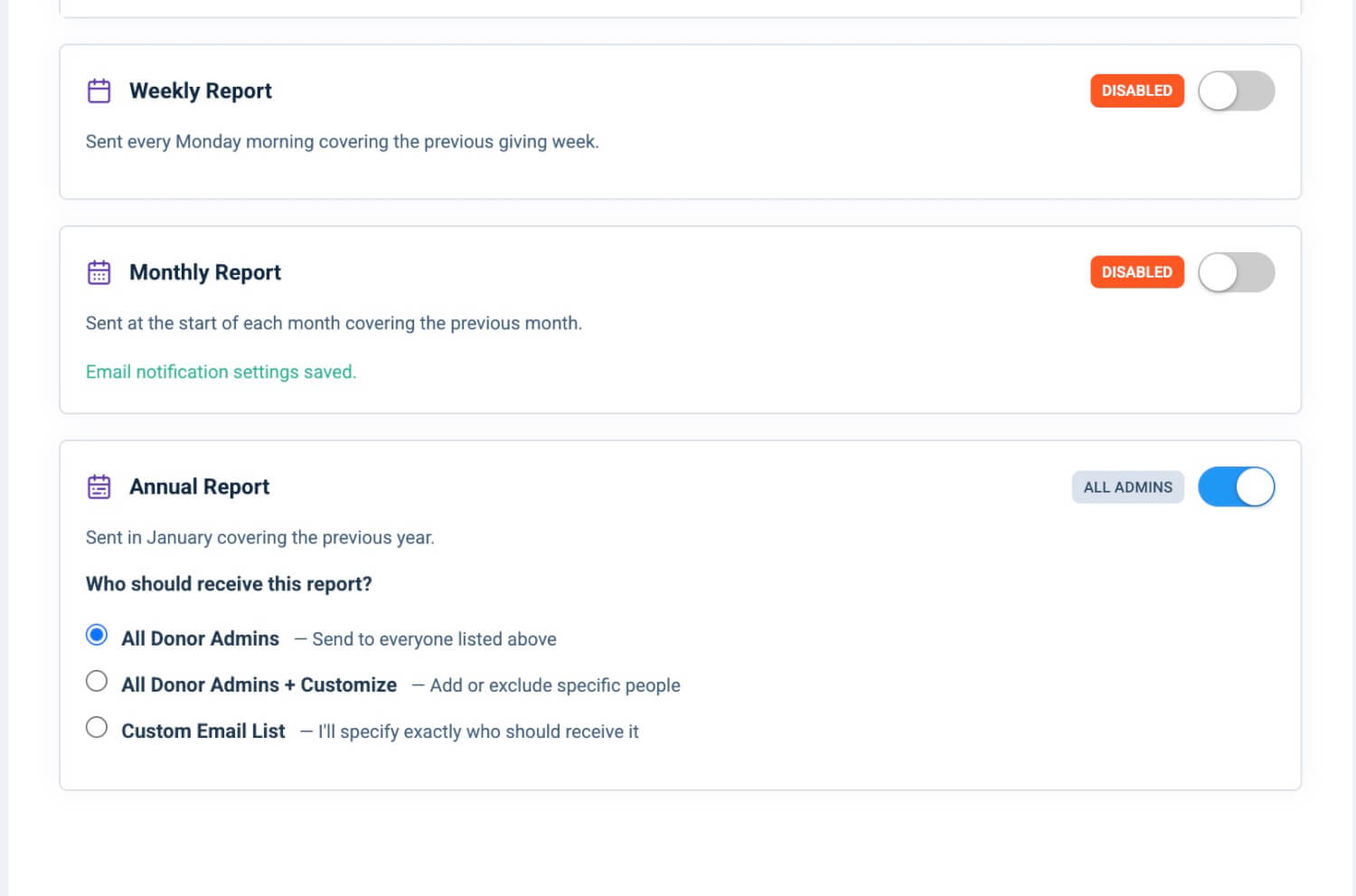
Three Independent Frequencies
Each frequency is now fully configurable and operates independently.
You can enable:
-
Weekly only
-
Monthly only
-
Annual only
-
Any combination of the three
-
Or all three together
You decide what cadence makes sense for your team.
Weekly Report
-
Delivered every Monday morning
-
Covers the previous giving week
-
Ideal for staying ahead of short-term trends
Monthly Report (New)
-
Delivered at the start of each month
-
Covers the full previous month
-
Ideal for finance reviews, board reporting, and seasonal trend analysis
This is a major addition — providing structured, consistent monthly reporting without manual effort.
Annual Report
-
Delivered in January
-
Covers the full previous calendar year
-
Ideal for strategic planning and year-in-review reporting
Full Control Over Notification Settings
This update introduces something powerful: complete control over notification delivery and recipients — per frequency.
Each frequency (Weekly, Monthly, Annual) now has:
-
Its own on/off toggle
-
Its own recipient configuration
-
Its own independent settings
You might send:
-
Weekly to finance
-
Monthly to leadership
-
Annual to your full elder board
Each one can be configured differently.
Choose Exactly Who Gets Each Report
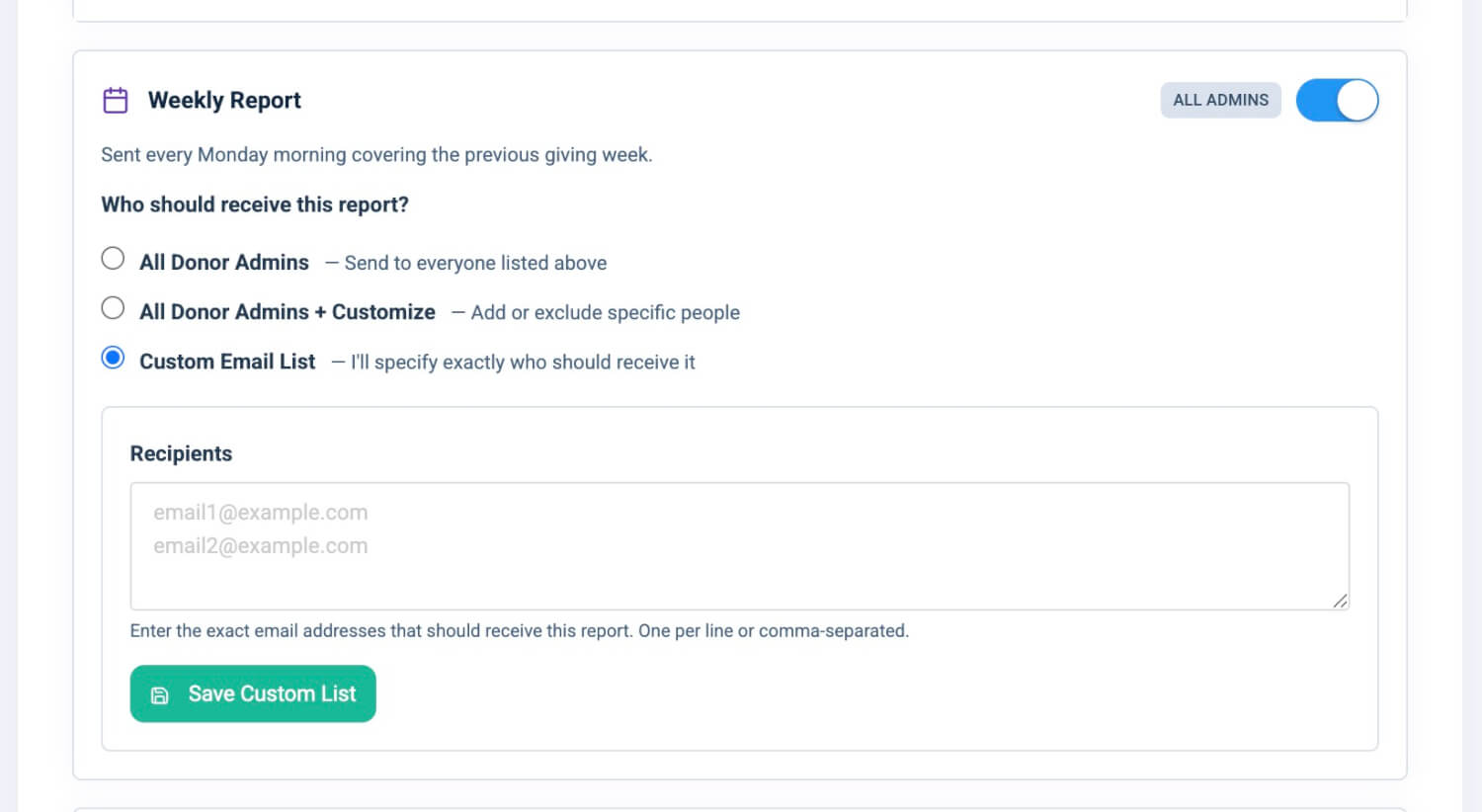
For every frequency, you now have three recipient modes:
Option 1: All Donor Admins (Default)
Every user with the Donor Admin role automatically receives the report.
This list updates dynamically — add or remove donor admins, and the recipient list adjusts automatically.
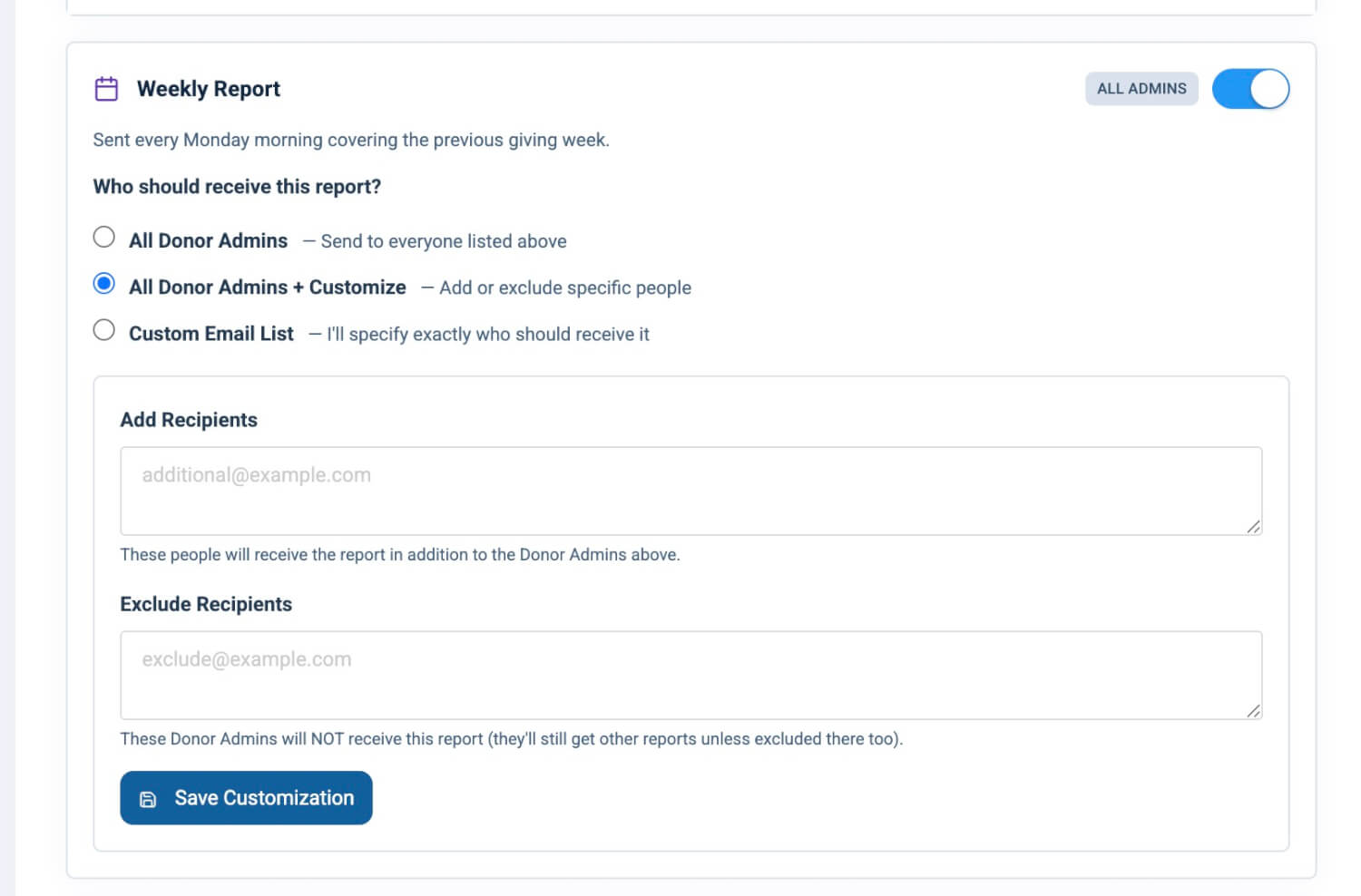
Option 2: Donor Admins ± Custom Adjustments
Start with all donor admins, then customize:
-
Add additional email addresses (board chair, accountant, campus pastor)
-
Exclude specific donor admins for that frequency only
This gives you flexibility without rebuilding the list from scratch.
Customizations apply per frequency. Weekly, monthly, and annual can all differ.
Option 3: Custom Email List
Override roles entirely.
Enter a specific list of email addresses — one per line or comma-separated — and only those people receive the report.
Perfect for advisory boards, stewardship committees, or specialized leadership groups.
Send Weekly, Monthly, Annual — or All Three
This update doesn’t force a structure.
You decide:
-
Which frequencies are active
-
Who receives each one
-
Whether leadership receives one cadence or multiple
You now have complete control over:
-
What is sent
-
When it is sent
-
Who receives it
Enhanced Email Template: More Insight, Better Presentation
This release also significantly upgrades the Snapshot email itself.
The email now includes:
-
Expanded report sections
-
Additional summary data
-
Improved formatting
-
Better visual hierarchy
-
Clearer health indicators
-
Expanded lifecycle visibility
-
More detailed fund insights
-
Refined year-over-year storytelling
This isn’t just automation — it’s a richer report delivered automatically.
Expanded Report Data & Deeper Links
The Generosity Snapshot report itself has also been enhanced.
Improvements include:
-
Additional lifecycle breakdown visibility
-
More detailed fund performance data
-
Expanded comparison data
-
Clearer year-over-year insight
-
More deep links throughout the report
Every meaningful number in the email links directly to filtered data inside the control panel:
-
Lifecycle categories → filtered Users view
-
Payment methods → filtered Transactions view
-
Funds → filtered Transactions by fund
-
Fund-specific lifecycle counts → filtered fund-level donor segments
-
One-Time giving → filtered transaction view
-
View Full Dashboard → Snapshot pre-set to the same period
This dramatically reduces friction when moving from summary to action.
See something interesting? Click it. You’re there instantly.
Reliable Automation (Now with Greater Flexibility)
The automation system continues to:
-
Run daily to evaluate scheduled sends
-
Deliver weekly on Mondays
-
Deliver monthly on the 1st
-
Deliver annual reports in January
-
Deduplicate sends to prevent duplicates
-
Catch up automatically if a scheduled run is missed
-
Audit every send with recipients, timestamp, period, and subject
But now, you control exactly how it behaves for your organization.
What This Update Really Means
This is no longer just “an automated weekly report.”
It’s a fully configurable leadership reporting system.
You now have:
-
Weekly visibility
-
Monthly structured reporting
-
Annual strategic review delivery
-
Per-frequency recipient control
-
Role-based + customizable distribution
-
Expanded report intelligence
-
Deep-link drill-down everywhere
More flexibility! More insight! More control! Same simplicity!