Feature Updates 02/18/2025
New Feature: Dynamic Parameters in Links for OnlineGiving.org App Designer
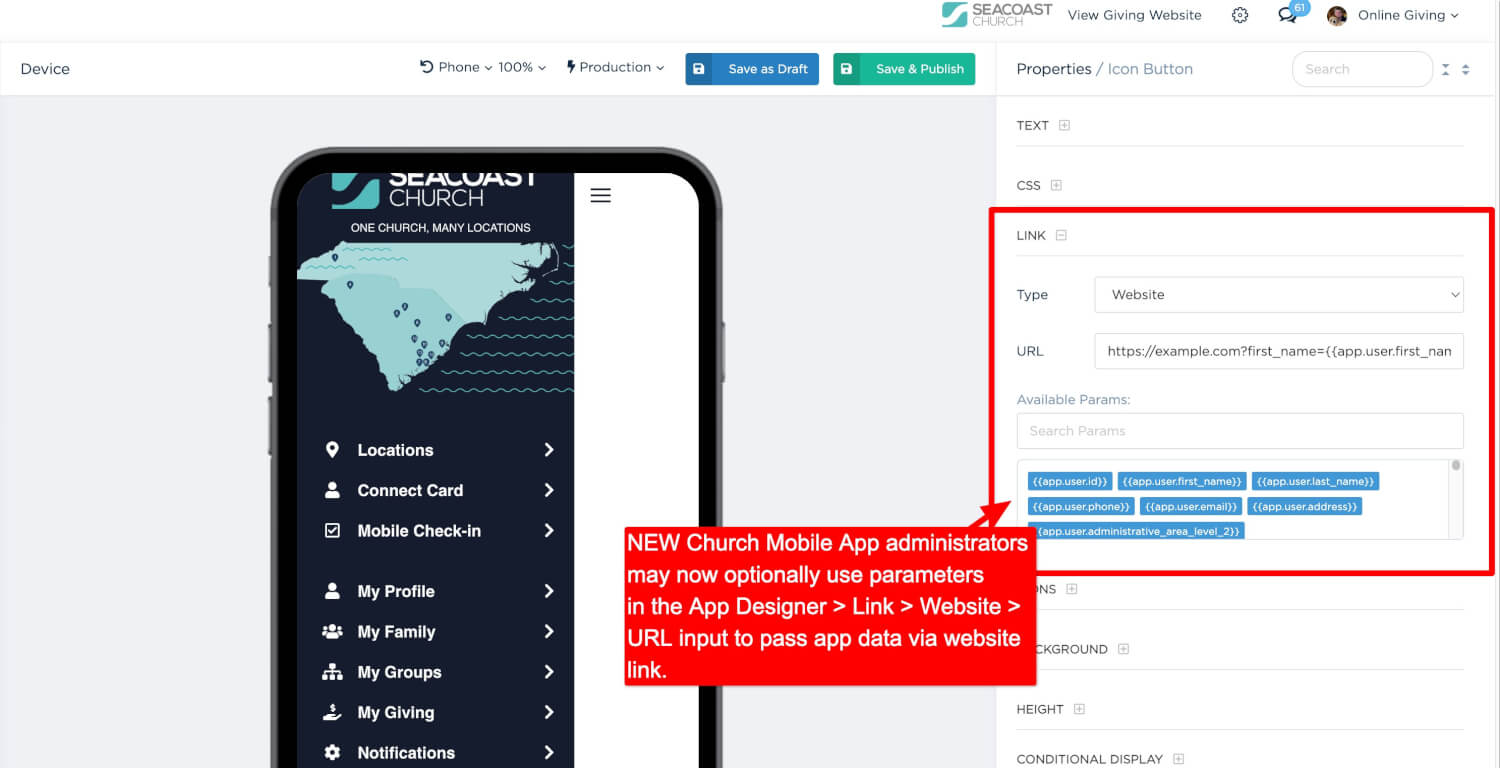
We are excited to introduce a significant enhancement to the OnlineGiving.org App Designer—the ability to use dynamic parameters in URLs across multiple link types. This feature allows church administrators to pass user-specific or system-generated information through links, enabling seamless integration with external websites, auto-filling forms, and improving user experience.
Why Is This Important?
With this update, church administrators and developers can now pass app parameter data directly into URLs, providing powerful automation capabilities. This is particularly useful for:
- Auto-filling external church website forms with user information.
- Enabling seamless authentication for church management system (ChMS) integrations.
- Improving user engagement by reducing repetitive data entry.
- Enhancing MinistryPlatform (MP) integrations by allowing MP Contact information to be used in external systems.
This feature is designed to work across multiple link types in the App Designer, ensuring a more dynamic and customized experience for church members and administrators alike.
Supported Link Types
The following link types now support App Parameters, allowing for the dynamic passing of data:
- Website (Opens in a browser)
- In-App Website (Opens inside the mobile app)
- Framed Web Page
- MP Portal Website with Single Sign-On (Requires Sign-In)
- MP Portal Website with Single Sign-On (Does Not Require Sign-In)
- Rock RMS External Website In-App-Website with Single Sign-On (Requires Sign-In)
- Rock RMS External Website In-App-Website with Optional Single Sign-On (Does Not Require Sign-In)
- Rock RMS External Website Framed with Single Sign-On (Requires Sign-In)
- Rock RMS External Website with Single Sign-On (Requires Sign-In)
Example Use Cases for Church App Administrators
1. Auto-Fill External Forms with User Information
Many churches use external registration forms for events, volunteer sign-ups, or prayer requests. With dynamic parameters, the app can pass user-specific details into these forms automatically.
Please note: OnlineGiving.org offers custom-form features which also auto-populate form fields based on the signed in information and the forms work direclty with the mobile application. However, in this case, we're mentioning the ability to use the params for use with external forms outside of the OnlineGiving.org platform.
Example: A church wants to auto-fill a registration form with a signed-in user's first name, last name, and email.
URL with App Parameters:
For a signed-in user, this would resolve as:
If the user is not signed in, blank values are used instead:
This simplifies form submissions and eliminates redundant manual entry.
2. Seamless Giving Experience Using MP Contact Parameters
For MinistryPlatform (MP) churches, administrators can now use MP-specific parameters, such as MP Contact record information, including the MP Contact GUID. This enables secure, authenticated experiences in MP-integrated donation forms or church applications.
Example: A church wants to send a logged-in user’s MP Contact GUID to an external MP-powered giving page.
URL with MP Contact GUID Parameter:
For a signed-in user, this would resolve as:
This allows external MP Widgets to recognize the donor without requiring manual input or extra authentication steps.
3. Pre-Fill Prayer Request or Connection Forms
Churches frequently use external forms for prayer requests, connection cards, and feedback surveys. This feature enables pre-filled form submissions, making it easier for members to engage.
Example:
For a logged-in user:
This ensures a seamless experience for church members, reducing friction in engagement.
Key Technical Notes and Requirements
-
Seamless Navigation & Instant Redirection
- The OnlineGiving.org mobile app routing service ensures that tapped links immediately redirect users without waiting for additional data loading. This enhances speed and user experience.
-
MP Contact Parameter Requirement (For MP Churches)
- To ensure proper functionality, at least one MP Contact parameter must be present on the home page. This allows the app to cache data for linking services and ensure parameters work as expected.
-
Cached Data Availability
- MP Contact parameters remain accessible as long as they are used on at least one home page component. This ensures seamless integration with MinistryPlatform-based workflows.
-
Handling Unauthenticated Users
- If a user is not signed into the mobile app, any App Parameter placeholders in URLs will be replaced with blank values to prevent errors.
How Church Developers Can Use This Feature
This feature is highly versatile and can be used in many different ways, including:
- Passing authenticated user data to external (non-OnlineGiving.org) forms (e.g., volunteer sign-ups, prayer requests, event registrations).
- Enhancing user authentication for third-party integrations.
- Pre-filling donation forms with user information.
- Automating MinistryPlatform workflows by passing MP Contact GUIDs.
- Personalizing user experiences on external church web pages.
Getting Started
This update enables greater automation and personalization for church apps. To start using App Parameters in links, simply update your App Designer links to include the available parameters.
If you need assistance implementing dynamic links, contact our support team at support@onlinegiving.org.
This feature is now live—start enhancing your church app today!