Feature Updates 02/23/2026
See the Heartbeat of Every Fund: The New Fund Generosity Snapshot
What’s New
You already know the big picture of your church’s giving. But what about your Building Fund? Your Missions Fund? Your Youth Ministry Fund? Until now, getting a clear picture of how a single fund is performing meant digging through spreadsheets or running manual reports.
Not anymore.
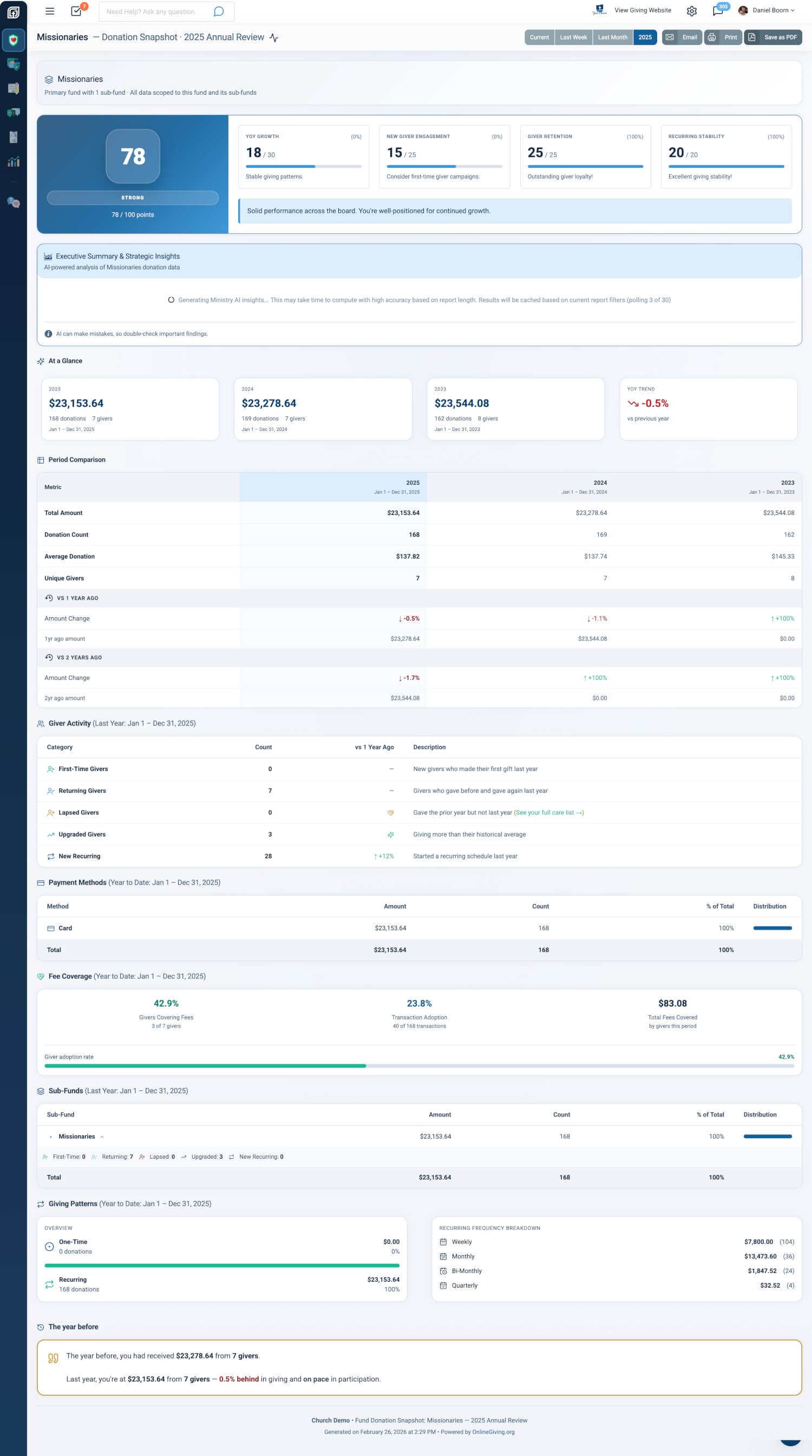
The new Fund Generosity Snapshot gives you a complete giving health dashboard for any individual primary fund with it's sub-funds —with a health score, AI-powered insights, donor lifecycle tracking, period comparisons, beautiful PDF exports, and automated email delivery. Everything you love about the Generosity Snapshot, now focused on the fund that matters most to you.
Where to Find It
The Fund Generosity Snapshot is in your control panel at:
Giving > Reports > Fund Snapshot
Any administrator with Giving Admin access can use it. Just click the Fund Snapshot card, pick your fund from the dropdown, and click View Report.

Always Know Which Fund You’re Looking At
Every fund report opens with a clear banner showing the fund name, how many sub-funds are included, and exactly what data you’re seeing. No guessing, no confusion—just clarity.
| What You See | What It Tells You |
|---|---|
| Fund Name | The fund displayed prominently at the top |
| Sub-Fund Count | How many sub-funds are rolled into this view |
| Scope Note | Whether you’re looking at one fund or an aggregate |
Why it matters: When you’re presenting to your board or reviewing with a ministry leader, you need to know exactly what the numbers represent. The fund banner removes all ambiguity.
Switch Funds Instantly
Need to check another fund? Use the Fund Picker dropdown to switch funds without leaving the report. The entire dashboard refreshes with the new fund’s data in seconds.
Why it matters: During a staff meeting or board review, you can compare funds on the fly without navigating back and forth. One click, new fund, fresh insights.
See Giving Health at Four Different Time Horizons
Every fund snapshot supports four period views so you can see the story from different angles:
| Period | What It Shows |
|---|---|
| Current | Year-to-date giving for this fund |
| Last Week | The most recent 7-day period |
| Last Month | The most recent full calendar month |
| Annual Review | Full prior year comparison |
Why it matters: Your weekly staff huddle needs last week’s numbers. Your annual board report needs the full year. Now one report serves both—just switch the period.
A Health Score That Tells the Whole Story
Each fund gets its own Health Score from 0 to 100, with a clear label: Thriving, Strong, Healthy, Building, Developing, or Starting. The score breaks down into factors like recurring giving, active givers, year-over-year growth, and average gift size—all calculated from this fund’s data alone.
Why it matters: Instead of guessing whether your Missions Fund is healthy, you get a single number and a clear label. You’ll know instantly which funds need attention and which are thriving.
AI-Powered Insights Written for You
The AI Executive Summary reads your fund’s data and writes a strategic analysis in plain language. No spreadsheets to interpret, no charts to decode—just clear, actionable insights:
| What You Get | What It Tells You |
|---|---|
| Executive Overview | A narrative summary of this fund’s giving health |
| Key Wins | What’s going well—celebrate these with your team |
| Watch Items | Areas that need your attention before they become problems |
| Period Comparison | How this period compares to previous ones |
| Year-over-Year Insights | Long-term trends and context |
| Giver Lifecycle | Who’s new, who’s returning, and who’s drifting away |
| Giving Patterns | Recurring vs. one-time giving, payment methods |
Why it matters: Raw numbers require interpretation. The AI summary transforms your fund’s data into strategic intelligence you can share with your board, your pastor, or your ministry team—without spending hours analyzing spreadsheets.
Track Your Fund’s Donor Lifecycle
See exactly who’s giving to this fund and how their giving is changing:
| Category | What It Means |
|---|---|
| First-Time Givers | People who gave to this fund for the very first time |
| Returning Givers | Faithful givers who gave before and gave again |
| Upgraded Givers | Givers who increased their giving above their average |
| New Recurring | People who started a new recurring gift to this fund |
| Lapsed | Givers who gave in the prior period but haven’t given recently |
Why it matters: Knowing that your Building Fund has 12 new first-time givers this month—or that 5 faithful givers have lapsed—helps you celebrate wins and follow up with care.
Export Beautiful PDFs and Share with Your Team
| Export Option | What You Get |
|---|---|
| Full Report PDF | The complete fund report with your church’s logo, branded header, and clean page breaks |
| Executive Summary PDF | Just the AI insights—perfect for a quick email to your board |
| Standard browser print for a quick hard copy |
Why it matters: When your board chair asks “How is the Building Fund doing?” you can send a professional, branded PDF in under 30 seconds.
Automated Email Delivery—Set It and Forget It
Schedule fund reports to arrive in your inbox automatically. Fund-level email delivery is opt-in—no emails are sent until you turn it on for a specific fund.
Choose Your Schedule
| Frequency | When It Arrives |
|---|---|
| Weekly | Every Monday morning |
| Monthly | 1st of each month |
| Annual | January |
Choose Your Recipients
| Option | Who Gets It |
|---|---|
| All Admins | Every administrator with giving access |
| Admins + Custom | All admins plus anyone else you specify |
| Custom List | Only the specific people you choose |
Why it matters: Your Missions Director gets the Missions Fund report every Monday. Your Finance Team gets the General Fund report monthly. Everyone gets exactly what they need, automatically.
At a Glance
| What You Get | How It Helps Your Ministry |
|---|---|
| Fund-Level Dashboard | See the complete giving health of any single fund |
| Fund Picker | Switch between funds instantly during meetings |
| Health Score | Know at a glance if a fund is thriving or needs attention |
| AI Insights | Get plain-language analysis you can share with your board |
| Donor Lifecycle | See who’s new, who’s faithful, and who needs a follow-up call |
| Four Period Views | Weekly, monthly, YTD, or annual—one report serves every need |
| PDF Export | Send a branded report to your board in 30 seconds |
| Scheduled Email | The right report to the right person, every week or month |
Try It Now
- Go to Giving > Reports and click the Fund Snapshot card.
- Pick a fund from the dropdown and click View Report.
- Explore the Health Score, read the AI Summary, and try exporting a PDF to share with your team.