Feature Updates 02/25/2025
Enhanced Merge Users Feature: Now Includes Organization Name Field
We’re excited to announce an important update to the Merge Users feature! With this enhancement, the Organization Name field is now available on the Merge User page, ensuring that all merged records retain complete and accurate organizational details.
Previously, this field was missing from the merge process, but with this improvement, managing user records is now more seamless and precise.
This update is live now—making user management even more efficient!
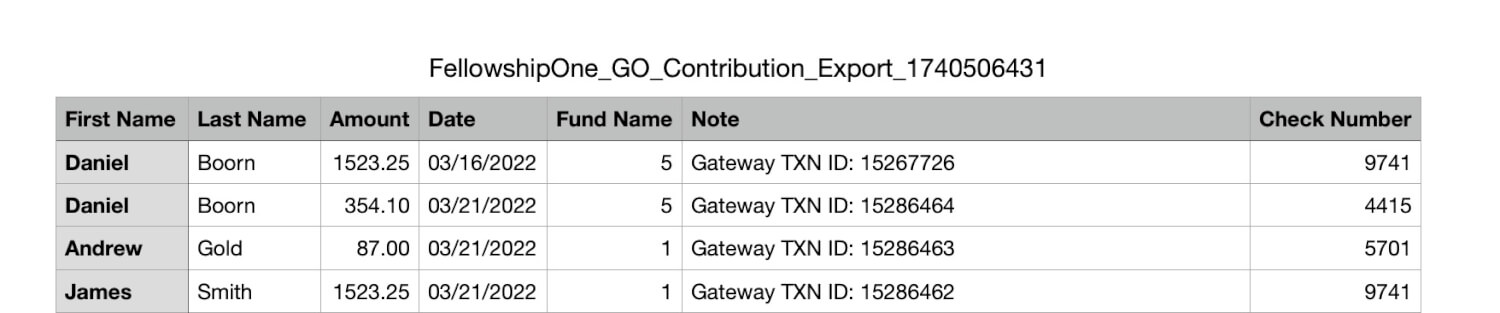
New FellowshipOne GO Contribution Export
OnlineGiving.org now supports FellowshipOne GO Contribution Export, making it easier for churches using FellowshipOne GO—the lightweight version of FellowshipOne—to export contributions in a compatible format. This should not be confused with FellowshipOne Prime, commonly referred to as FellowshipOne or F1 in the OnlineGiving.org control panel.
Steps to Export Contributions to FellowshipOne GO
- Go to the Donations section in the OnlineGiving.org Control Panel.
- Filter donations by date range to select the contributions you want to export.
- Filter by “Approved” status to ensure only completed donations are included.
- Click on the Export button, then select "Export FellowshipOne GO CSV Spreadsheet."
Important Notes:
- The Fund Name in the export comes from OnlineGiving.org > Control Panel > Funds/Sub-Funds > "External Fund Number (optional)" field. Before exporting, ensure that all "External Fund Number (optional)" fields are correctly populated for your funds/sub-funds.
- If migrating to FellowshipOne GO from another ChMS, please update your funds/sub-funds first and then contact support@onlinegiving.org so we can retroactively apply those changes to your transaction history for accurate exporting.
Example of Export:
How to Filter & Export Steps:
