Feature Updates 03/01/2026
Every Dollar to the Right Invoice: Product-Level MinistryPlatform Recording
What's New
When someone buys a t-shirt, a conference ticket, and a coffee mug in a single checkout, those items often belong to different programs, events, and campuses in your church management system. Until now, the entire checkout was recorded as a single lump-sum payment in MinistryPlatform — leaving your finance team to manually sort out which dollars belonged where. Not anymore. Product-Level MP Recording automatically splits each checkout into separate invoices and payments based on the MinistryPlatform mapping you set on each product. One checkout, multiple products, perfectly allocated — no manual work required.
Where to Find It
Product-Level MP Recording is configured in your control panel under:
Payments > Products > click any product > Organization panel
Any administrator with product management access can set up the mappings. Once configured, recordings happen automatically whenever a customer completes a checkout — no additional steps needed.
What It Does
Map Each Product to the Right Place in MinistryPlatform
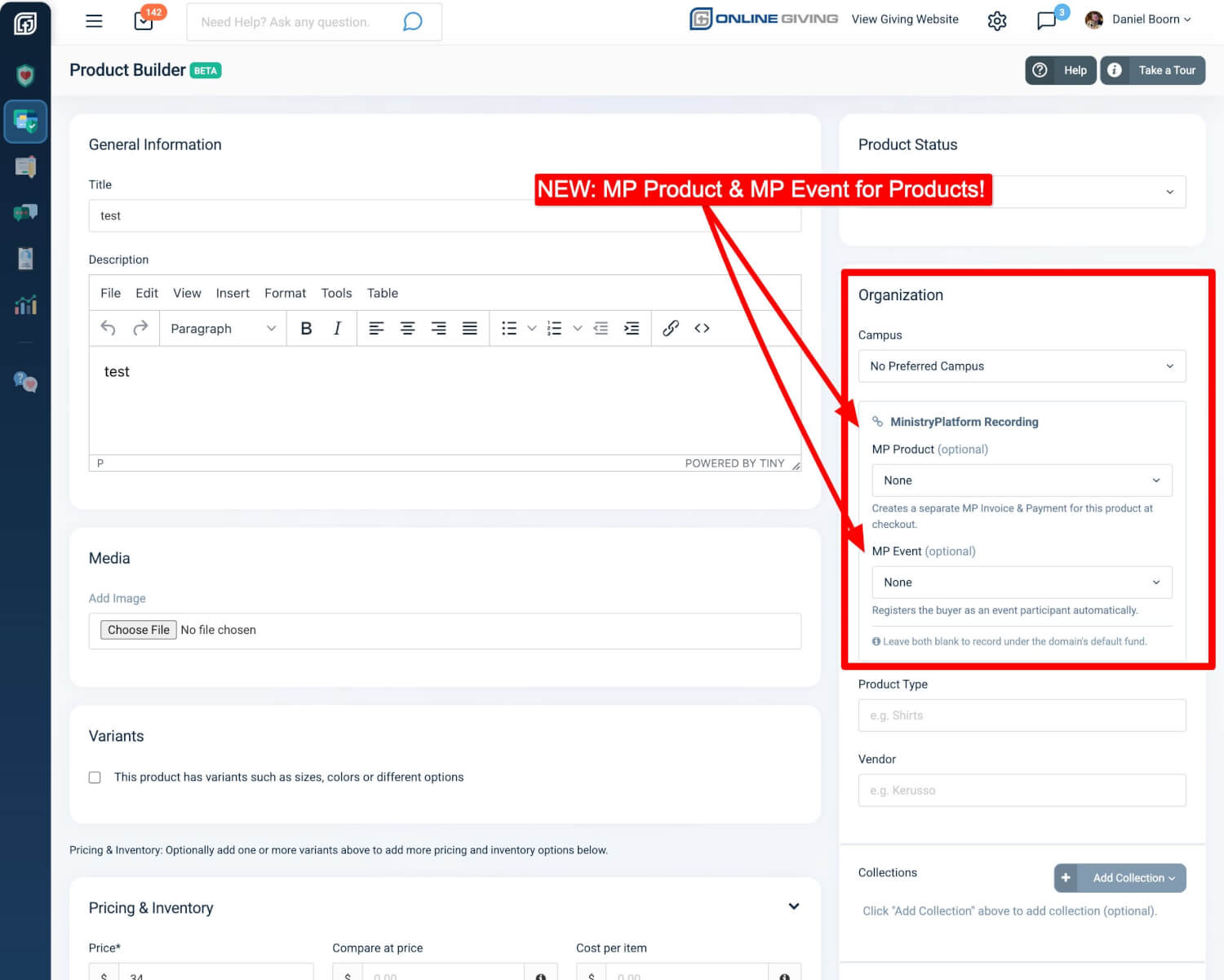
Open any product in the Product Builder and you will see two new fields in the Organization panel on the right side: MP Product and MP Event. These dropdowns pull directly from your MinistryPlatform system, so you are choosing from real MP Products and Events — not typing IDs by hand.
- MP Product tells the system which MinistryPlatform Product to record the sale under
- MP Event optionally links the purchase to a specific event, so the buyer is automatically registered as an event participant
Set both for event-related merchandise. Set just the MP Product for general store items. Leave both blank and the product records under your default fund — exactly as it did before.
Each dropdown includes a built-in search field, so you can quickly find the right MP Product or Event by typing a few characters — no scrolling through long lists.
Why it matters: Your store products finally speak the same language as your church management system. Conference registrations, campus-specific merchandise, and ministry fundraiser items all flow to the correct programs automatically — no spreadsheet reconciliation needed.
Automatic Checkout Splitting
When a customer checks out with multiple products that contain a MP Product (and optionally an MP Event), the system groups items by their MinistryPlatform mapping and creates a separate invoice and payment for each group. The amounts are proportionally allocated so every dollar adds up to the exact transaction total.
For example, if someone buys:
- A conference t-shirt mapped to your "Youth Conference" MP Product and Event
- A devotional book mapped to your "Bookstore" MP Product
- A general donation item with no MP mapping
The system creates three separate recordings: one invoice and payment for the conference, one for the bookstore, and one default payment for the unmapped item. All from a single checkout. However, if they checkout with mutiple products associated to the same MP Product, MP Event, then a single invoice will be created. Finially, if no MP Product association is configured for the OnlineGiving.org Product, then it will fallback to the existing MP Payments fund MP configuration.
Why it matters: Multi-product checkouts no longer create accounting headaches. Each program, event, and campus gets its own clean financial record in MinistryPlatform without anyone having to manually split transactions.
See Every Recording at a Glance
After a checkout is processed, open the transaction in your control panel and you will see an updated Ministry Platform section. Each product group is listed with a direct link to its Invoice and Payment in MinistryPlatform — click any link to jump straight to the record.
Why it matters: Your team can verify recordings instantly without leaving the control panel. The clickable links take you directly to the MinistryPlatform record — no searching, no guessing which invoice belongs to which product.
Verified in MinistryPlatform
Every invoice created through Product-Level Recording appears in MinistryPlatform with full details: the purchaser's contact record, the correct congregation, line item totals, and a notes field that traces back to the original checkout. Invoices are automatically marked as "Paid in Full."
Why it matters: Your MinistryPlatform records are complete and accurate from the moment the checkout is processed. Auditors, finance teams, and campus leaders can trust that every invoice reflects exactly what was purchased and where the money should go.
Event Registration Built In
When you map a product to both an MP Product and an MP Event, the system does double duty: it creates the financial records (invoice and payment) and registers the buyer as an event participant. Sell a conference ticket in your store and the attendee shows up on your event roster automatically.
Why it matters: No more cross-referencing store orders with event sign-up sheets. Sell event tickets through your store and know that every buyer is registered — saving your events team hours of manual data entry.
Smart Validation
The system prevents common configuration mistakes. If you select an MP Event but forget to set an MP Product, you will see a clear message: "MP Product is required when MP Event is set." This ensures every event-linked product has a valid financial destination.
Quick Start
Ready to try it? Here is how to get started:
- Go to Payments > Products and open any product you want to map
- In the Organization panel, select an MP Product from the dropdown (and optionally an MP Event)
- Save the product — the next time someone purchases it, the recording flows to the right place in MinistryPlatform automatically
At a Glance
- MP Product Mapping: Each product records to the correct MinistryPlatform program
- MP Event Mapping: Event merchandise automatically registers buyers as participants
- Automatic Checkout Splitting: Multi-product orders create separate invoices per program
- Proportional Allocation: Every dollar is accounted for — totals always match
- Direct MP Links: Click through from any checkout to the exact invoice in MinistryPlatform
- Event Participant Registration: Sell tickets in your store and attendees appear on the event roster
- Smart Validation: Prevents misconfigured products before they cause recording errors
- Zero Disruption: Existing products without mappings continue to work exactly as before