Feature Updates 03/04/2026
Payment Reports Hub & Payments Snapshot
Overview
A new Payment Reports Hub gives payment administrators a single command center for payment-related reports. The hub introduces a Payment Snapshot report with three period views: Current (year-to-date), Last Week, and Previous Year (annual review), plus quick access to the existing Payment Report and User Payment Report.
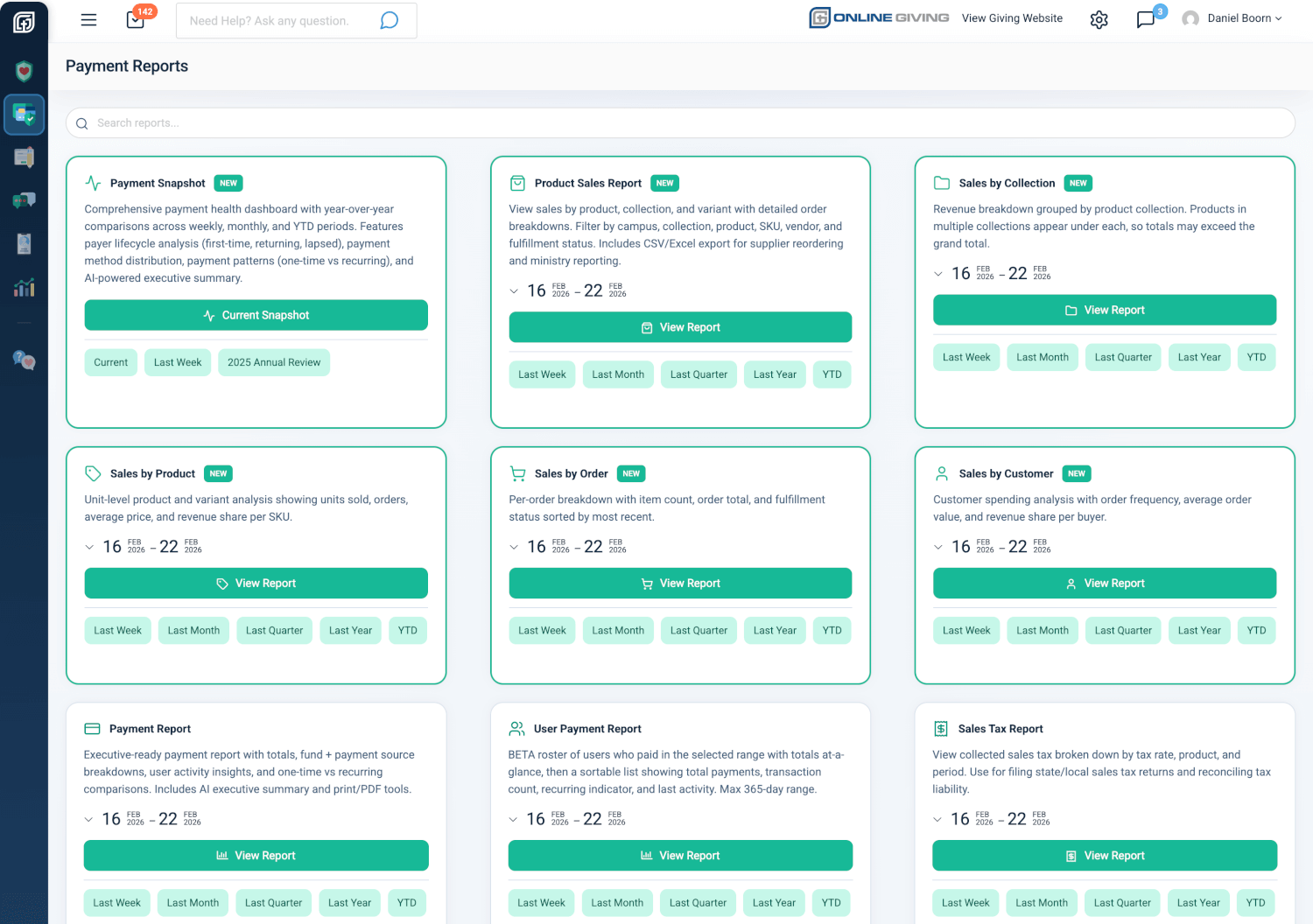
Payment Reports Hub
Location: Admin → Payments section → Reports
Who can use it: Users with Donor Admin or Payments Admin role.
The hub is a landing page that surfaces:
- Payment Snapshot (new) — Current, Last Week, and prior-year annual views.
- Payment Report — Executive-ready report with date-range picker (Last Week, Last Month, Last Quarter, Last Year, YTD).
- User Payment Report — Roster of users who paid in the selected range (BETA), with the same date presets.
All date ranges use the organization's default timezone (e.g. America/New_York) for consistent reporting.
Payments Snapshot — Period Views
The snapshot page includes a period switcher (Current | Last Week | [Previous Year]) in the header so users can change view without leaving the report.
- Current: Payment Snapshot for year-to-date (YTD). Default view.
- Last Week: Last week payment snapshot (Monday–Sunday of the previous week in domain timezone).
- Previous Year: Prior calendar year payment review (e.g. "2024 Payment Review").
What the Payment Snapshot Includes
The snapshot focuses on payments (non–tax-deductible, approved transactions: event registrations, merchandise, fees, tuition, etc.), not donations.
- Health score — High-level payment health for the selected period.
- At a glance — Totals and comparisons across weekly, monthly, and YTD (or period-appropriate) ranges.
- Period comparison table — Amounts, transaction counts, payer counts with prior-period and year-over-year change indicators.
- Payer lifecycle — First-time vs returning payers, lapsed and upgraded payers (with prior-year comparison when data exists).
- Payment method breakdown — Distribution by method (card, ACH, etc.) for the focus period.
- Payment patterns — One-time vs recurring payment mix.
- This time last year — Natural-language comparison to the same week or prior year when historical data is available.
- AI executive summary — Factual narrative summary of the visible metrics (no invented numbers); cached per domain, date, and period.
- Print / PDF — Print, "Save as PDF," and "Executive Summary PDF" for sharing.
Where to Open the Snapshot
- From the hub: Payment Reports → Payment Snapshot card → Current Snapshot or the Current | Last Week | [Year] Annual Review quick links.
- From the Payments list: Snapshot dropdown → Current Snapshot, Last Week, or [Year] Annual Review (each opens the snapshot in a new tab with the correct period).
Summary
- Payment Reports Hub: Single page for Payment Snapshot, Payment Report, and User Payment Report with clear entry points and date presets.
- Payments Snapshot — Current: YTD payment snapshot with health score, lifecycle, methods, patterns, YoY comparison, and AI summary.
- Payments Snapshot — Last Week: Same snapshot focused on the previous calendar week (Mon–Sun in domain timezone).
- Payments Snapshot — Previous Year: Full prior calendar year payment review with the same sections and comparisons.