Feature Updates 03/10/2026
Meet the New User Profile: Your AI-Powered Member Intelligence Command Center
What's New
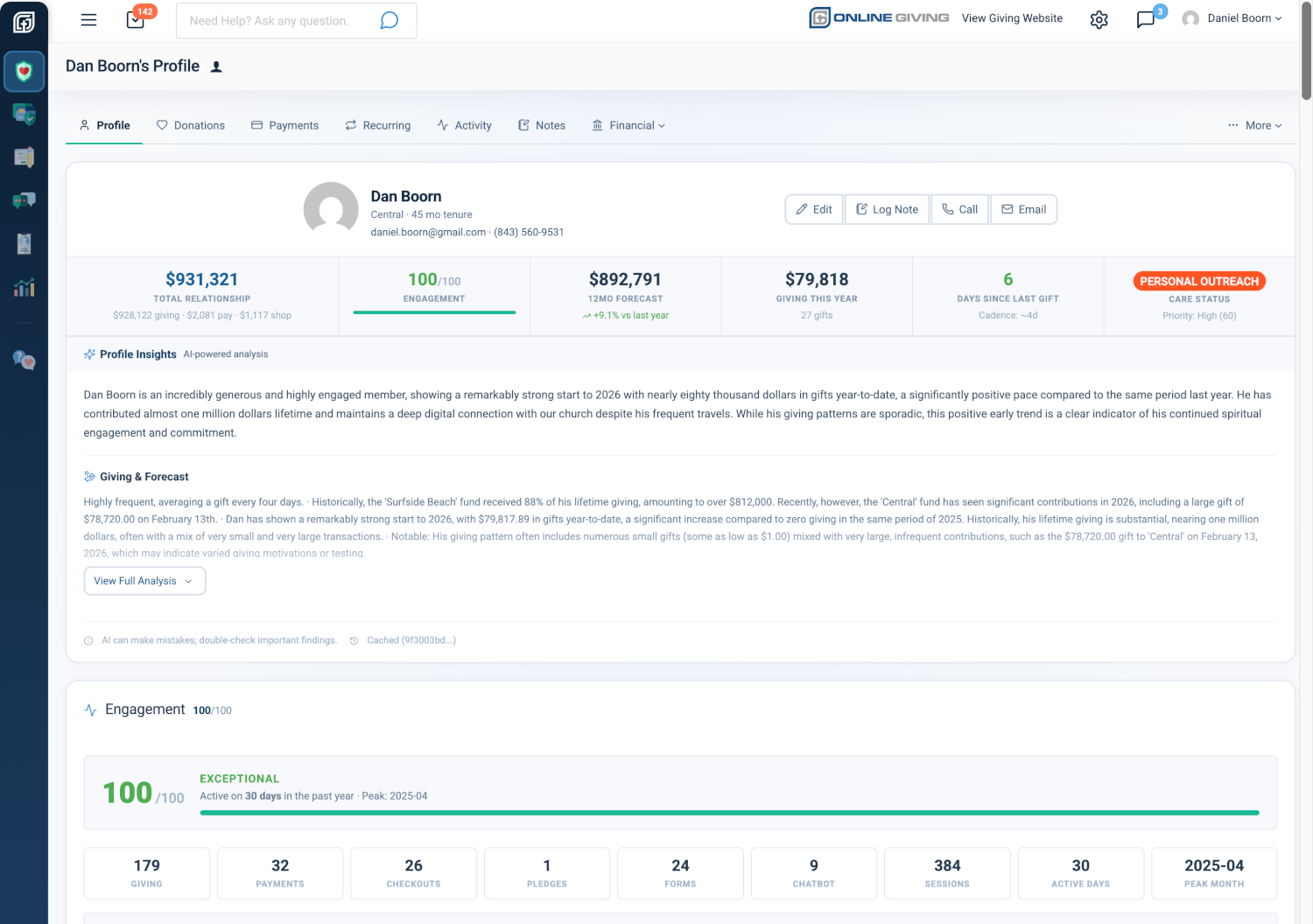
Remember when a member record was just a name, an email, and a few scattered details? Those days are over. The User Profile transforms that basic record into a living, AI-enhanced intelligence hub — a command center that brings together every dimension of a person's relationship with your church into a single, actionable view. It answers the three questions every ministry must answer about every member: Who are they? What have they done? What should we do next?
Where to Find It
How to get there: Go to Giving > Donors & Users > click any name > Profile
Who can use it: Any administrator with giving access.
Other ways to open a profile:
- Reports > At-Risk Pastoral Care > click a person's name
- Reports > Product Sales > Invoice popup > "View User Profile"
- From any list (Transactions, Payments, Checkouts, Subscriptions) > click the person's name or dropdown > "View User Profile"
Announcement Series (7 Parts)
The User Profile is announced over 7 installments, each spotlighting a major section:
- Part 1: Overview, Hero Card & AI Insights — See who they are at a glance, AI-powered insights, easy tabbed navigation
- Part 2: Giving & Forecast — Year-over-year trends, fund breakdowns, giving timeline, patterns, and forecasts
- Part 3: Care Assessment — Risk tier, care priority score, suggested next steps, care timeline
- Part 4: Engagement Dashboard — Engagement score, key metrics, activity heatmap
- Part 5: Location & Travel Intelligence — Maps, address accuracy, travel patterns, seasonal insights
- Part 6: Payments & Shop — Payment trends, shop activity, payment forecasts
- Part 7: Channels, Security & Integrations — Giving channels, login & security, church management system links
Profile Sections at a Glance
See Who They Are at a Glance
Photo, name, campus, how long they've been with you, contact links, and 7 key metric tiles: Total Relationship, Engagement Score, 12-Month Forecast, Giving This Year, Active Recurring, Days Since Last Gift, Care Status.
Why it matters: You get immediate context before every interaction. See who the person is and the current state of their relationship without jumping to separate screens — so you can care for them well from the moment you open their profile.
AI-Powered Profile Insights
Artificial intelligence analyzes each member's complete history and generates a personalized narrative with 7 insight sections: Briefing, Giving & Forecast, Engagement, Location & Travel, Care Assessment, Payments & Shop, Pledges. Includes refresh and smart caching for fast loading.
Why it matters: AI turns raw numbers into a clear story. Your team can quickly understand a member's situation and suggested next steps without manually piecing together dozens of data points — saving time and helping you focus on ministry, not spreadsheets.
Engagement Dashboard
A 0–100 engagement score with clear labels, 9 interactive metric boxes, and an activity heatmap that shows participation at a glance with click-to-drill details.
Why it matters: Engagement scoring reveals participation patterns that giving amounts alone cannot show. The heatmap makes activity frequency and recency visible at a glance — so you know who's connected and who might need a gentle check-in.
Giving & Forecast
Year-over-year trends, fund breakdowns, donut charts, giving timeline, patterns, forecasts, recurring history, pledges, and alternative giving (crypto, securities, non-cash assets).
Why it matters: Giving insights inform stewardship conversations and help you identify people ready for increased commitment or re-engagement — growing generosity and deepening relationships.
Care Assessment
Risk tier, care priority score (0–100), AI-suggested next steps, and care timeline.
Why it matters: Care Assessment helps you prioritize pastoral outreach so staff can focus on the right people at the right time — caring for your congregation with intention.
Location & Travel Intelligence
Interactive maps, address accuracy, travel patterns, and seasonal insights.
Why it matters: Geographic context supports campus-specific outreach and helps you time communications when people are home or traveling — meeting them where they are.
Payments & Shop
Payment trends, shop activity, and payment forecasts for non-tax-deductible transactions.
Why it matters: Payment and shop information completes the financial picture beyond tax-deductible giving — so you see the full picture of how people engage with your church.
Login & Security
Authentication methods (Password, Google, Facebook, Biometric, Phone) and profile completeness (Verified Phone, Address, Digital Statements, Payment Method).
Why it matters: Security and completeness checks help you spot members who may need help with account setup or verification — reducing friction and supporting smooth giving.
Giving Channels
Channel flags (Web, Text, Chatbot, App, Kiosk, Campus), text-to-give sources, and chatbot platform sources.
Why it matters: Channel visibility shows how members prefer to give and where to focus channel-specific campaigns — meeting people in the ways they choose.
Church Management System Links
Collapsible section showing linked IDs across 13+ systems (MinistryPlatform, Rock RMS, Breeze, CCB, PCO, OCS, Aplos, IconCMO, TouchPoint, SalesForce, Aegis, FellowshipOne, Envelope ID) with direct links to external profiles.
Why it matters: ChMS links let you move seamlessly between your control panel and church management systems without manual lookup — saving time and keeping information in sync.
Easy Tabbed Navigation
Profile, Donations, Payments, Recurring, Activity, Notes, Financial dropdown (Checkouts, Crypto, Assets, Pledges), More dropdown (Form Submissions, Chatbot Conversations, Edit Profile, Virtual Terminal, Payment Methods, Sign In as User, Delete User).
Quick Start
- Go to Giving > Donors & Users in your control panel.
- Click any member's name to open their profile.
- Review the top summary card and AI insights, then use the tabs to explore donations, notes, and more — all in one place.
At a Glance
- See Who They Are at a Glance: Identity, contact info, tenure, and 7 key metrics in one view
- AI-Powered Profile Insights: Personalized narrative with 7 structured insight sections
- Engagement Dashboard: 0–100 score, metric boxes, activity heatmap
- Giving & Forecast: Year-over-year trends, fund analysis, timeline, patterns, forecast, recurring, pledges
- Care Assessment: Risk tier, care priority, suggested next steps, care timeline
- Location & Travel: Maps, address accuracy, travel intelligence, seasonal patterns
- Payments & Shop: Payment trends, shop analytics, payment forecast
- Login & Security: Auth methods, profile completeness checklist
- Giving Channels: Channel flags, text-to-give, chatbot sources
- Church Management System Links: 13+ system links with direct profile URLs
- Easy Tabbed Navigation: Profile, Donations, Payments, Recurring, Activity, Notes, Financial, More