Feature Updates 03/11/2026
The Big Reveal: Hero Card & AI-Powered Insights That Know Your Members — Part 1 of 7
What's New
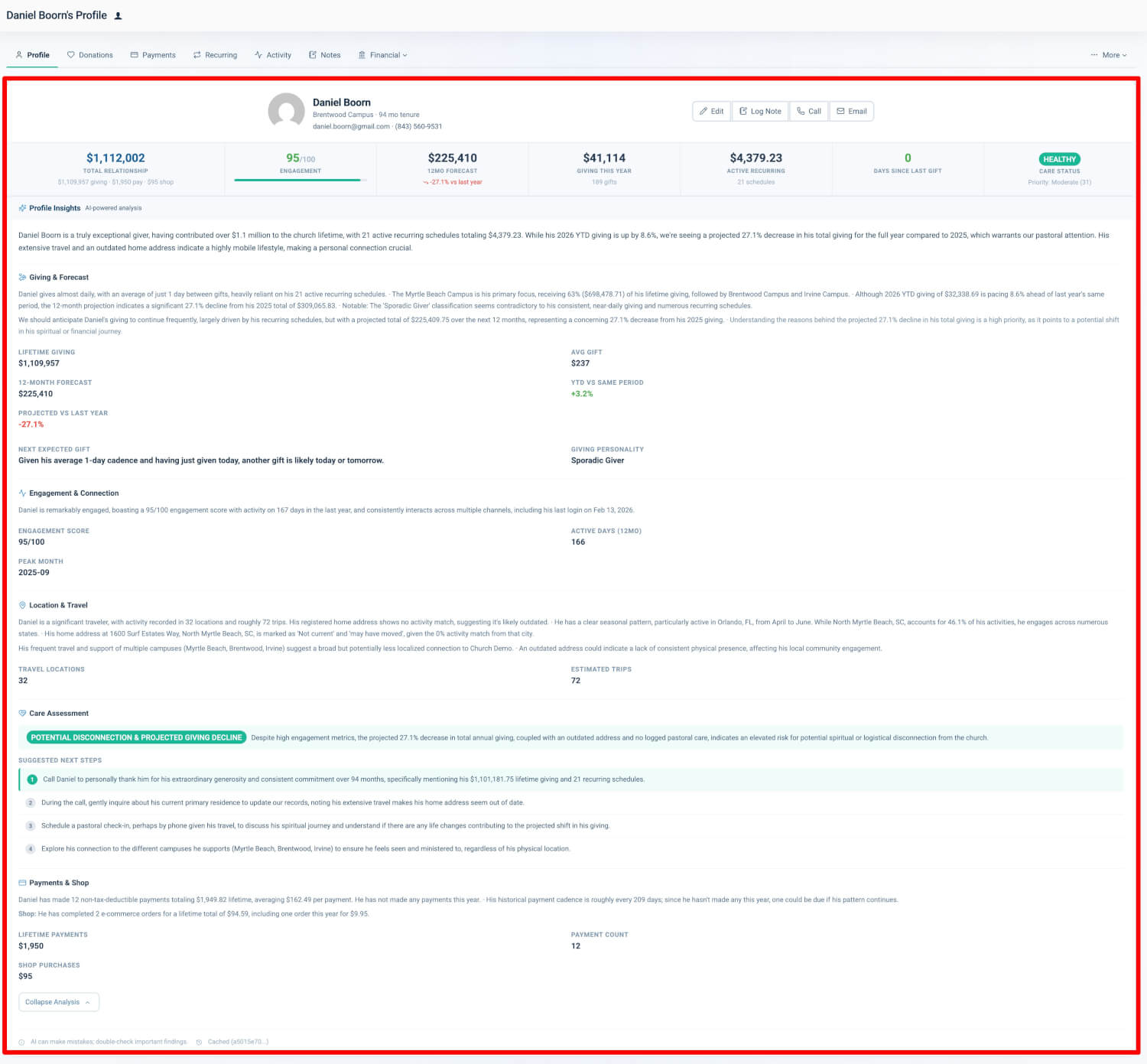
The old basic member detail page is gone — replaced by an intelligence powerhouse. The User Profile is a single-page experience that brings together giving patterns, engagement signals, geographic insights, care assessments, financial forecasts, and channel analytics into one actionable view. AI-powered insights turn raw numbers into a clear narrative. Tabbed navigation keeps you in the member's context as you move seamlessly between the insights dashboard and embedded views. This is the big reveal: your member profiles just got a major upgrade.
Where to Find It
How to get there: Go to Giving > Donors & Users > click any name > Profile
Who can use it: Any administrator with giving access.
Other ways to open a profile:
- Reports > At-Risk Pastoral Care > click a person's name
- Reports > Product Sales > Invoice popup > "View User Profile"
- From any list (Transactions, Payments, Checkouts, Subscriptions) > click the person's name or dropdown > "View User Profile"
See Who They Are at a Glance
The summary card at the top of every profile gives you an at-a-glance view of who the member is and the current state of their relationship with your church. It stays visible on the Profile tab so you always have context.
Identity Row
- Photo: Circular portrait (if they have one on file)
- Full name: First and last name in bold heading
- Campus: Preferred campus (if set) or organization name
- Tenure: How long they've been with you (e.g., "48 months") or "Since" date
- Contact links: Clickable email and phone for one-tap outreach
Quick-Action Buttons
- Edit: Opens the full member edit form
- Log Note: Jumps to the Notes tab for logging a care touchpoint
- Call: Opens your device's phone dialer (visible when phone is on file)
- Email: Opens your default mail client (visible when email is on file)
Key Metric Tiles
Below the identity row is a horizontally scrollable row of seven contextual metric tiles. Each tile is clickable and takes you to the relevant tab for more detail.
- Total Relationship: Combined lifetime value across giving, payments, and shop purchases
- Engagement Score: 0–100 composite score with color-coded thresholds (green 70+, amber 30–69, red <30)
- 12-Month Forecast: Projected giving for the next 12 months with year-over-year trending
- Giving This Year: Current calendar year giving amount with gift count
- Active Recurring: Monthly recurring donation amount with schedule count
- Days Since Last Gift: Numeric count with color coding (green <=45d, amber 46–90d, red >90d)
- Care Status: At-risk tier badge (Healthy, Gentle Check-in, Personal Outreach, Priority Care)
When metrics are still loading: If the system hasn't finished computing metrics for a member yet, the tiles show basic totals from their record until the full analysis is ready.
Why it matters: Pastoral staff and administrators need immediate context before every interaction. The summary card provides identity, contact info, tenure, and seven key metrics at a glance, so you don't have to navigate to separate screens. Quick-action buttons let you reach out with one click — call, email, or log a follow-up note — so you can focus on caring for people, not hunting for information.
AI-Powered Profile Insights
The centerpiece of the profile is an AI-Powered Profile Insights panel powered by artificial intelligence. It generates a structured, natural-language analysis of the member based on their complete history with your church.
How It Works
- The system analyzes their complete history across giving, engagement, payments, and more.
- That information is assembled into a clear picture.
- Artificial intelligence generates personalized insights in plain language.
- Results are organized into distinct sections for easy reading.
- Insights are cached for fast loading on subsequent visits.
Insight Sections
- Briefing: 2–3 sentence executive summary of relationship status
- Giving & Forecast: Cadence, preferred funds, gift trends, giving personality classification
- Engagement & Connection: Engagement patterns, active day count, peak period identification
- Location & Travel: Geographic narrative, travel patterns, address accuracy assessment
- Care Assessment: Risk label with explanation and 2–3 suggested next steps
- Payments & Shop: Non-tax-deductible payment patterns and e-commerce behavior
- Pledges: Pledge commitment status, fulfillment progress, reliability insights
View Full Analysis
When the AI briefing is long, a "View Full Analysis" toggle expands the panel to show the complete analysis.
Loading States
- Generating: Shimmer animation with "Generating insights..." text
- Polling: For longer generations, the system checks every 10 seconds for up to 5 minutes
- Empty: Placeholder when no AI insights are available yet
Refresh & Caching
- Refresh button triggers a full refresh with fresh insights
- Cached indicator displays when serving previously generated results
- Disclaimer reminds you that AI can make mistakes; double-check important findings
Why it matters: Raw numbers require interpretation. The AI briefing transforms dozens of data points into actionable pastoral intelligence. Your team can read a concise narrative and suggested next steps without manually piecing together spreadsheets — saving time and helping care teams focus on ministry instead of data analysis.
Easy Tabbed Navigation
The profile includes a full tab bar so you can move between the insights dashboard and embedded views without leaving the member's profile.
Primary Tabs
- Profile: The intelligence dashboard (summary card, AI insights, all profile sections)
- Donations: Transaction list filtered to this member
- Payments: Payment list filtered to this member
- Recurring: Subscription list filtered to this member
- Activity: Activity log with date filtering and heatmap click-through
- Notes: Care notes for logging and viewing touchpoints
Financial Dropdown
- Checkouts, Crypto, Assets, Pledges
More Dropdown
- Form Submissions, Chatbot Conversations
- Edit Profile, Virtual Terminal, Payment Methods
- Sign In as User, Delete User
Seamless Experience
All non-Profile tabs load within the member's profile context. You stay on the same page while viewing full administrative views with pagination and date range pre-filtering.
Why it matters: The tabbed design enables a single-context workflow. A care worker can review the AI briefing, check recent donations, log a care note, and process a gift through the virtual terminal without navigating away from the member's profile — everything in one place.
Giving Personality Types
The system classifies members into giving personality types based on their patterns. These insights help you tailor stewardship conversations and outreach.
- Planned Giver: Regular cadence (every 45 days or less) with high consistency and 3+ gifts
- Impulse Giver: Low consistency with 3+ gifts — may respond well to timely appeals
- Seasonal Giver: Moderate cadence with gifts concentrated in 4 or fewer months
- Event-Driven: Gift timing correlates with events — may respond to campaign-specific outreach
- Sporadic Giver: Moderate cadence with gifts spread across many months
- New Member: Fewer than 3 lifetime gifts — may need welcome and onboarding focus
Quick Start
- Go to Giving > Donors & Users in your control panel.
- Click any member's name to open their profile.
- Review the summary card and AI insights at the top, then use the tabs to explore donations, notes, and more — all in one place.
At a Glance
- See Who They Are at a Glance: Photo, name, campus, tenure, contact links, quick-action buttons, seven key metric tiles
- AI-Powered Profile Insights: Artificial intelligence analysis with seven structured sections, refresh, and smart caching
- Easy Tabbed Navigation: Profile, Donations, Payments, Recurring, Activity, Notes, Financial dropdown, More dropdown
- Giving Personality Types: Classification of giving patterns to help tailor stewardship conversations