Feature Updates 03/16/2026
Beyond the Offering Plate: Complete Payment & E-Commerce Intelligence — Part 6 of 7
What's New
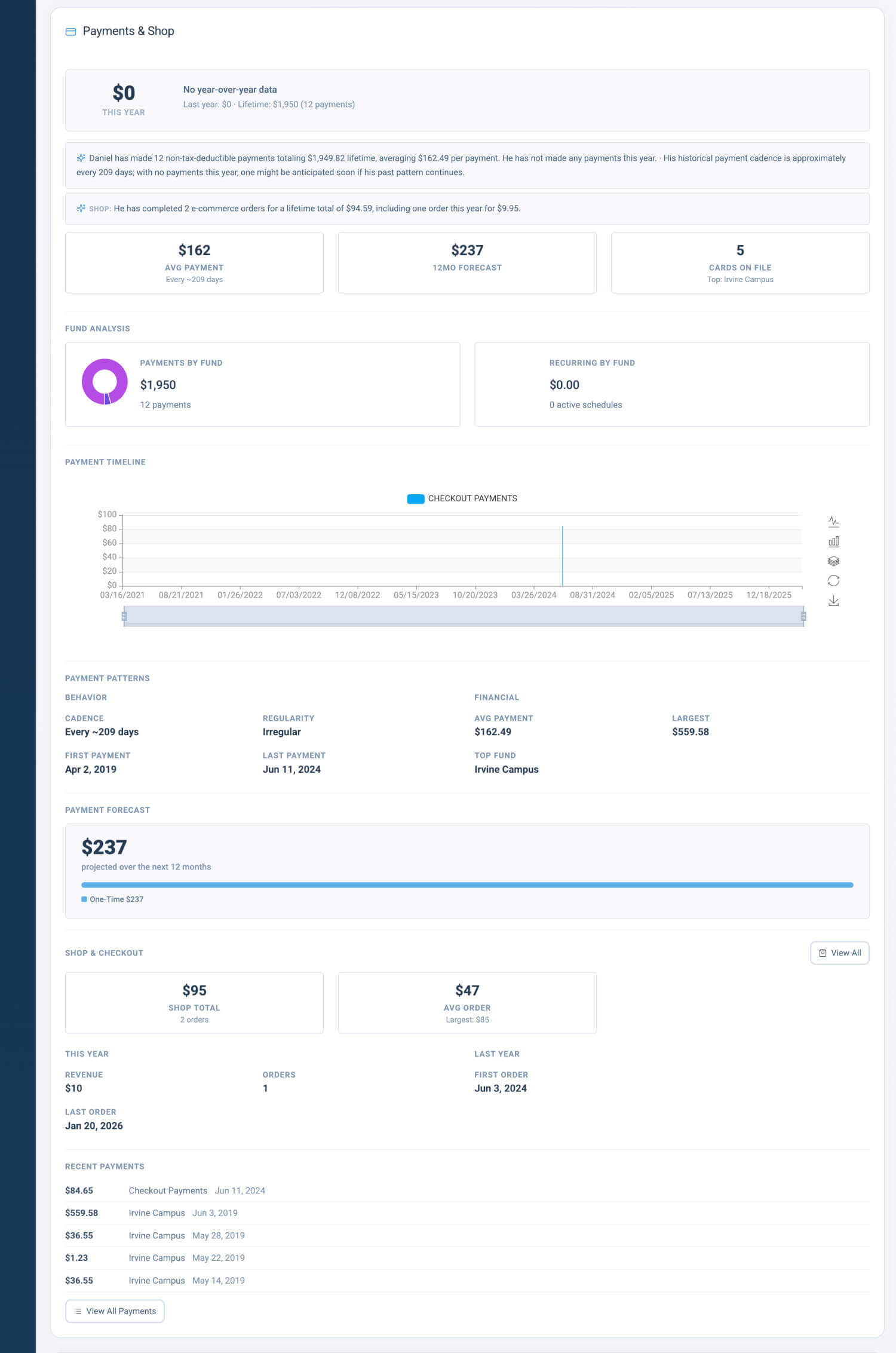
There's a whole world of financial activity beyond regular giving — event registrations, store purchases, tuition payments, fees, and more. This section brings the complete financial picture into focus. Parallel intelligence to the Giving section, applied to everything beyond the offering plate: AI-powered narratives that tell the story of non-donation revenue, forecasting that anticipates what's coming, and behavioral patterns that reveal how members engage with your shop and payment flows. The section only appears when the member has payment or checkout history.
Where to Find It
Path: Admin > Donors & Users > click any member name > Profile tab > scroll to Payments & Shop section
Who can use it: Any administrator with access to donor and member records.
Payment Trend Hero Bar
The Payment Trend Hero Bar anchors the Payments & Shop section with the same intelligence as the Giving hero bar, applied to payment transactions.
- This Year's Total: Current calendar year payment amount, color-coded for trend direction
- Pace-Adjusted YoY: Year-over-year comparison adjusted for the same calendar period
- Projected vs Last Year: Side-by-side bars showing projected amount versus prior year actual
- Lifetime Context: Lifetime payment total for long-term perspective
- Decline Highlighting: Visual emphasis when year-over-year decline exceeds 25%
Why it matters: Staff need immediate context on whether a member's payment activity (events, store, tuition, fees) is growing, stable, or declining. The hero bar surfaces the most critical comparison insights without requiring manual calculation or navigation to separate reports.
AI Payment Narratives
When AI analysis is available, two distinct narrative blocks provide context:
- Payments Narrative: Payment patterns, cadence, fund preferences, and behavioral insights for everything beyond regular giving
- Shop Narrative: Store checkout behavior, product preferences, order frequency, and purchase patterns
Why it matters: Raw payment and shop insights require interpretation. The separate narratives allow staff to understand both general payment behavior and specific store engagement without conflating the two.
Snapshot Cards (3-Up)
Three compact cards provide at-a-glance status for payment activity.
- Avg Payment: Average payment amount with cadence indicator
- 12-Month Forecast: Projected payment amount for the next 12 months
- Cards on File: Count of saved payment methods; clickable for drill-down to payment methods
Why it matters: The 3-up layout delivers average payment size, financial projection, and payment method status in a single glance. Staff can assess payment reliability and method availability without drilling into separate views.
Payment Fund Analysis
Payment Fund Analysis visualizes where a member directs their payments across funds — everything beyond regular giving.
- Payments by Fund: Donut chart showing proportional allocation across funds
- Recurring Payments by Fund: Donut chart showing recurring payment allocation by fund
- Fund Allocation Bars: Top 10 funds as proportional horizontal bars; clickable for drill-down
Why it matters: Understanding fund preferences for payments helps staff tailor communication and recognize when a member's payment activity shifts between ministries or campaigns. The dual donut charts separate one-time from recurring allocation for clearer insight.
Payment Timeline Chart
The Payment Timeline Chart is an interactive bar chart displaying payment history in the same format as the Giving timeline.
- Time Range: Historical payment insights over multiple years
- Fund-Level Color Coding: Bars are color-coded by fund for visual allocation over time
- Interactivity: Hover and click for detailed breakdowns
Why it matters: Long-term payment patterns are difficult to infer from tables alone. The timeline chart reveals seasonal spikes, fund shifts, and multi-year trends for event registrations, store purchases, tuition, and fees at a glance.
Payment Patterns
Payment Patterns is a two-column layout combining behavioral and financial insights.
Behavior Column
- Cadence: Typical interval between payments
- Regularity: Consistency of payment timing
- Consistency: Percentage of expected payments delivered
- First/Last Payment: Dates of first and most recent payments
Financial Column
- Avg Payment: Average payment amount
- Largest: Single largest payment amount
- Top Fund: Most-supported fund for payments
- Last Year Total: Total payment amount in the prior calendar year
Payment Sources bars show the proportional breakdown by channel (Web, Text, Kiosk, App, etc.).
Why it matters: Behavioral and financial patterns together inform how to approach a member for payments. Cadence and consistency reveal whether a member pays on schedule or sporadically; top fund and last year total provide financial context for outreach.
Payment Forecast
Payment Forecast projects future payment activity.
- 12-Month Projection: Total projected payments for the next 12 months
- Composition Bar: Proportional breakdown: Recurring, One-Time, and Growth components
Why it matters: Forecasts enable proactive planning. Staff can anticipate when a member is likely to make their next payment and adjust outreach or product promotion timing accordingly.
Shop & Checkout
Shop & Checkout summarizes store activity and checkout behavior.
Hero Cards
- Shop Total: Total revenue from store/checkout transactions
- Avg Order: Average order value
- Favorite Product: Most frequently purchased product
YoY Comparison
- This Year vs Last Year: Side-by-side comparison of Revenue and Orders
- Date Ranges: Calendar period alignment for accurate comparison
Why it matters: Store activity represents a distinct engagement channel. Staff can identify members who are active purchasers, understand their product preferences, and compare year-over-year store engagement to spot trends.
Recent Payments
The Recent Payments block displays the last five payment transactions with a "View All Payments" link to the full Payments tab.
Why it matters: Quick access to recent activity supports immediate follow-up. Staff can verify a recent payment or review the last few transactions without leaving the Payments & Shop section.
Up Next
Part 7 covers Channels, Security & Integrations — communication preferences, security settings, and third-party integrations.
Quick Start
- Go to Admin > Donors & Users, then click any member name.
- Open the Profile tab and scroll to the Payments & Shop section.
- Check the hero bar and snapshot cards first — then use the fund analysis and timeline chart to explore patterns.
At a Glance
- Payment Trend Hero Bar: This year's total, pace-adjusted YoY, projected vs last year bars, lifetime context, decline highlighting — immediate context on payment trends
- AI Payment Narratives: Payments narrative and Shop narrative (separate) — understand patterns and store behavior in plain language
- Snapshot Cards (3-Up): Avg Payment (with cadence), 12-Month Forecast, Cards on File (clickable) — at-a-glance status
- Payment Fund Analysis: Payments by Fund and Recurring Payments by Fund donut charts, Fund Allocation Bars (top 10) — see where payments go
- Payment Timeline Chart: Same format as Giving, for event registrations, store purchases, tuition, fees — spot seasonal spikes and fund shifts
- Payment Patterns: Behavior (Cadence, Regularity, Consistency, First/Last Payment) and Financial (Avg Payment, Largest, Top Fund, Last Year Total); Payment Sources bars — inform outreach approach
- Payment Forecast: 12-month projection, Composition bar (Recurring/One-Time/Growth) — proactive planning
- Shop & Checkout: Hero Cards (Shop Total, Avg Order, Favorite Product), YoY Comparison — understand store engagement
- Recent Payments: Last 5 transactions, "View All Payments" link — quick follow-up