Feature Updates 03/18/2026
Every Answer at Your Fingertips: The All-New Knowledge Base, AI Support Chat & Feature Updates
What's New
It is Wednesday morning. A board member just emailed asking how to set up recurring giving for the building fund. Your office administrator needs to know where to find the payment reports. A volunteer leader wants to learn about text marketing. Each time, you open the support page, try to guess the exact title of the article you need, type a keyword, and hope something comes up. Half the time, nothing does -- because you searched "weekly giving" but the article was titled "Recurring Transactions."
Not anymore.
Your entire support experience has been rebuilt from the ground up. The new Knowledge Base understands what you mean when you search, not just what you type. A completely redesigned AI Support Chat gives you instant, personalized answers pulled from every article, guide, and feature update in the system. A dedicated Feature Updates & News section lets you browse and search every product improvement with date filtering. And the best part? New articles and guides are created and indexed in real time as features are released -- so the Knowledge Base and AI always have the latest answers, the same day a feature ships.
Where to Find It
Everything lives under Support in your admin navigation:
- Knowledge Base -- Search, browse, and chat with AI
- AI Chat -- A standalone conversation with the Support GPT
- Feature Updates -- Browse and search all product improvements
Any administrator sees the new experience immediately. There is nothing to enable and nothing to configure.
Ask a Question, Get Real Answers
Open the Knowledge Base and type a question the way you would ask a colleague: "How do I refund a donation?" or "Where are my text message reports?" The search understands the meaning behind your words. Search "weekly giving" and it finds the recurring transactions guide. Search "text blast" and it finds your SMS marketing articles. No more guessing the exact title.
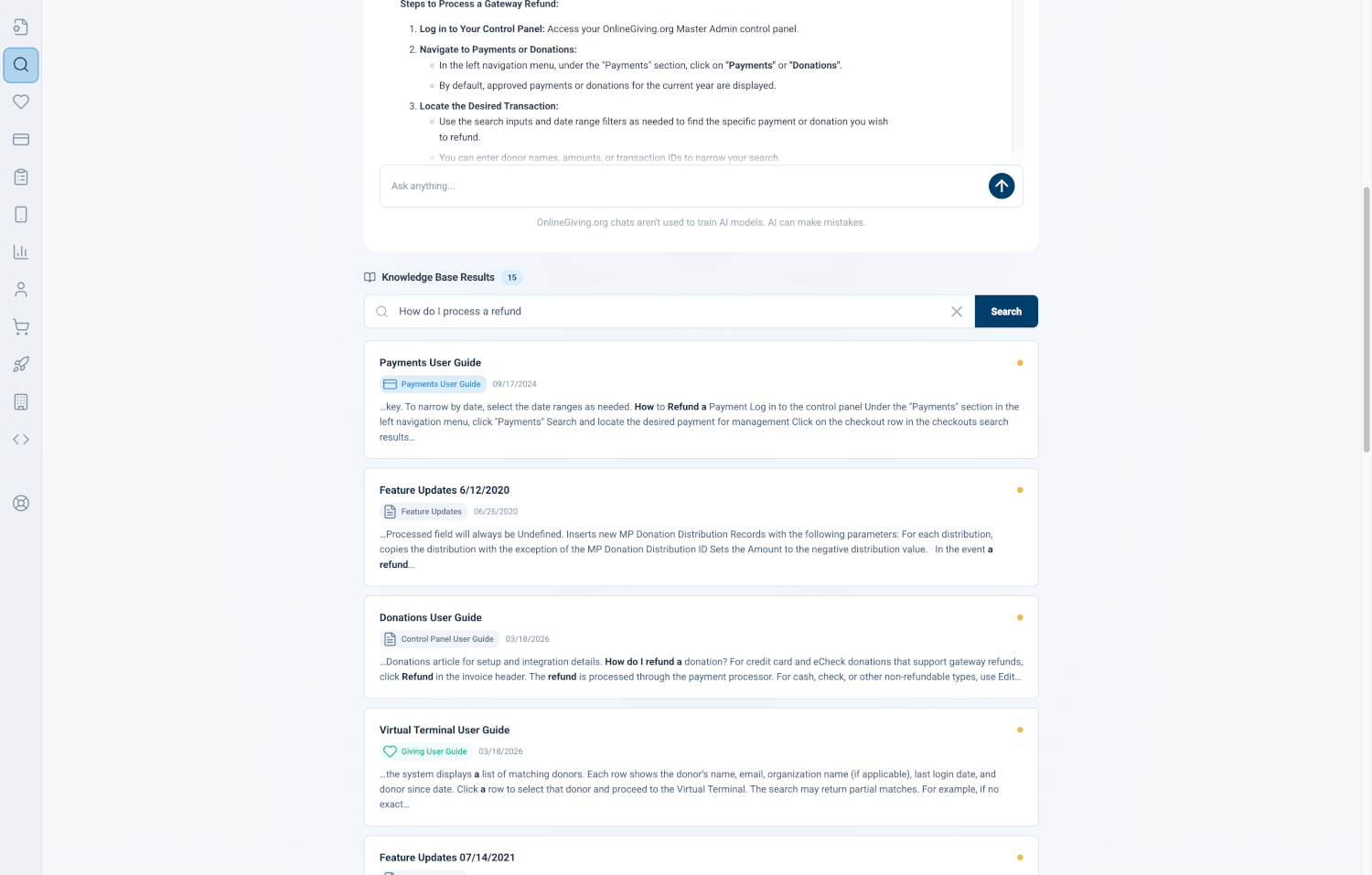
Each result shows how closely it matches your question -- a green dot means it is right on target, yellow means a partial match. You also see which category each article belongs to and when it was last updated, so you can quickly tell if you are looking at a user guide, a feature update, or a how-to article.
Why it matters: When a donor calls asking about their recurring gift and you need the answer in 30 seconds, you should not have to guess keywords. Just ask your question in plain language and the right article appears.
One-Tap Quick Search
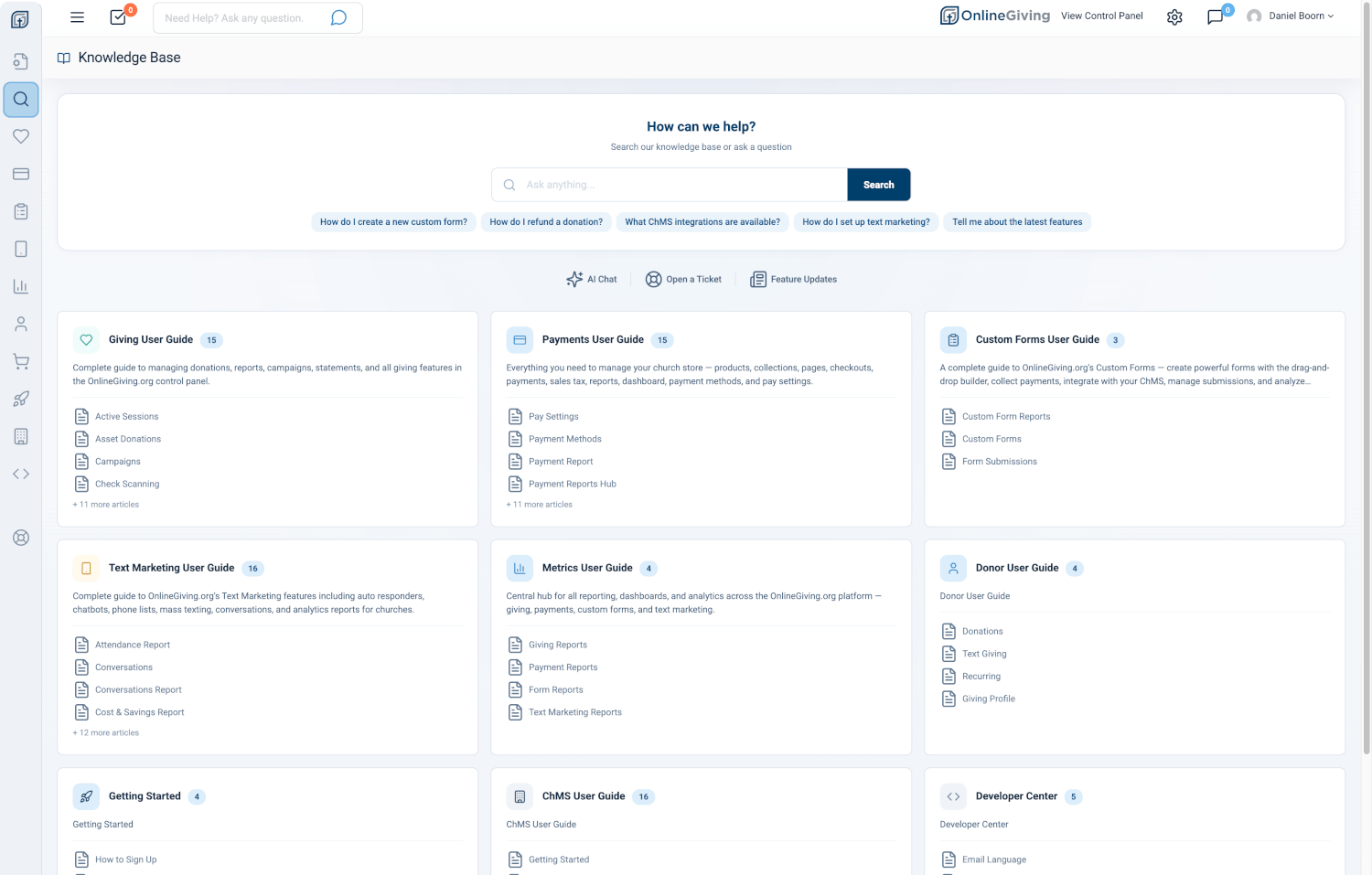
Below the search bar, you will see a row of quick-search chips -- common topics like "How do I create a new custom form?", "How do I refund a donation?", "What ChMS integrations are available?", and "Tell me about the latest features." Tap any chip and the search fires instantly, showing results and starting an AI conversation about that topic.
Why it matters: You are standing at the welcome desk between services. A staff member asks about refunds. One tap -- not even any typing -- and you have the answer.
Your Own AI Support Expert
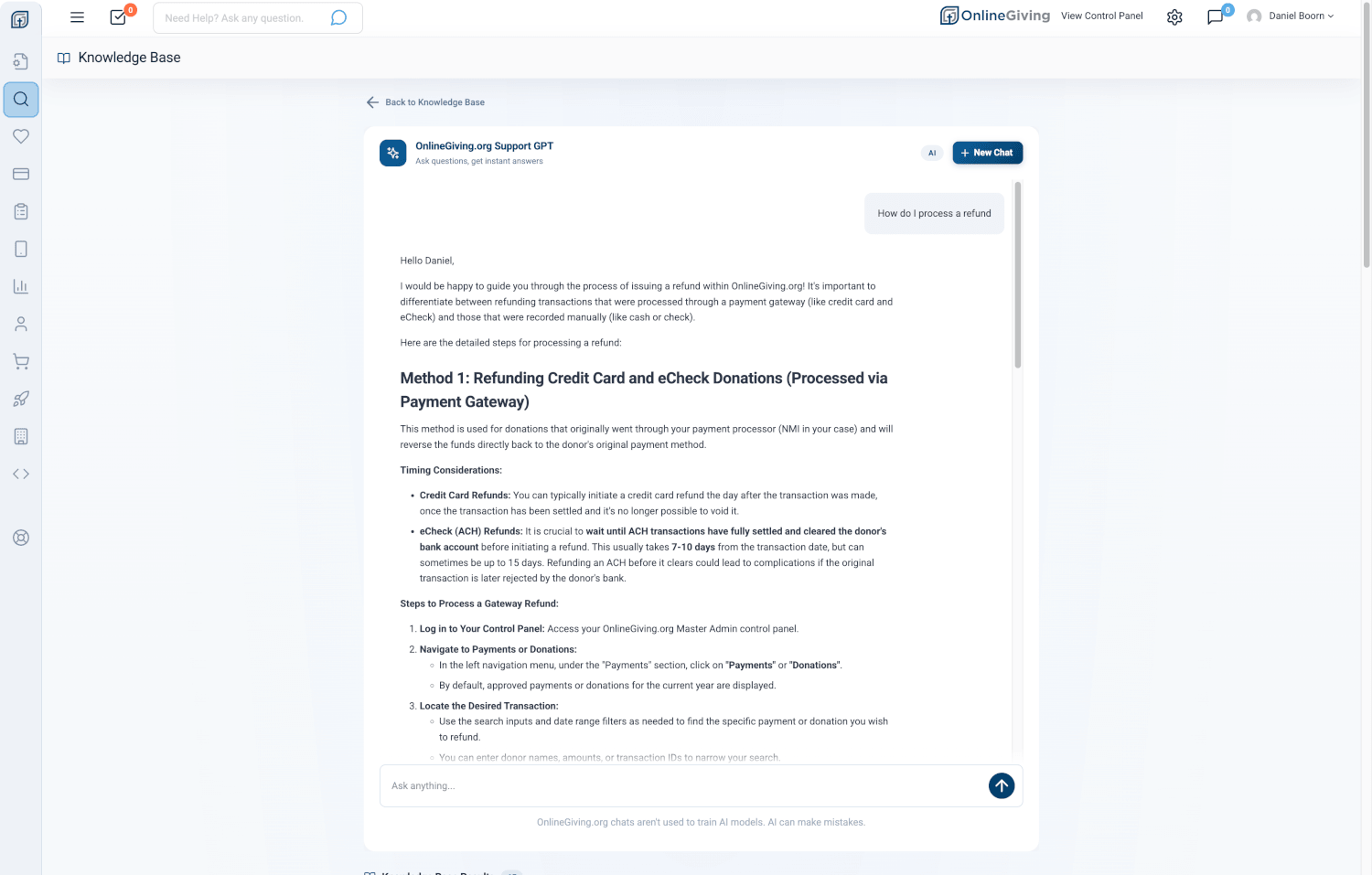
The OnlineGiving.org Support GPT is a completely redesigned AI chat that has read every article, every guide, and every feature update in the system. Ask it anything and it gives you a detailed, conversational answer -- not a list of links, but a real explanation in plain language.
When you search the Knowledge Base, the AI chat appears right alongside your search results and already knows what you searched for. You get both a list of matching articles and a detailed AI explanation at the same time.
Answers That Stream in Real Time
When you ask a question, the answer appears word by word -- just like a real conversation. A subtle "Thinking..." animation lets you know the AI is working, and the response streams in so you can start reading immediately.
Not Sure What to Ask?
The chat opens with ten example questions covering the most common topics: ChMS integrations, custom forms, giving widgets, refunds, sermon media, and more. Tap any prompt and the conversation starts instantly.
Copy Any Answer or Talk to a Human
Every AI response has a copy button so you can paste it into an email, a note, or a message to a board member. And if the AI cannot fully answer your question, a Talk to Human button connects you to the OnlineGiving.org support team with your full conversation context -- no need to repeat yourself.
Start Fresh Anytime
Hit New Chat to start a clean conversation whenever you want. Your history is preserved so you can pick up where you left off later.
Why it matters: This is not a chatbot that pastes links at you. The Support GPT reads and understands your entire Knowledge Base. It synthesizes information from multiple articles and explains things the way a product expert would -- available 24/7, whenever you need it.
Every Feature Update in One Place
A dedicated Feature Updates & News page gives you a clean, chronological view of every product improvement, new feature, and enhancement. No more hunting through old emails or asking support for a changelog.
The same AI-powered search works here too. Type "forms" and see every update related to custom forms. Type "reports" and find every new report that has shipped. Use the date range picker to filter by a specific time period -- perfect for board meetings, annual reviews, or catching up after a vacation.
Each update is displayed in a rich card format with the release date, full formatted content, images, and step-by-step instructions.
Why it matters: Your board asks "What new features did we get this quarter?" Open Feature Updates, set the date range to the last three months, and show them exactly what their investment delivered.
A Knowledge Base That Updates Itself
Here is what makes this truly different. Your Knowledge Base is not a static collection of articles that someone remembers to update. It is a living system that stays current in real time.
When a new feature ships, a professional Knowledge Base article is created automatically -- complete with a table of contents, step-by-step instructions, FAQs, and even a podcast-style audio narration so you can listen instead of read. The moment that article is published, it is immediately searchable and the AI Support Chat can reference it. There is no delay, no backlog, no waiting.
Ask the AI about a feature that shipped this morning and it already knows the answer.
Why it matters: You should never open the Knowledge Base and wonder "Is this information still current?" Every article reflects the latest version of the product. When we ship a new feature on Monday, the guide, the audio walkthrough, and the AI's ability to answer questions about it are all live by Monday.
Browse by Category
When you open the Knowledge Base without searching, you see your articles organized into clean category cards -- Giving, Payments, Custom Forms, Text Marketing, Metrics, and more. Each card shows the category name, a description, how many articles it contains, and quick links to the first four articles.
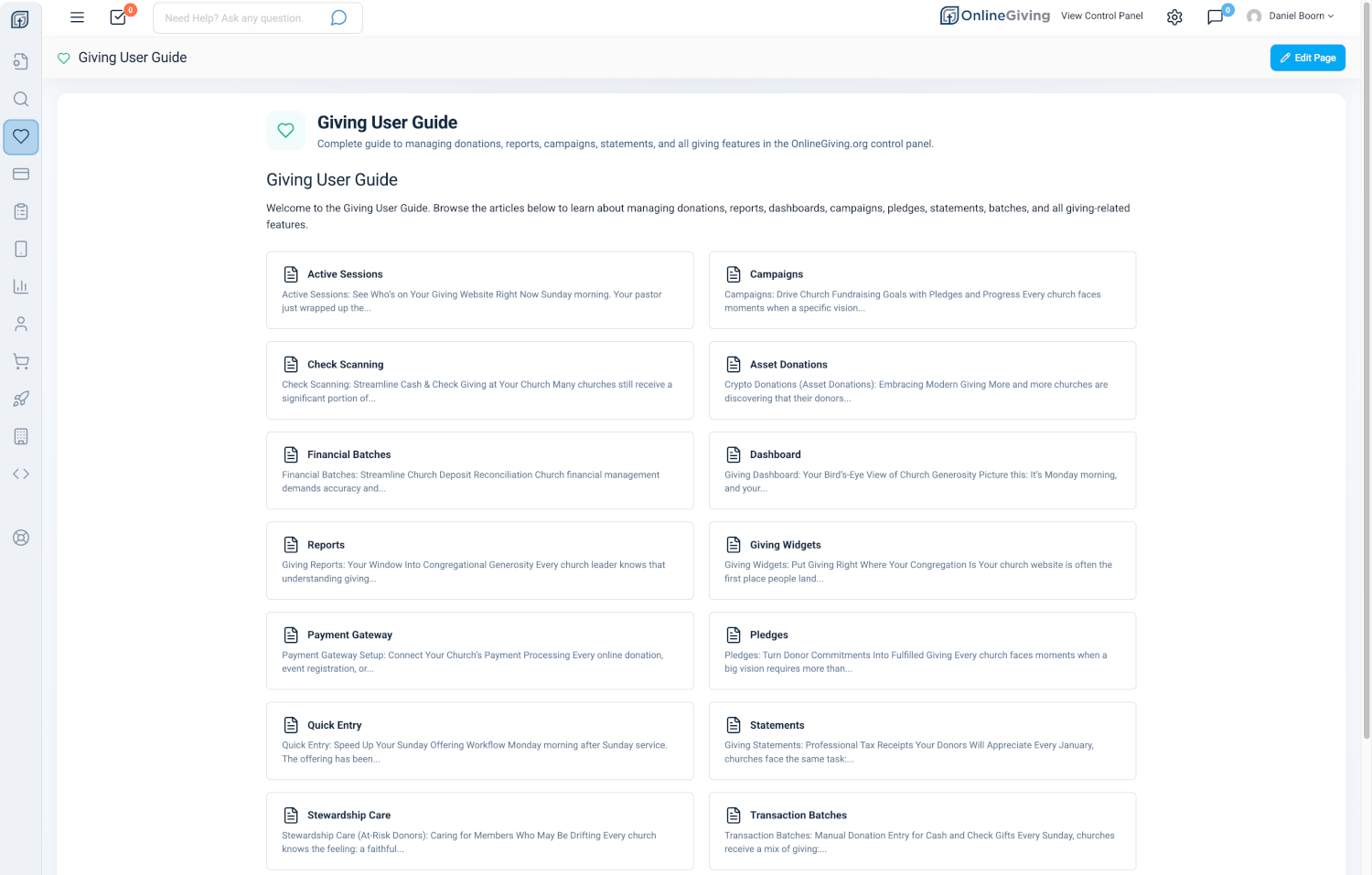
Tap into any category and you land on a hub page with a two-column grid of every article in that section. Each article card shows a preview description so you can find what you need at a glance.
Why it matters: Sometimes you do not have a specific question -- you just want to browse and learn. The card layout makes exploring feel natural, whether you are at your desk or on your phone in the hallway.
Knowledge Base Results Right Below the Chat
When you search, the AI chat and the article results work together on the same page. Scroll past the chat and you see a full list of Knowledge Base Results ranked by relevance, each showing the article title, category, date, and a snippet with your search terms highlighted in bold.
Why it matters: You get the best of both worlds in one place -- an AI explanation that synthesizes information from multiple sources, plus direct links to the original articles if you want to dive deeper.
At a Glance
- AI-powered search: Ask questions in plain language and find the right article every time -- no keyword guessing
- Quick-search chips: One-tap access to common topics like refunds, ChMS, text marketing, and latest features
- AI Support Chat: Get instant, conversational answers from an AI that has read every article and guide
- Streaming responses: See answers appear in real time as the AI writes them
- Copy and escalate: Copy any AI answer or connect to a human with your full conversation context
- Feature Updates hub: Browse and search all product updates with date filtering
- Real-time Knowledge Base: New articles are searchable and available to the AI the instant they are published
- Audio articles: Listen to articles with an embedded audio player when available
- Category cards: Clean, modern cards organize your Knowledge Base by topic with quick-access links
- Example prompts: Ten ready-made questions to get started with AI chat instantly
Try It Now
- Open your admin control panel and click Support > Knowledge Base in the sidebar.
- In the search bar, type a question like "How do I process a refund?" and watch the AI chat and search results work together.
- Tap one of the quick-search chips below the search bar to instantly search a popular topic.
- Click AI Chat in the navigation for a standalone conversation with the Support GPT -- try asking "What are the latest features?"
- Visit Feature Updates to browse recent product improvements and try the date range filter.