Feature Updates 04/28/2025
New: Non-Cash Assets Support via Quick Entry
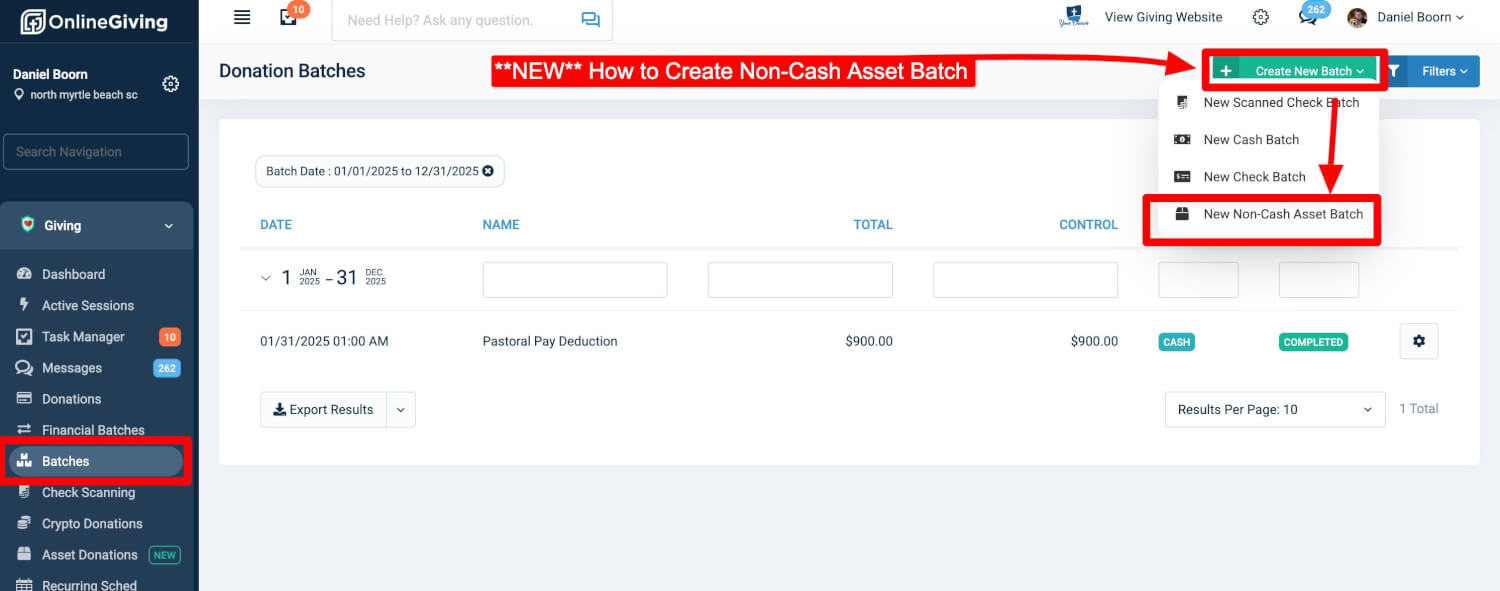
We are pleased to announce that churches can now record Non-Cash Asset Donations directly through the Control Panel > Quick Entry feature.
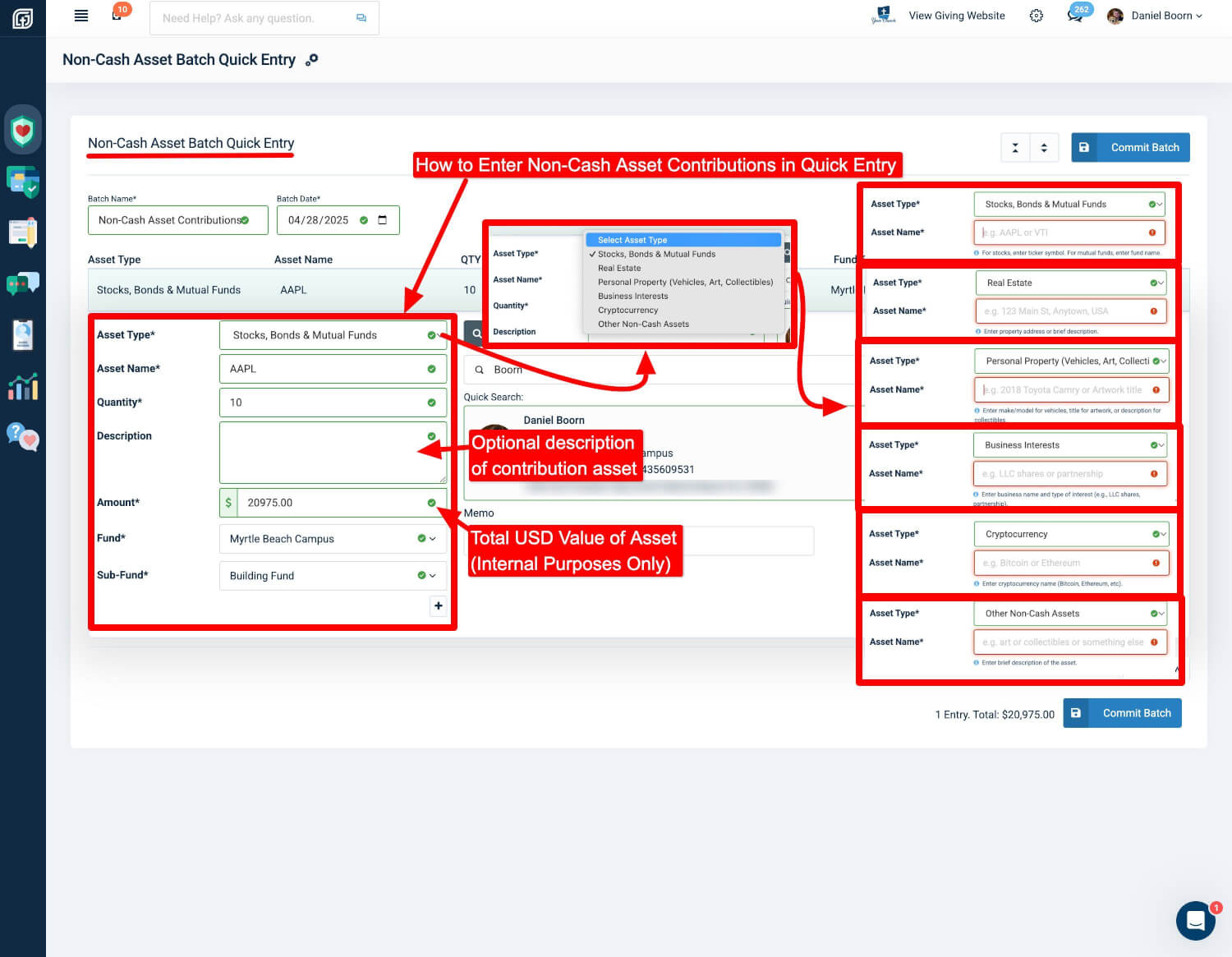
Church financial administrators may now record non-cash asset transactions including:
-
Stocks
-
Bonds
-
Mutual Funds
-
Real Estate
-
Personal Property (such as Vehicles, Art, Collectibles)
-
Business Interests
-
Cryptocurrency
-
And more
This is accomplished through the new "Create Non-Cash Asset Batch" option within the control panel.
When creating a non-cash asset entry, administrators can specify:
-
Asset Type
-
Asset Name
-
Quantity
-
Optional Long Description (for additional internal notes)
-
USD Liquidation Amount (used for internal administrative tracking only; not visible to donors)
-
Fund and Sub-Fund Allocation
-
Donor Association (new or existing)
Important Information:
If the asset has been liquidated into USD, it is highly recommended to enter the Liquidation USD Amount. This value is included in internal control panel reporting but is never displayed to donors.
Donor Visibility:
Donors will only see:
-
Asset Type
-
Asset Name
-
Quantity
-
Fund Allocation
-
Contribution Date
Quick Entry Email Notifications:
If you have Quick Entry email notifications enabled, donors with a valid email address will automatically receive a receipt once a non-cash asset batch is saved.
Each account includes a new customizable email template specifically for Non-Cash Asset Contributions.
New: Filter by Non-Cash Asset Transactions in Donations
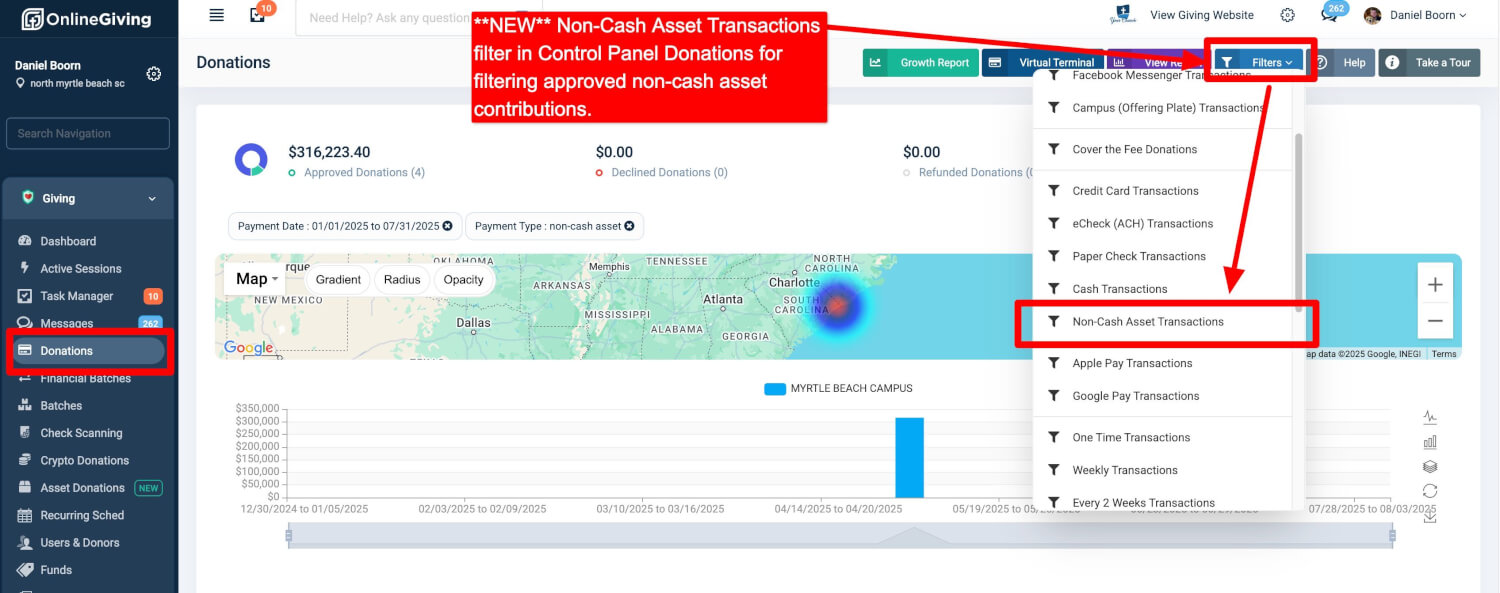
Administrators now have the ability to filter and view only Non-Cash Asset Donations from within:
Control Panel > Donations > Filter (Blue Button - Top Right)
This new filter allows for quick viewing and searching of approved non-cash asset transactions.
Additionally, the donations reporting functionality has been updated to ensure approved non-cash contributions are accurately included in reports.
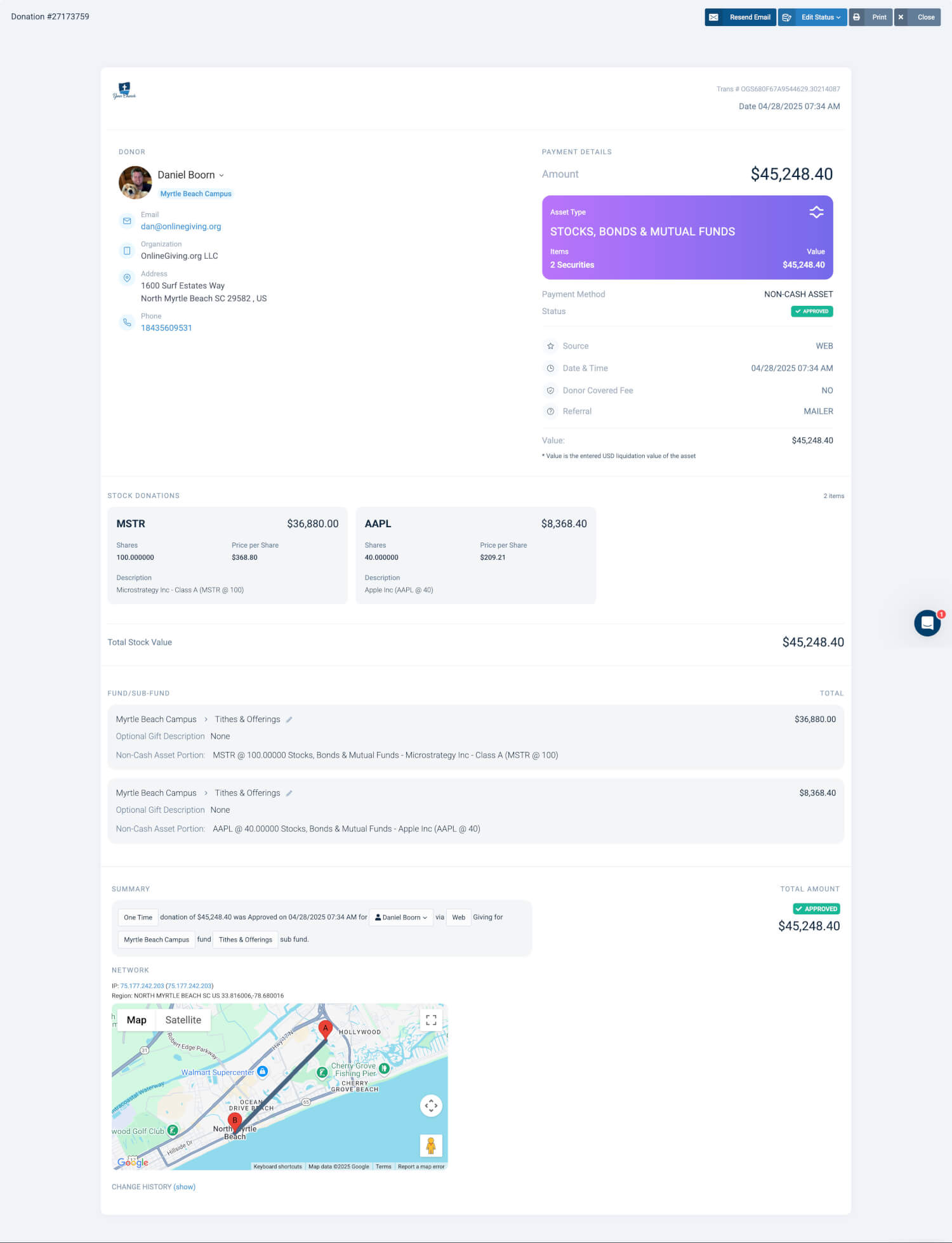
New: Dedicated Asset Donations Feature
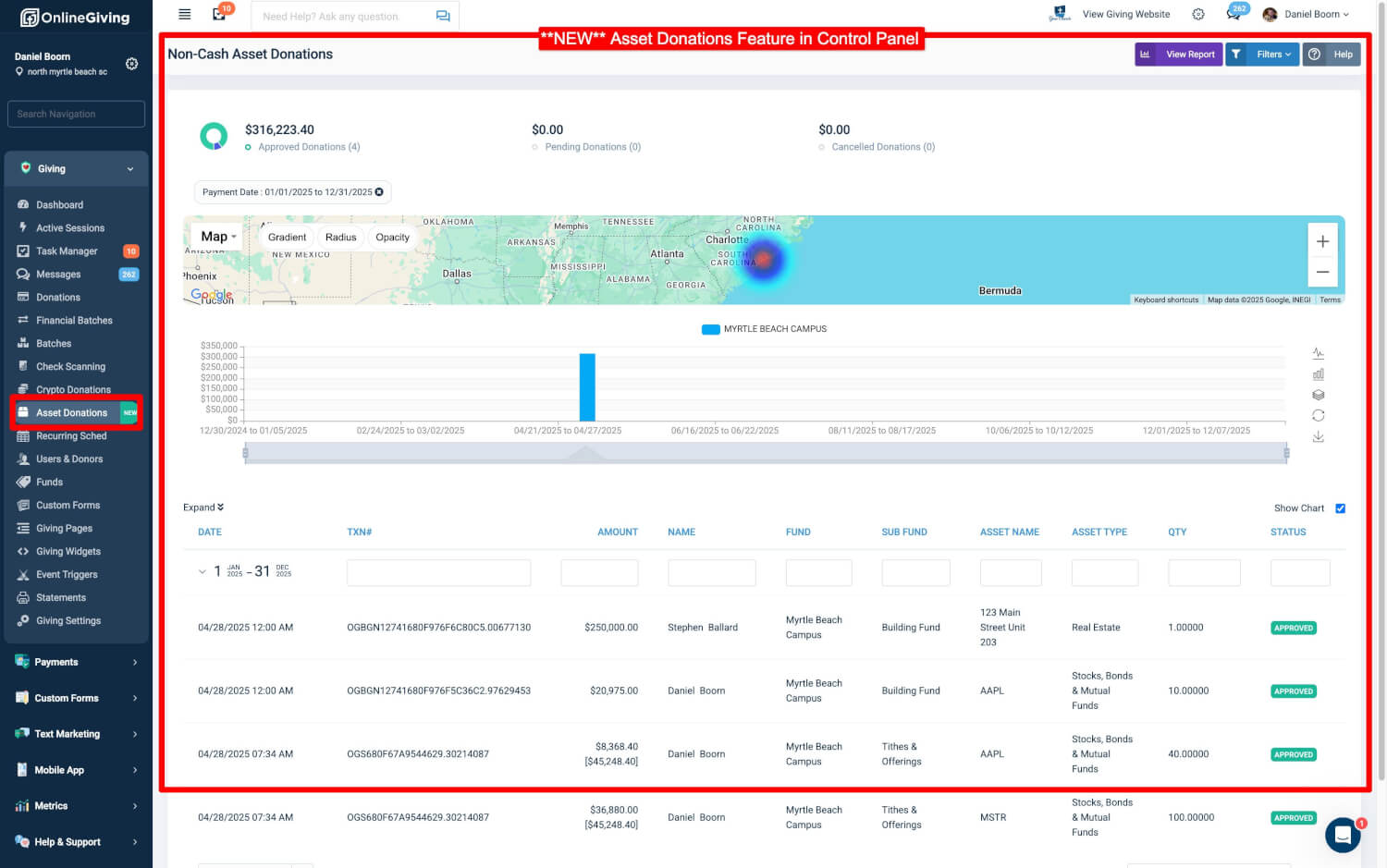
We have introduced a new feature in the control panel called Asset Donations.
This feature provides a dedicated workspace for viewing and managing only non-cash asset contributions.
It includes contributions entered via:
-
The Quick Entry feature by administrators
-
The upcoming Stock Donations feature for donors (more details to be announced soon)
This separation enhances the management experience for church financial teams by simplifying workflows specific to non-cash assets.
New: Enhanced ChMS Integration Support for Non-Cash Assets
We are also pleased to share that all OnlineGiving.org ChMS integrations have been enhanced to optionally support the recording of Non-Cash Asset Contributions into the church's integrated ChMS platform (when supported by the ChMS API).
This enhancement makes it even easier for churches to:
-
Record non-cash contributions once in OnlineGiving.org
-
Have those contributions automatically pushed into their connected ChMS system (e.g., MinistryPlatform, Rock RMS, and others)
Note:
External ChMS support for non-cash contributions depends on each ChMS’s available API functionality. If supported, OnlineGiving.org will now automatically record these entries into the church’s system without requiring any manual duplication of effort.
This improvement further simplifies donor recordkeeping, audit reporting, and year-end statement preparation across both OnlineGiving.org and integrated platforms.
Key Benefits
-
Streamlined recording for all types of major non-cash assets
-
Improved internal tracking with optional USD liquidation recording
-
Enhanced visibility in the Donations and Reporting features
-
Immediate donor receipting when enabled (optional, disabled by default)
-
Seamless synchronization with integrated ChMS platforms
-
Centralized management for all non-cash contributions