Feature Updates 05/16/2023
User Present Successful Payment & Donation Receipt Processing Moved to Background
An update is live that migrates the user's present successful payment or donation email receipt from the foreground to the background. The update allows ChMS-integrated email receipts to have automatic retry features that are included with OnlineGiving.org background processing technology. The update also prevents user disruption in the event a ChMS server is unavailable or fails to respond.
NEW OnlineGiving.org > Control Panel > Financial Batches (BETA) Feature
We're pleased to announce an update is now live that adds a new feature to the OnlineGiving.org control panel named "Financial Batches (BETA)." The new OnlineGiving.org Financial Batches (BETA) feature is a fully automated feature that displays financial batches that are designed to line up with bank deposits. Moving forward, OnlineGiving.org will start automatically populating and displaying financial batches based on daily transactional data, including cash, paper checks, scanned checks, cards, ACH, ACH failure, and scanned check failure.
Financial batches are updated in multiple ways, including when a transaction is completed and multiple times during the day as a scheduled task. By default, current-day financial batches are not visible in the OnlineGiving.org control panel date range as they are still in progress and subject to change. OnlineGiving.org will automatically apply a closed status to a financial batch that has been checked repeatedly over the course of multiple days. It is recommended that churches wait for a closed status prior to exporting or reviewing for deposit totals. However, at any time, churches may view financial batches with any status (open/closed) directly in the OnlineGiving.org control panel.
OnlineGiving.org Financial Batches are designed to aid in matching deposits with transactions. For this reason, financial batches have different transactional grouping rules based on multiple factors such as payment type, gateway account settings, date, and more. For those churches using multiple payment gateway processors for separate deposits, whether it's for payments vs. donations or different donation bank accounts, OnlineGiving.org's new Financial Batch feature creates separate batches for each gateway processor configured with the OnlineGiving.org account.
Examples of Financial Batch Transaction Grouping
- Donations from cards (credit or debit cards) are grouped together into a daily financial batch. Additionally, any card refunds performed on the same day of the batch are grouped into the financial batch, as the processor will include both new card transactions and any card refunds for the same day into a net deposit.
- Donations from ACH (electronic check) are grouped together into a daily financial batch. Additionally, any ACH refunds performed on the same day of the batch are grouped into the financial batch, as the processor will include both new ACH transactions and any ACH refunds for the same day into a net deposit. However, ACH failures such as bank rejections and check returns are excluded from this batch as those are debited separately and have their own financial batch.
- Donations from Scanned Checks (electronically deposited via Check21) are grouped together into a daily financial batch. However, Scanned Check failures such as bank rejections and check returns are excluded from this batch as those are debited separately and have their own financial batch.
- Donations from cash (entered via the QuickEntry tool) are grouped together into a daily financial batch.
- Donations from paper checks (entered via the QuickEntry tool) are grouped together into a daily financial batch.
- ACH failure (ACH bank rejection, ACH return) from ACH donations are grouped together into a financial batch based on the date the ACH failure happened at the gateway level.
- Scanned Check failure (Scanned Check bank rejection, Scanned Check return) from Scanned Check donations are grouped together into a financial batch based on the date the ACH failure happened at the gateway level.
In the examples above, donations are used. Repeat this example for any secondary gateway processor configured with the OnlineGiving.org account, such as payments or secondary donation processors.
Preview of New OnlineGiving.org Financial Batches:
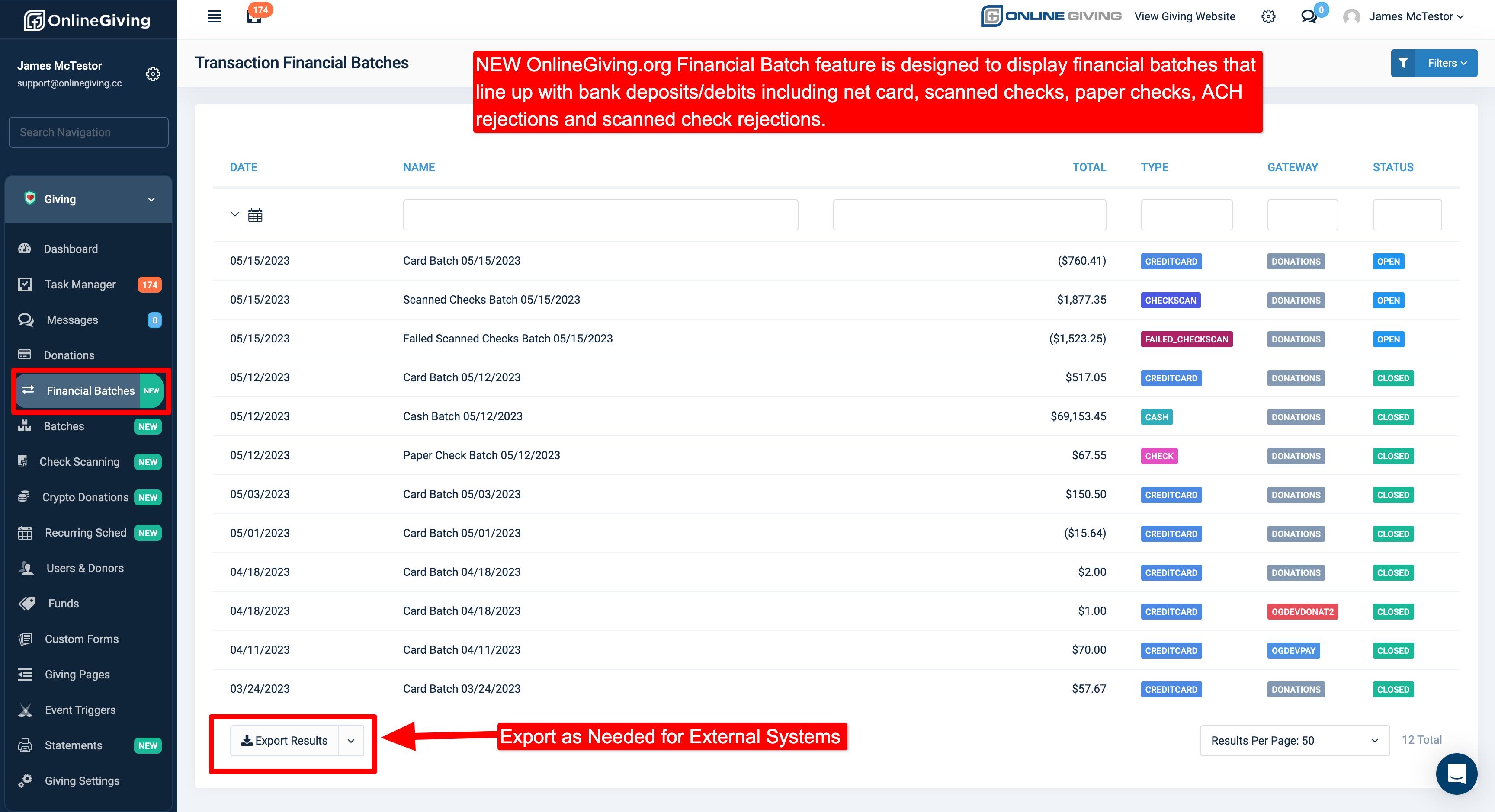
The OnlineGiving.org Financial Batch feature also includes an export option which can be helpful for exporting filtered batches to external financial products.