Feature Updates 05/29/2025
NEW OnlineGiving.org Rock RMS Option: Alternative Transaction Code for Non-Cash Asset Donations
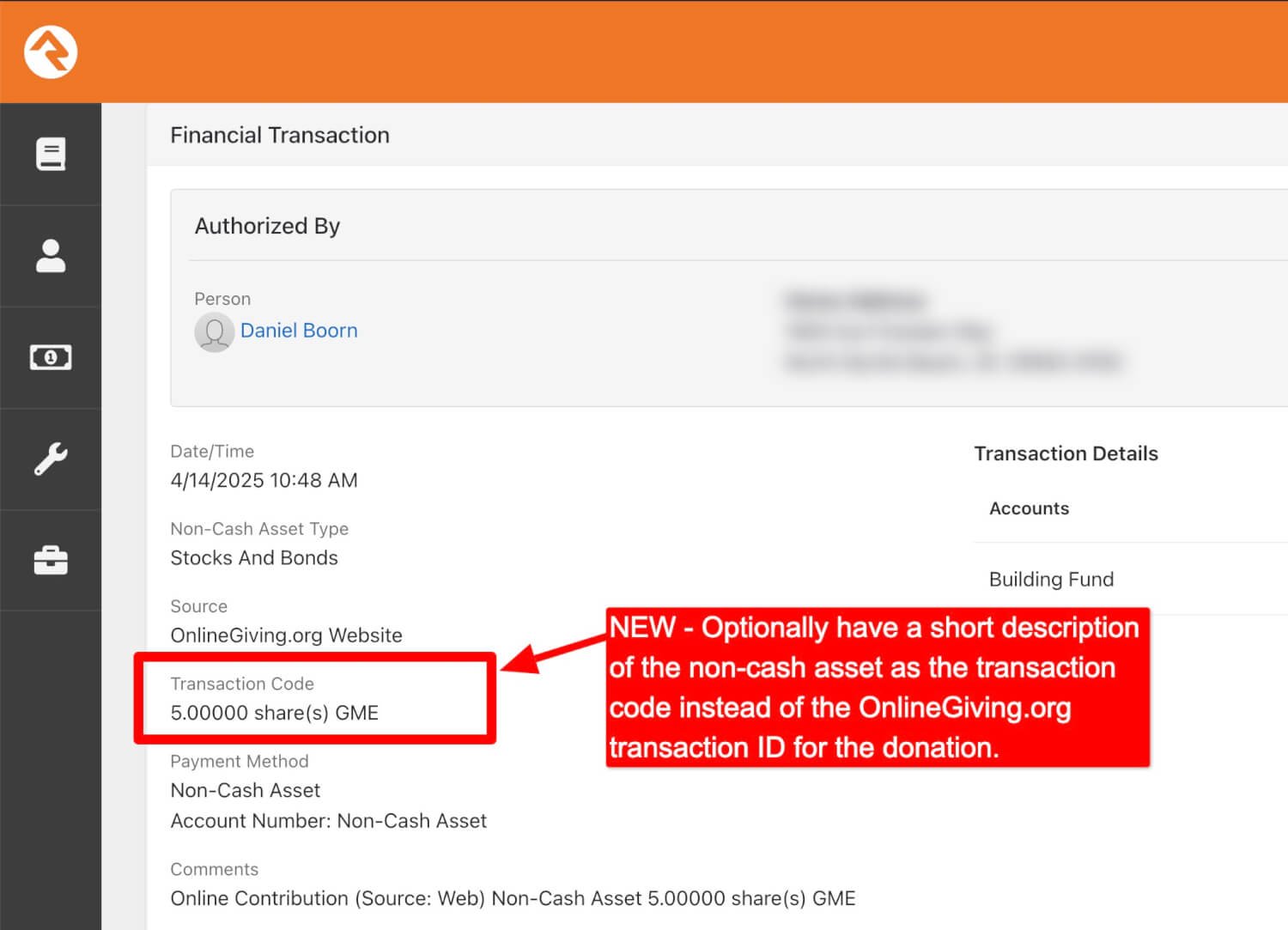
A new optional feature is now available in the OnlineGiving.org integration for Rock RMS, providing an alternative way to display the Transaction Code for non-cash asset donations. When enabled, this feature allows the field to show a short description of the donated asset—such as the number of shares and ticker symbol (e.g., 5.00000 share(s) GME)—in place of the default OnlineGiving.org transaction ID.
This is purely an alternative display option for non-cash asset transactions that would otherwise show the OnlineGiving.org transaction ID. It gives organizations the option to reflect basic asset details directly in the Transaction Code field if preferred.
Important Note: The non-cash asset description is already included by default in the Rock RMS transaction notes/comments field for all non-cash donations. This new option affects only the content of the Transaction Code field.
Key points:
-
Applies only to non-cash asset donations
-
Replaces the default OnlineGiving.org transaction ID in the Transaction Code field with a short asset description.
-
The original OnlineGiving.org transaction ID remains available in system records.
-
Asset description continues to appear in the notes/comments section regardless of this setting.
This feature is disabled by default and can be enabled upon request by contacting support@onlinegiving.org.
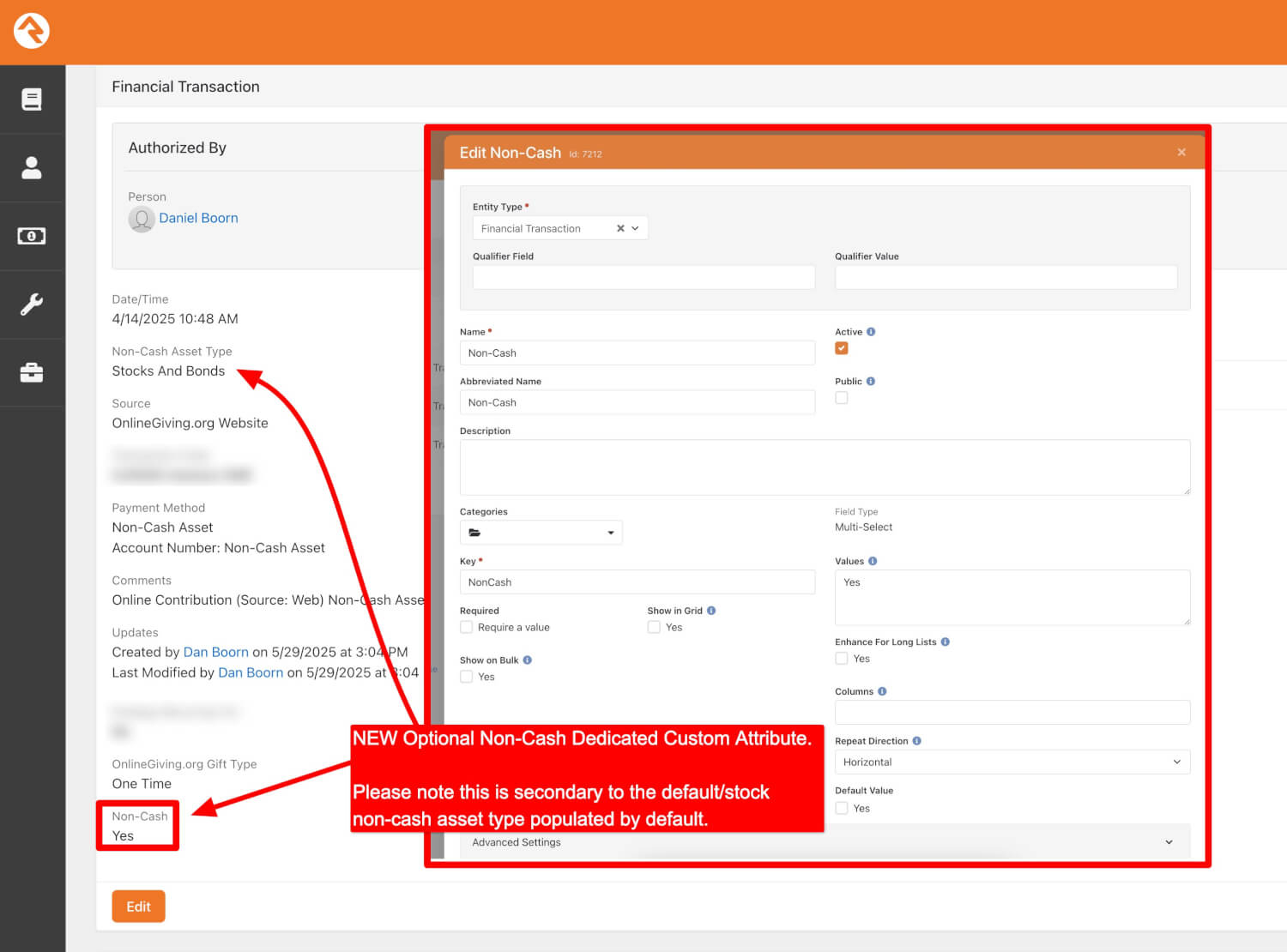
NEW OnlineGiving.org Rock RMS Option: Dedicated Custom Attribute for Non-Cash Asset Transactions
A new optional feature is now available in the OnlineGiving.org integration for Rock RMS that introduces a dedicated custom attribute for identifying non-cash asset transactions. This attribute can be configured to appear on financial transaction records in Rock RMS and indicates whether a donation involved a non-cash asset.
When enabled, this custom attribute (e.g., “Non-Cash: Yes”) will be included on applicable transactions, providing a consistent, queryable field that can be used in reports, grids, and workflows within Rock RMS.
This custom attribute is designed to supplement the default Non-Cash Asset Type field (such as “Stocks and Bonds”), which is already populated by the system based on the donation data. The new attribute does not replace this existing field but instead offers an additional, flexible way to flag non-cash activity—particularly useful for scenarios where you want to group or filter transactions by type using Rock's built-in tools.
Key points:
-
This is a custom attribute applied to the Financial Transaction entity type.
-
Attribute values can be configured (e.g., “Yes”) to identify non-cash asset contributions.
-
Appears in transaction records alongside the default Non-Cash Asset Type field.
-
Can be included in Rock reports, grids, or used in workflow conditions.
This feature is optional and must be manually configured for your Rock RMS environment. It is disabled by default and can be enabled upon request by contacting support@onlinegiving.org.