Feature Updates 08/02/2021
*New* Crypto Donations Opening for Private Beta in September 2021
We're pleased to announce an update is now live that adds private beta support for accepting cryptocurrency donations starting September 2021. The private beta will include support for accepting Bitcoin (BTC), Dash (DASH), Dogecoin (DOGE), and Litecoin (LTC). Additionally, Ethereum (ETH) support is planned for late 2021. If you are interested in participating in our private beta, please reach out to support@onlinegiving.org or give us a call at 615-206-4000. As always, ease of giving and ChMS integrations are a top priority at OnlineGiving.org, and crypto donations are launching with full ChMS integration.
Screencast Video Preview of Crypto Donations on OnlineGiving.org
Directions: Click below to watch a detailed screencast video walking through multiple crypto donations on OnlineGiving.org.
*New* Ability to Accept Crypto Donations on Primary Donation Form, Custom Giving Pages & Custom-Forms
We're pleased to announce that OnlineGiving.org has added full support for accepting crypto donations (opening for private beta starting September 2021), including the ability to accept crypto on the primary donation form, custom giving pages, and custom forms. It's important to note that crypto donations are only available once configured and as part of our private beta starting September 2021. Starting September, church's may request to enable Bitcoin (BTC), Dash (DASH), Dogecoin (DOGE), and Litecoin (LTC) donations.
Kindly note crypto donations are only made available on the giving website after enabling the feature and account-specific configuration by our knowledgable support staff. Unless specifically configured for each account, no option for accepting crypto is visible to the donor. Additionally, it's important to note that the IRS requires crypto donations to be treated as non-cash contributions.
*New* Crypto Non-Cash Asset Email Receipts
We're pleased to report an update is now live that adds support for sending out a crypto donation email to serve as a non-cash asset receipt to the donor.
*New* Crypto Donation History Page
We're pleased to report an update is now live that adds a crypto donation history page to all giving websites that have crypto donations enabled for their account. Kindly note to avoid confusion, the new crypto giving history page is only visible once crypto donations are enabled for the account.
*New* OnlineGiving.org > Control Panel > Crypto Donations
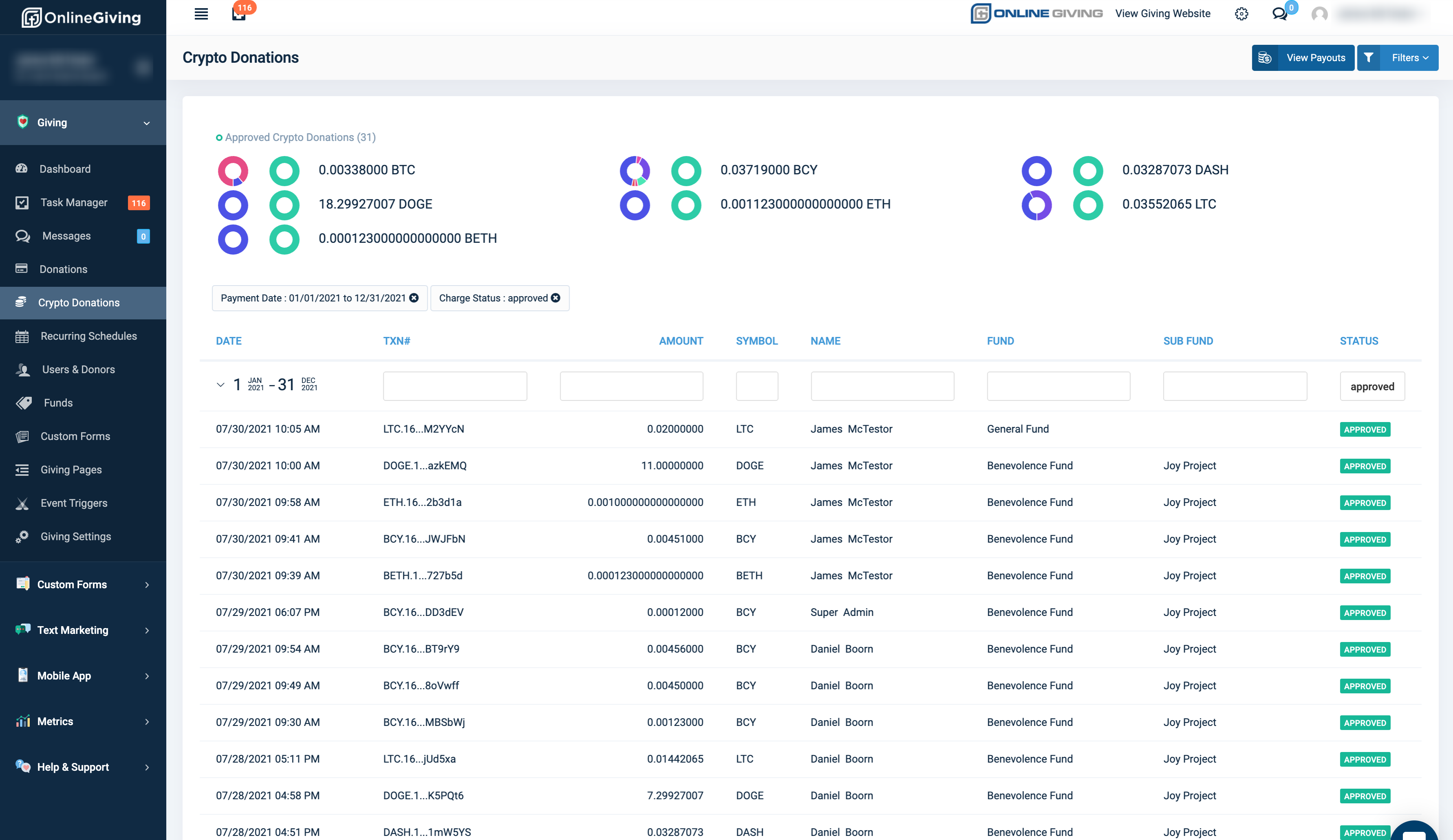
We're pleased to report a new administrative control panel feature is now live for viewing crypto donations and associated payouts. Crypto donations are opening for private beta in September. If you are interested in participating in our private beta, please reach out to support@onlinegiving.org or give us a call at 615-206-4000.
Preview of Crypto Donations in Control Panel:
*New* OnlineGiving.org MinistryPlatform Integration > Enhanced to Support Recording of Crypto Donations
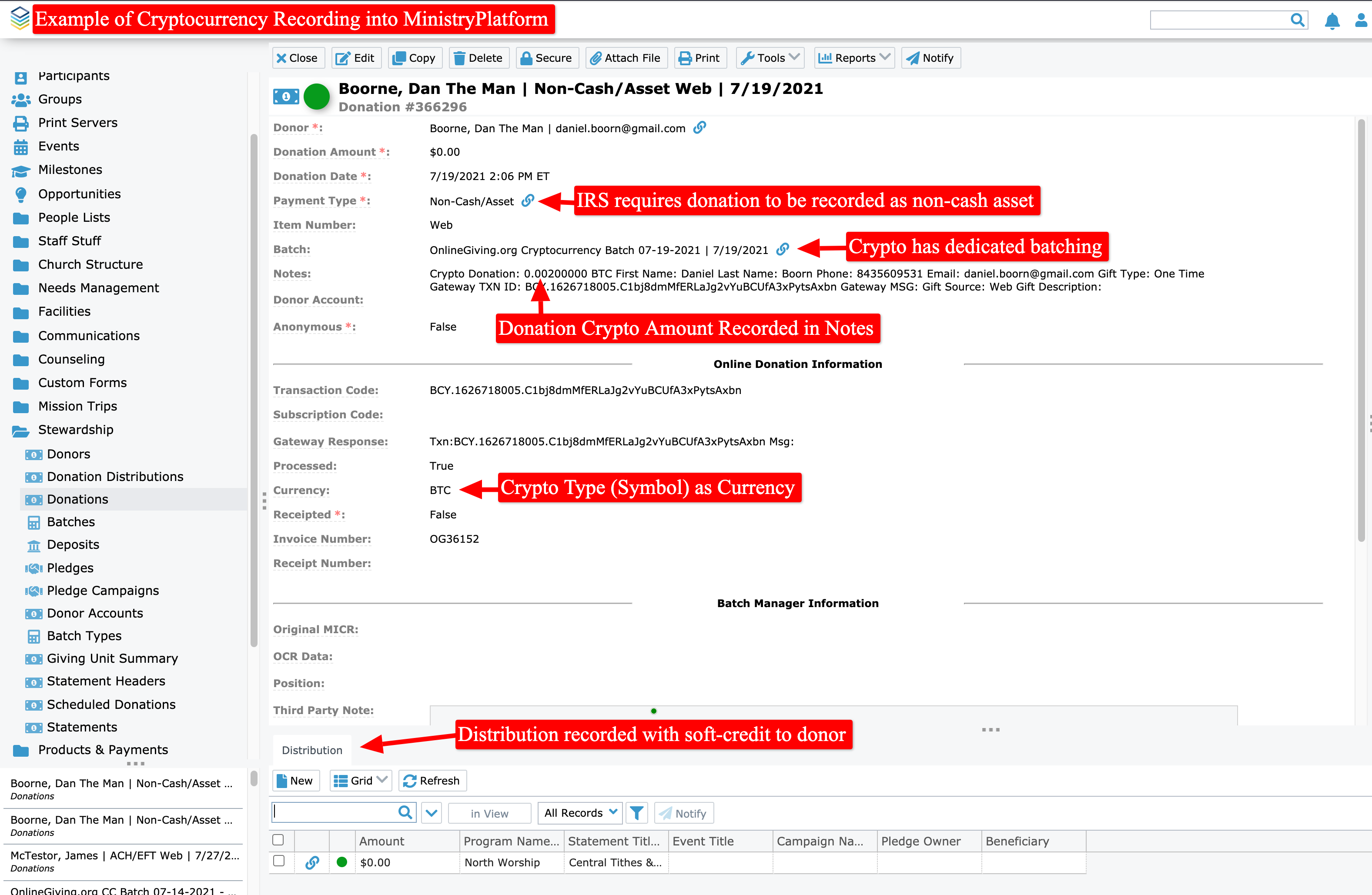
We're pleased to report the OnlineGiving.org MinistryPlatform integration has been enhanced to support the recording and batching of crypto donations. Crypto donations are recorded into MinistryPlatform as a non-cash asset with custom currency and dedicated crypto batching/deposit records.
Preview of a Crypto Donation in MinistryPlatform
*New* OnlineGiving.org Rock RMS Integration > Enhanced to Support Recording of Crypto Donations
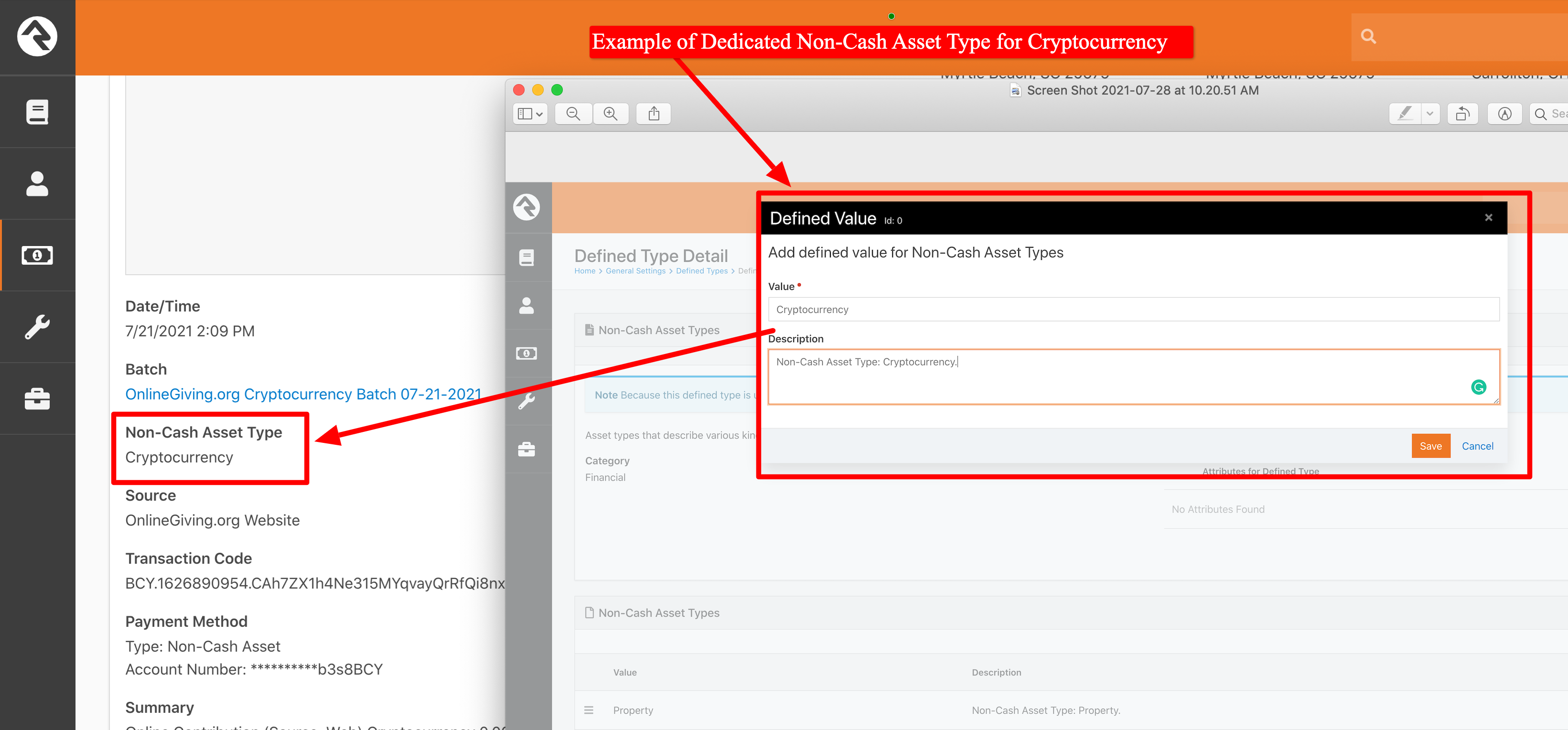
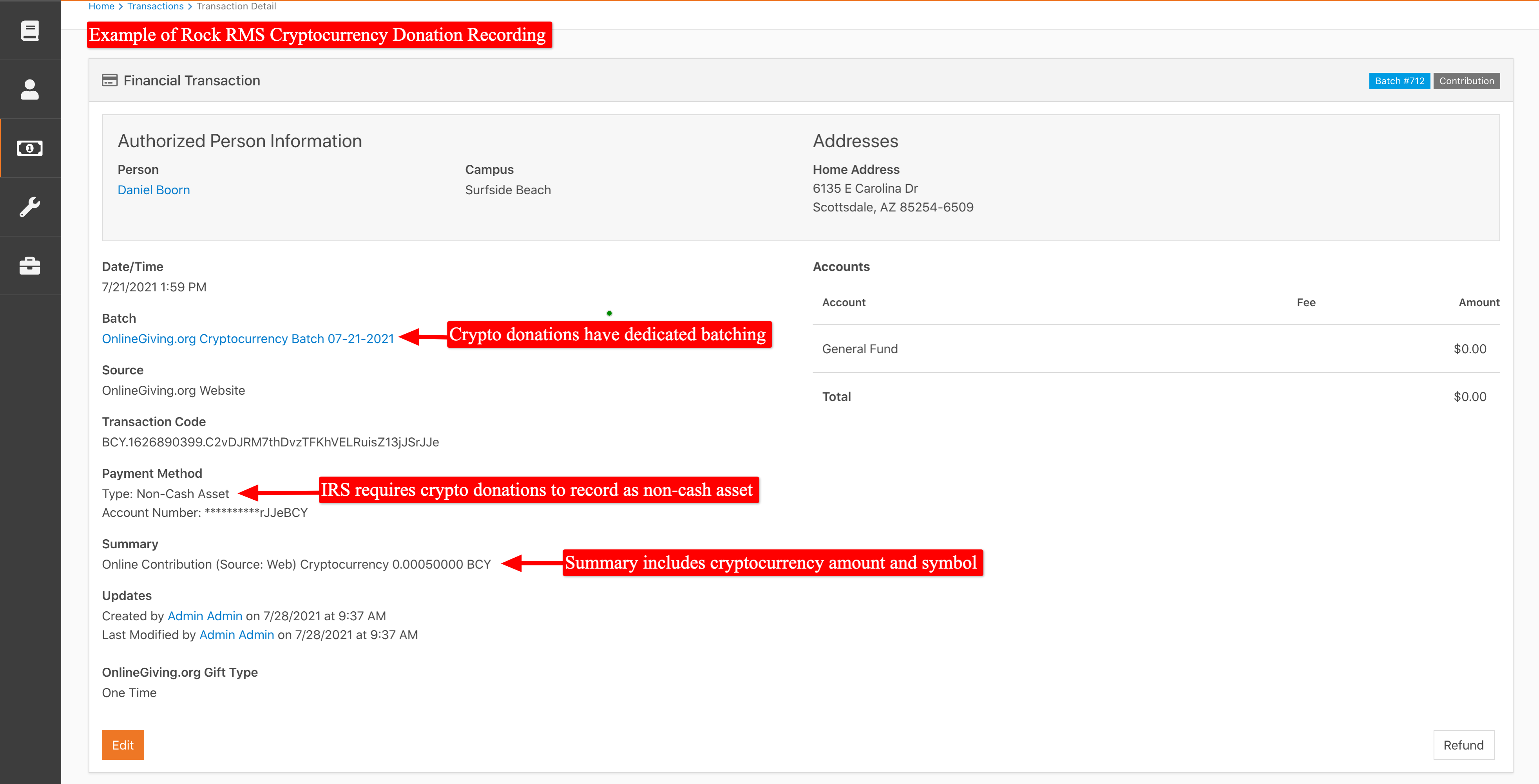
We're pleased to report that the OnlineGiving.org Rock RMS integration has been enhanced to support the recording and batch of crypto donations. Crypto donations are recorded into Rock RMS as a non-cash asset type cryptocurrency with dedicated crypto batching/deposit records.
Preview of a Non-Cash Asset Type Cryptocurrency
Preview of a Crypto Donation in Rock RMS
*New* OnlineGiving.org Aplos Integration > Enhanced to Support Recording of Crypto Donations
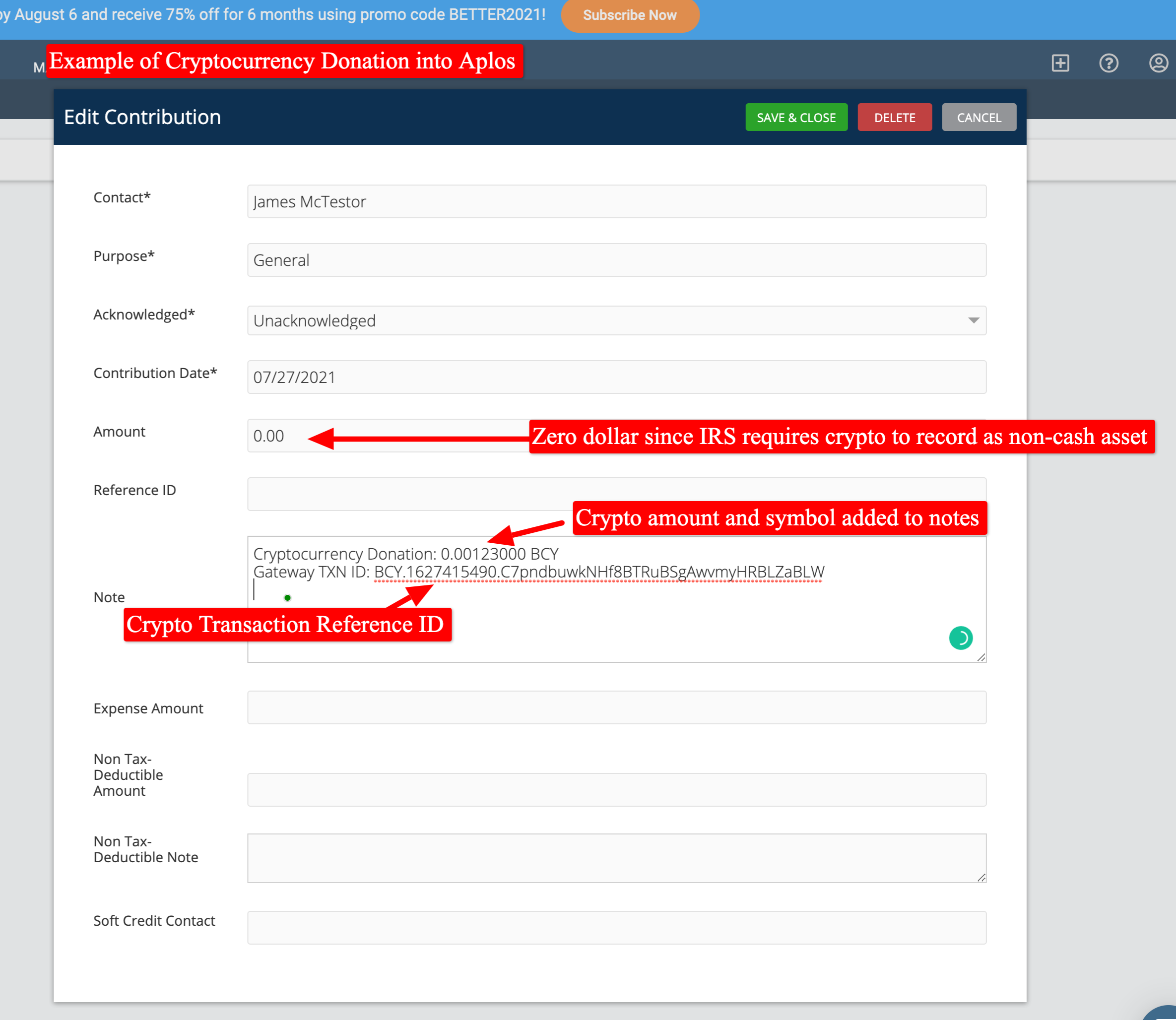
We're pleased to report the OnlineGiving.org Aplos integration has been enhanced to support the recording and batching of crypto donations. Crypto donations are recorded into Aplos as a non-cash asset with additional crypto information located in the note field.
Preview of a Crypto Donation in Alos
*New* OnlineGiving.org Kindful Integration > Enhanced to Support Recording of Crypto Donations
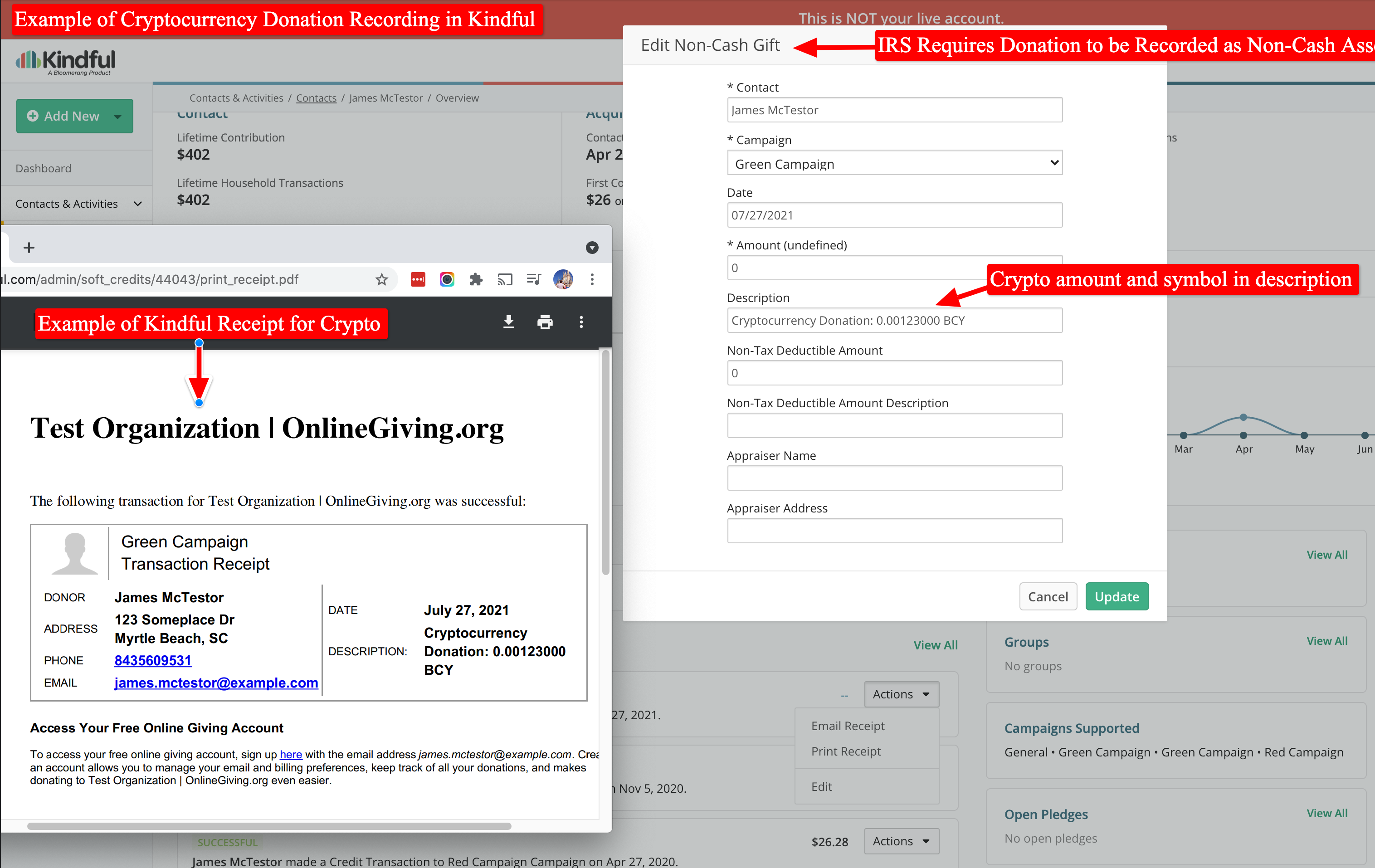
We're pleased to report the OnlineGiving.org Kindful integration has been enhanced to support the recording and batching of crypto donations. Crypto donations are recorded into Kindful as a non-cash asset with additional crypto information located in the description field.
Preview of a Crypto Donation in Kindful
*New* OnlineGiving.org BreezeChMS Integration > Enhanced to Support Recording of Crypto Donations
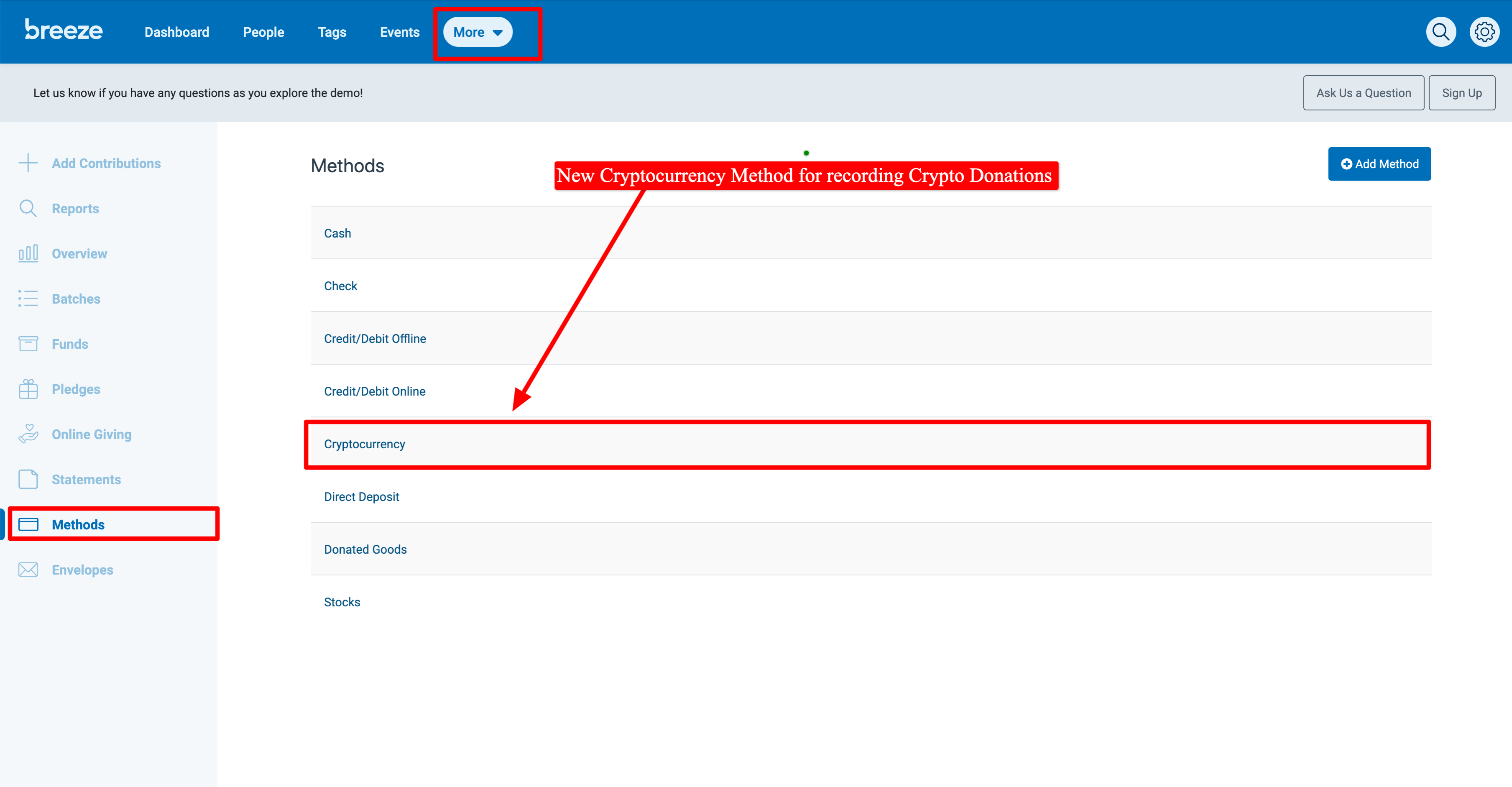
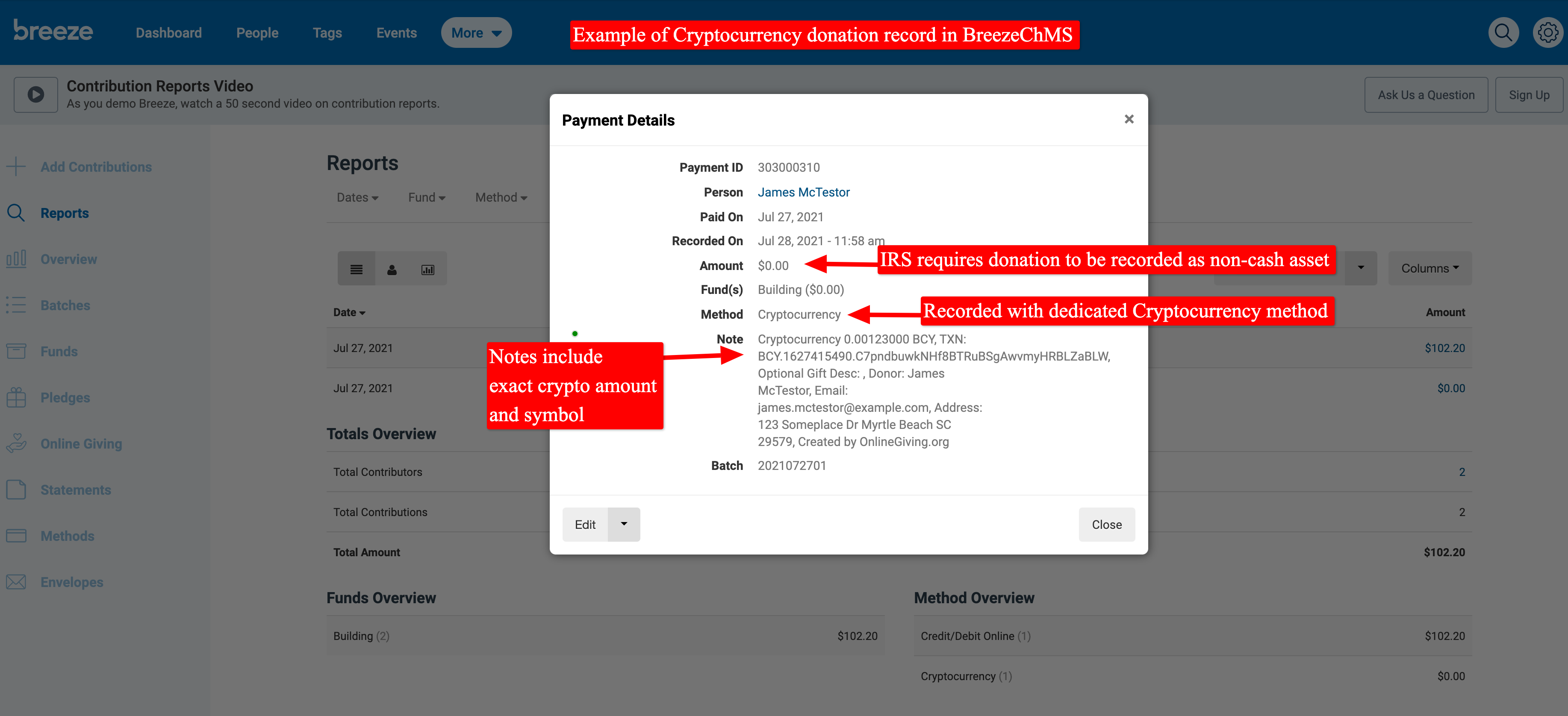
We're pleased to report the OnlineGiving.org BreezeChMS integration has been enhanced to support the recording and batching of crypto donations. Crypto donations are recorded into BreezeChMS as a non-cash asset with additional crypto information located in the Note field.
Preview of the Custom Crypto Payment Method
Preview of a Crypto Donation in BreezeChMS
*New* OnlineGiving.org FellowshipOne Integration > Enhanced to Support Recording of Crypto Donations
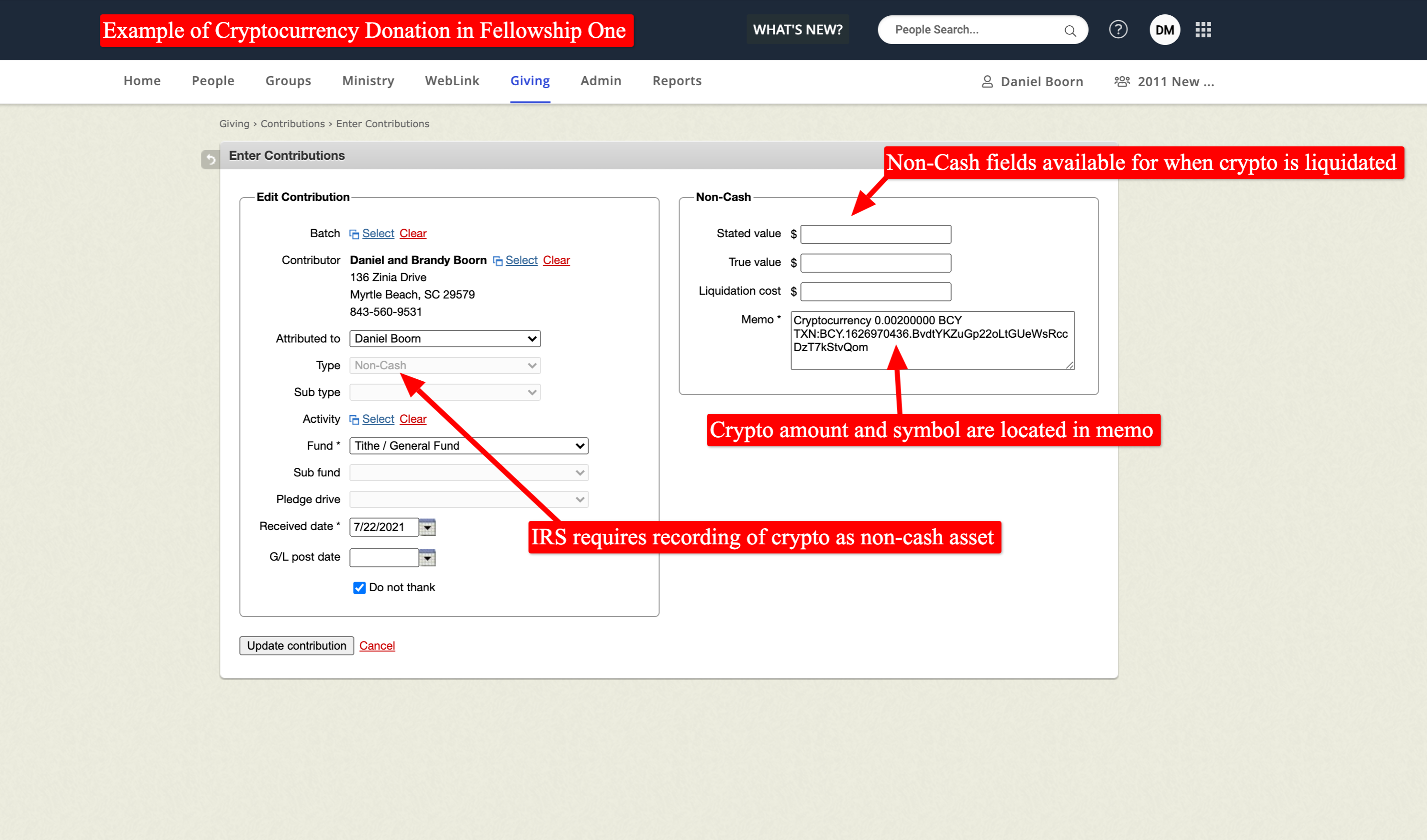
We're pleased to report the OnlineGiving.org FellowshipOne integration has been enhanced to support the recording and batching of crypto donations. Crypto donations are recorded into FellowshipOne as a non-cash asset with additional crypto information located in the Memo field.
Preview of a Crypto Donation in FellowshipOne
Important Information on Planning Center and Church Community Builder Crypto Donation Recording:
Unfortunately, at the time of this feature release, neither the Planning Center API nor Church Community Builder API included features for recording non-cash contributions, making a recording of crypto (or any non-cash) donation not currently possible via their API. Unfortunately, both APIs require a USD monetary value to record a contribution which is not allowed according to the IRS for non-cash contributions. For this reason, the OnlineGiving.org Planning Center and Church Community Builder integrations have been updated to allow the donor contact to be matched/created after a gift is completed. However, the actual cryptocurrency (non-cash asset) contribution remains solely in OnlineGiving.org. As always, we are committed to continual API enhancement with our ChMS partners. Should Planning Center or Church Community Builder add support for non-cash assets, we shall promptly enhance our integration.
*New* OnlineGiving.org > Planning Center > Preferred Campus Support
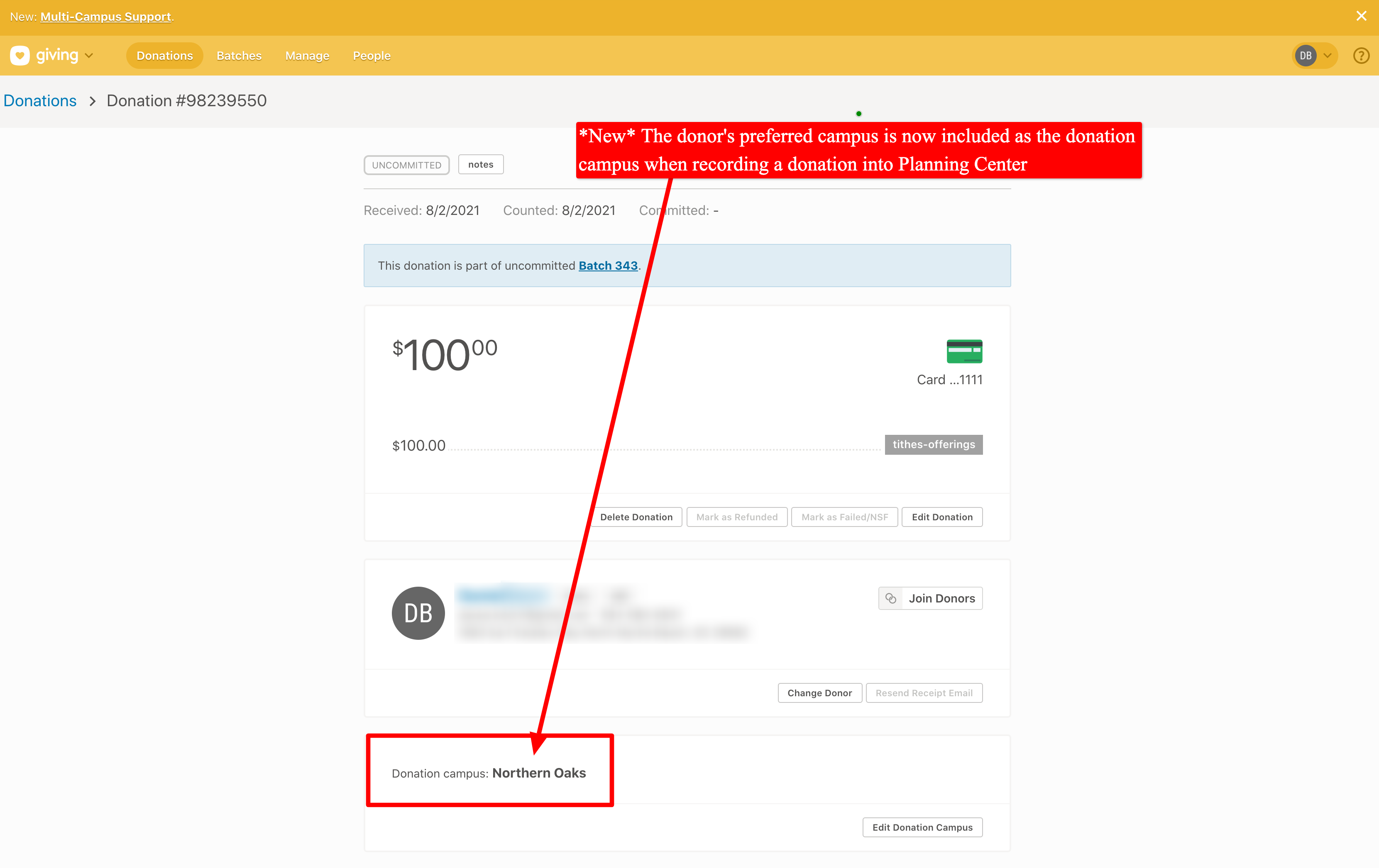
We're pleased to report an update is now live that adds support for supplying the donor's preferred campus to Planning Center when recording a donation. Planning Center recently added multi-campus support to their donation application which now includes the ability to specify a campus for a donation. Additionally, we've enhanced the Planning Center integration to automatically push over the donor's preferred campus into the Planning Center People Profile anytime the donor or an administrator updates a profile that includes a preferred campus. It's important to note that preferred campuses are matched based on the name of the campus in OnlineGiving.org vs the name of the campus in Planning Center. Further, OnlineGiving.org will not overwrite any existing preferred campus located on the Planning Center People Profile. Instead, the preferred campus will only be pushed to Planning Center when the person's preferred campus is unknown in Planning Center. With that being said, donations moving forward recorded into Planning Center will now include preferred campus information (when the campus is available).
Preview of a Donation Recorded with Preferred Campus
*New* OnlineGiving.org > Control Panel > Custom Form Builder > Rock RMS Create Pledge Action
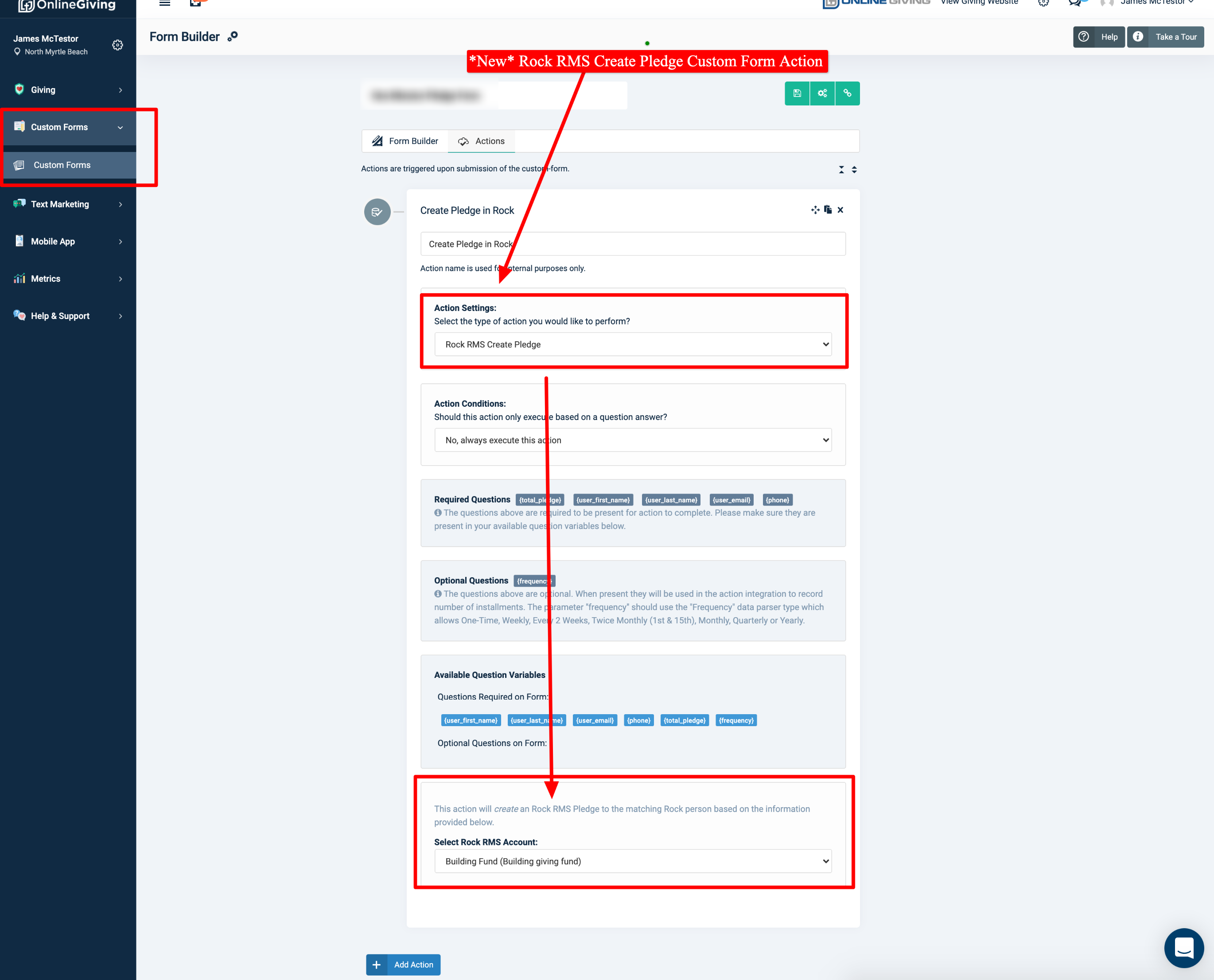
We're pleased to report an update is now live that enhances the OnlineGiving.org custom forms with a new Rock RMS integration action to create a pledge. The update aims to allow church administrators to use OnlineGiving.org custom forms for creating Rock RMS pledge records.
Preview of New Rock RMS Custom Form Create Pledge Action
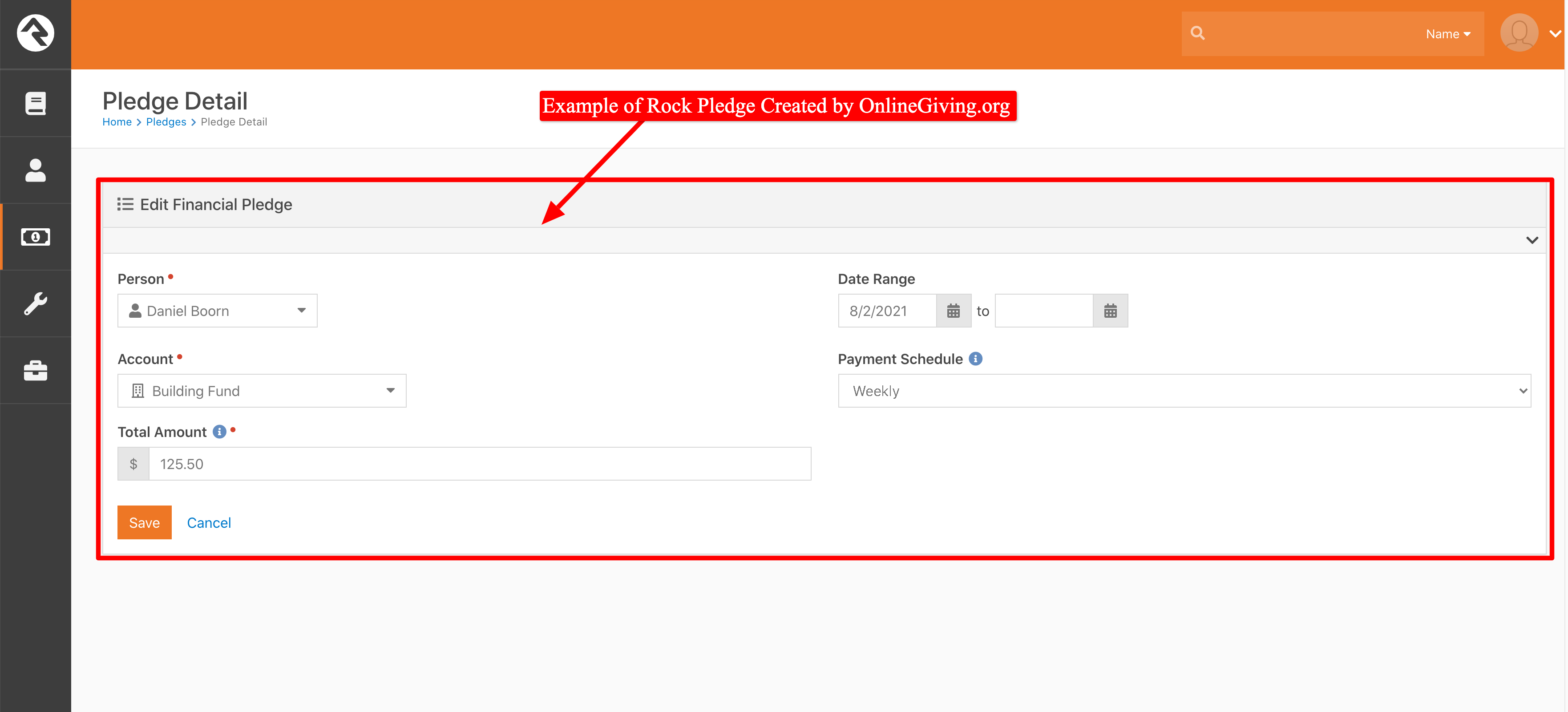
Preview of Pledge Created by Custom Form Rock RMS Create Pledge Action
*New* OnlineGiving.org > Control Panel > Chatbot Builder > Rock RMS Create Pledge Action
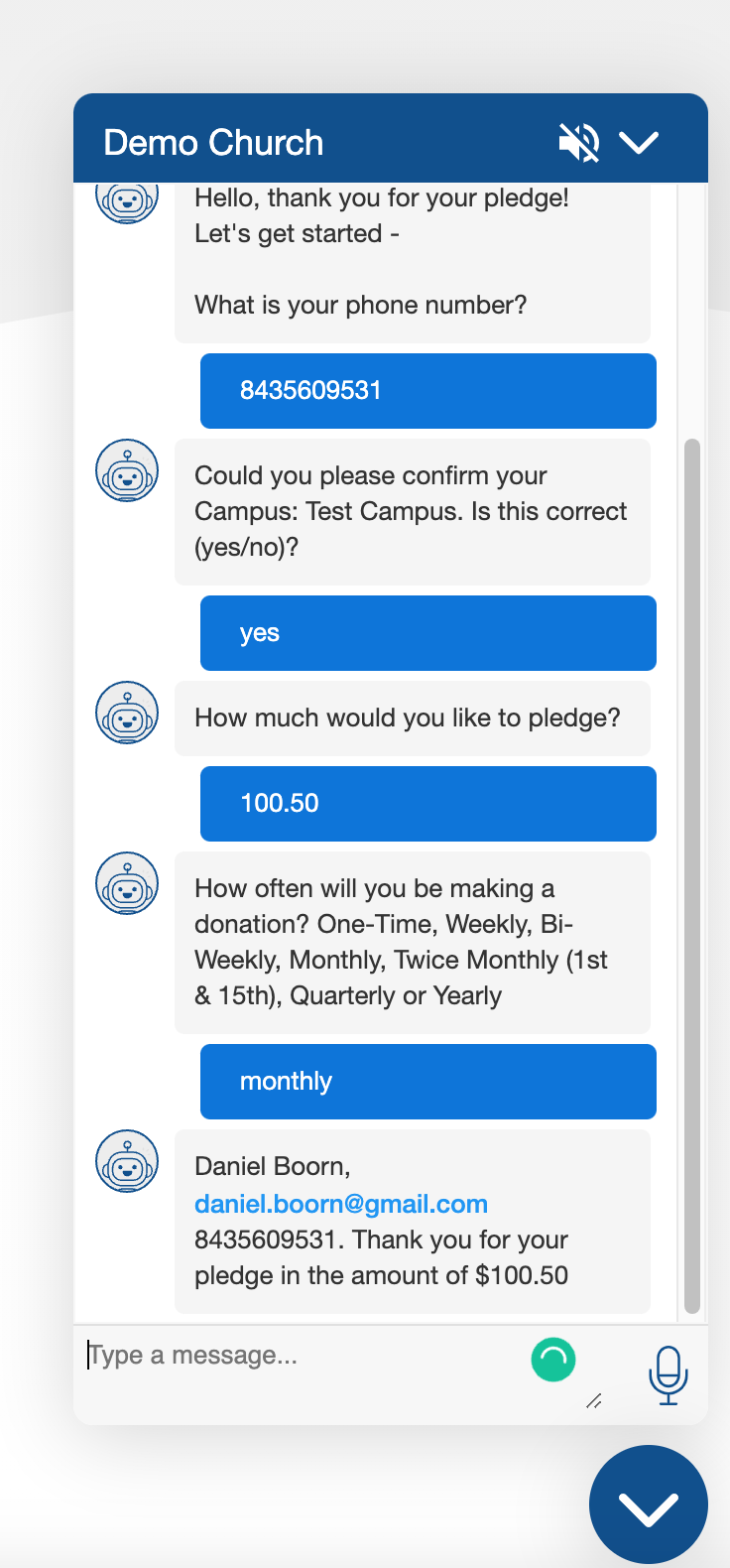
We're pleased to report an update is now live that enhances the OnlineGiving.org chatbot with a new Rock RMS integration action to create a pledge. The update aims to allow church administrators to use the OnlineGiving.org chatbot for creating Rock RMS pledge records.
Preview of New Rock RMS Chatbot Create Pledge Action
Preview of Example Chatbot Conversation for Creating a Pledge
Preview of Pledge Created by Custom Form Rock RMS Create Pledge Action
*New* OnlineGiving.org > Mobile App > MinistryPlatform > My Groups > Group Leaders > View & Record Event Metrics
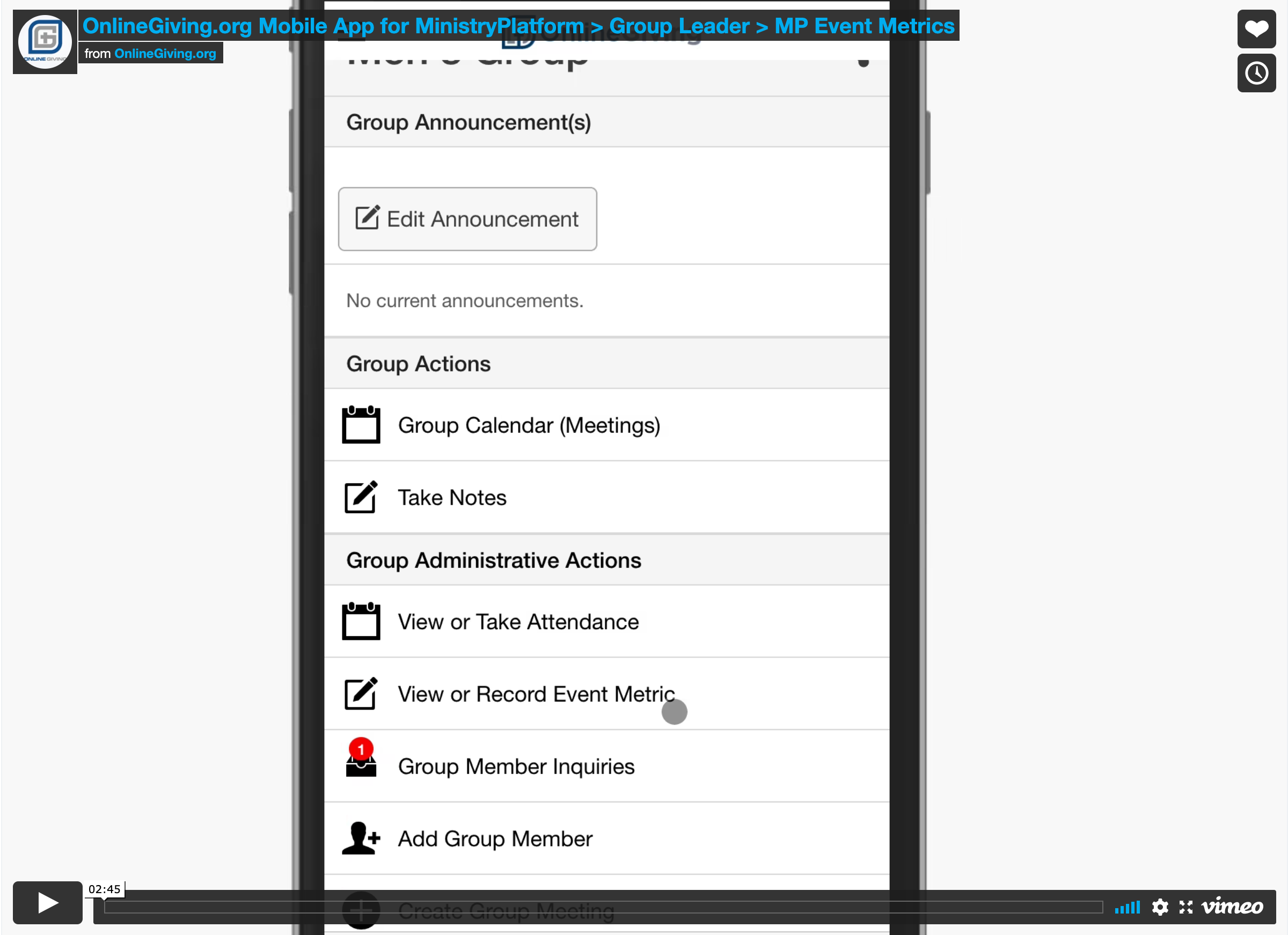
We're pleased to report an update is now live that enhances the OnlineGiving.org mobile application for MinistryPlatform to allow group leaders to view and record event metrics. The feature is only visible and accessible to group leaders using the My Groups feature for the mobile app. The new feature aims to allow group leaders to view and record group meeting event metrics.
Short screencast video walking through new Group Leader Event Metrics Feature:
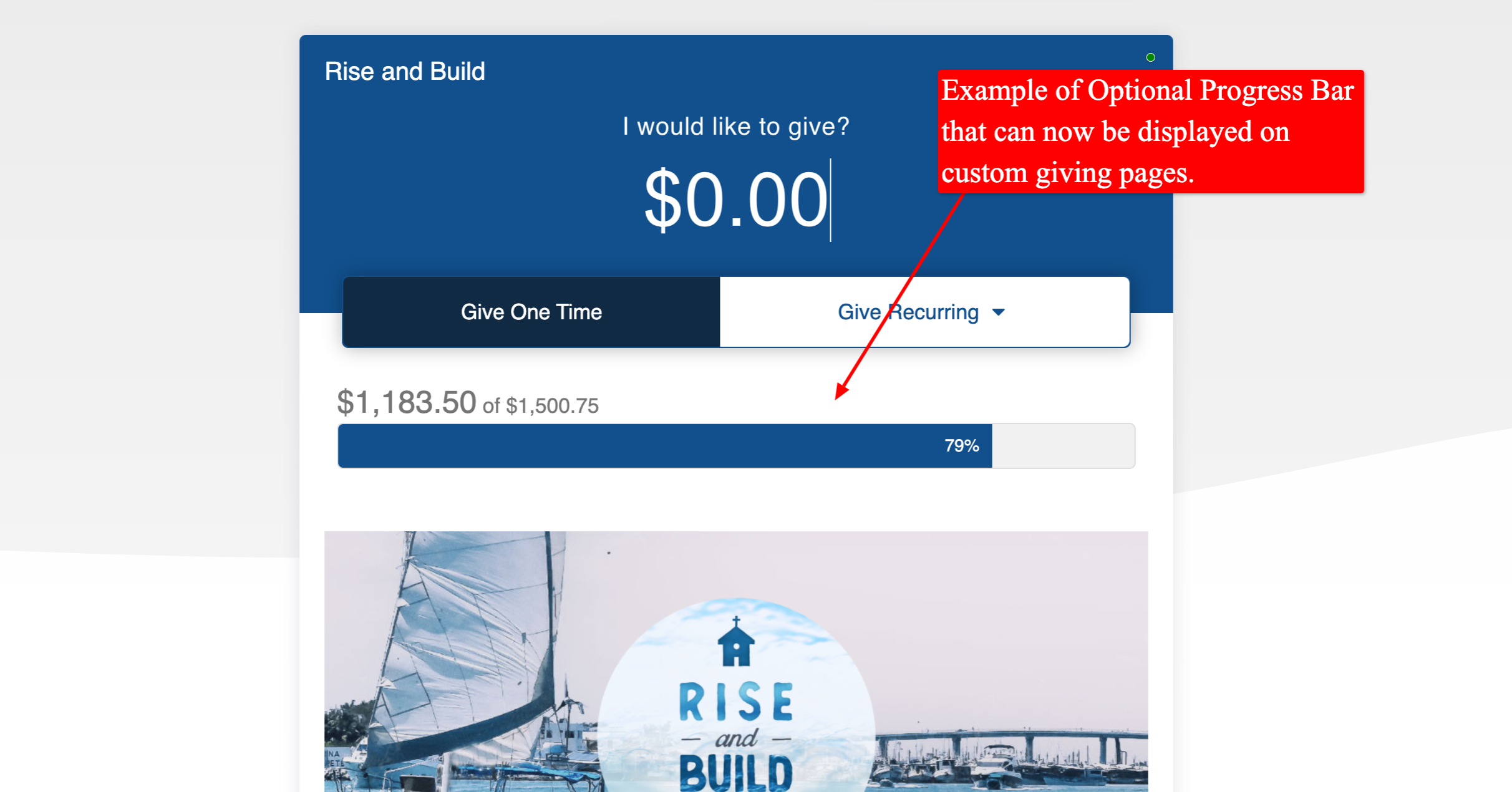
*New* OnlineGiving.org > Custom Giving Page > Optional Campaign Total Progress Bar
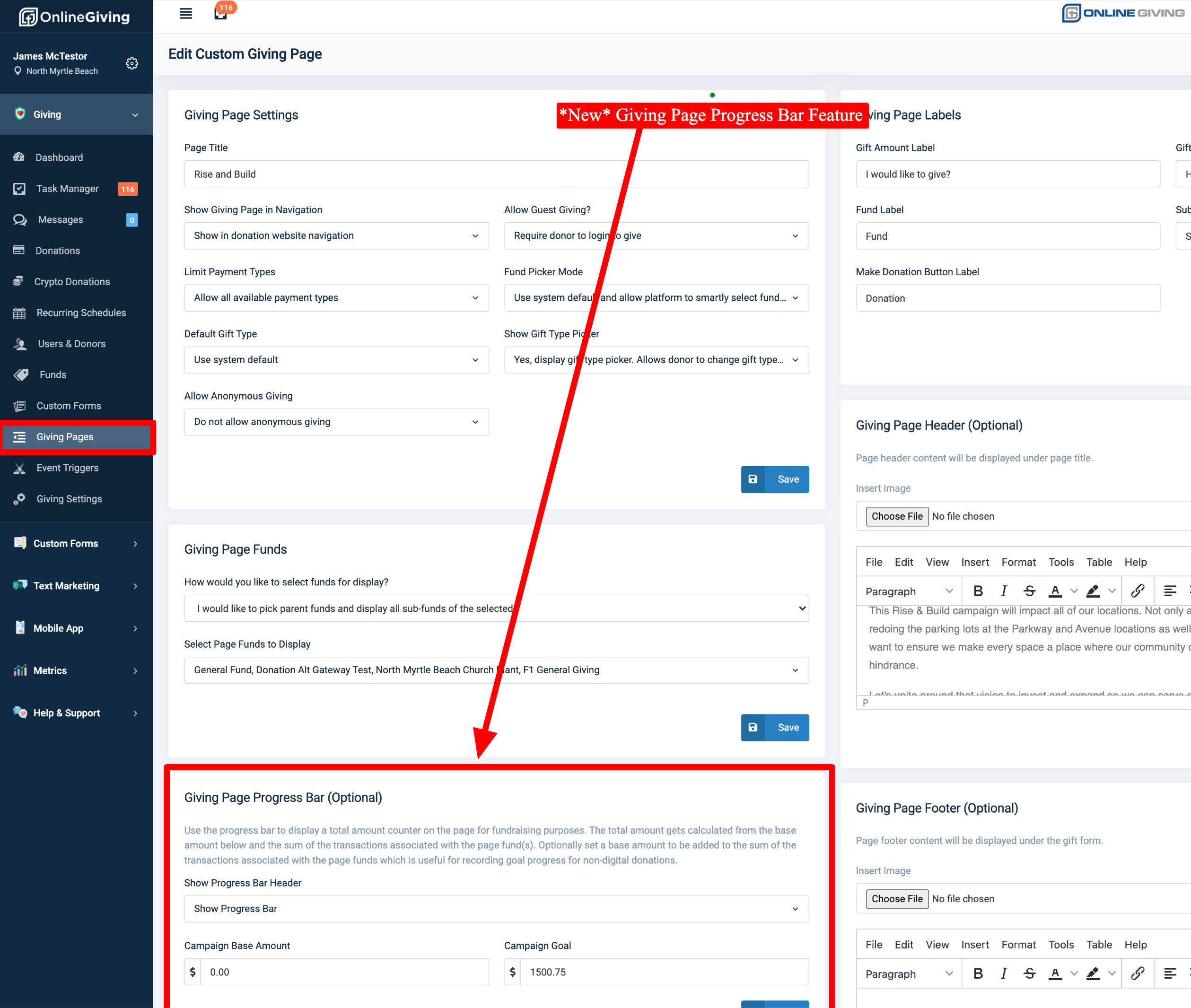
We're pleased to announce a new feature is now available to optionally display a campaign total progress bar on custom giving pages. The new feature allows a church administrator to optionally enable the progress bar that updates automatically as contributions are completed to the funds associated with the custom giving page. Additionally, a church administrator may set a "base amount" added to the total to account for any non-digital giving.
Preview of New Giving Page Campaign Total Progress Bar
Preview of New Custom Giving Page Progress Bar Feature in Control Panel