Feature Updates 08/07/2025
New Feature: Control Whether a Fund Allows Recurring Donations on the Primary Donation Form
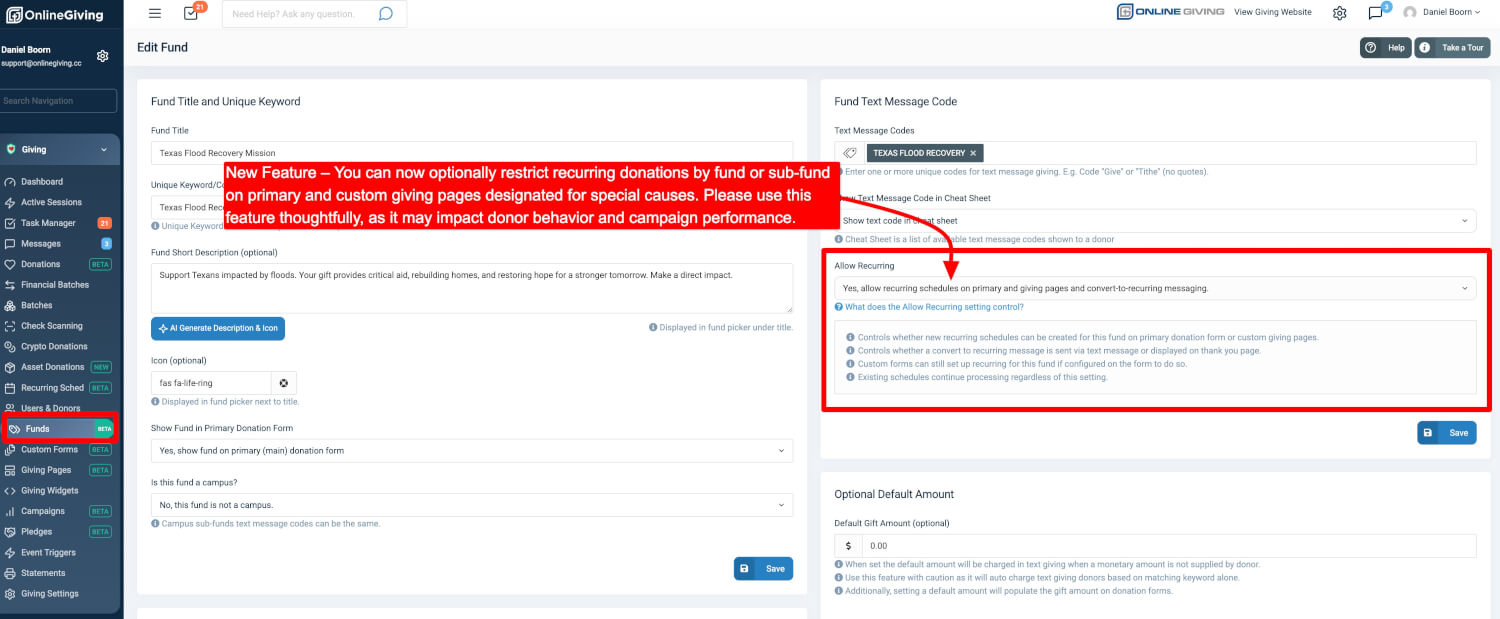
You can now turn off recurring donations for specific funds or sub-funds on your primary donation form.
This gives you more control over how donors give to time-sensitive or one-time-use campaigns — while keeping recurring giving enabled for everything else.
You can now include one-time-only funds directly on your main donation form, without needing a custom giving page or custom form.
To use this feature, go to your Control Panel, then navigate to:
Giving → Funds → Edit Fund → “Allow Recurring” setting
This is a power-user feature and should be used with careful consideration. We strongly recommend keeping recurring enabled unless you are certain that a fund should only receive one-time gifts.
When to Use This Feature
This feature is intended for specific use cases where recurring giving does not make sense or may cause confusion.
Examples include:
-
Disaster Relief or Emergency Campaigns
One-time support for a specific event (such as hurricane or wildfire relief) where ongoing giving isn’t appropriate. -
Seasonal or Time-Bound Campaigns
Events with fixed start and end dates like Easter offerings, VBS, or back-to-school drives. -
One-Time Project Funds
Fundraisers for mission trips, renovations, or equipment purchases that don’t need ongoing support. -
Legacy or Closing Funds
Older funds being retired where new recurring donations are no longer desired.
This feature does not replace the powerful flexibility of a custom giving page or custom form.
Be sure to consider whether your unique use case would be better served by creating a dedicated giving page or a fully customized donation experience.
In these situations, disabling recurring giving helps ensure donors do not unintentionally set up ongoing gifts where they are not applicable.
Why Recurring Giving Should Stay Enabled (In Most Cases)
Recurring giving is the default and preferred behavior on OnlineGiving.org — and for good reason. It helps your organization:
-
Build sustainable, long-term donor support
-
Increase total giving over time
-
Improve donor retention
-
Simplify budgeting and forecasting
By default, all funds allow recurring gifts, and we recommend keeping it that way unless there is a clear reason to restrict it.
What Donors Will See
If a donor selects a fund that does not allow recurring gifts:
-
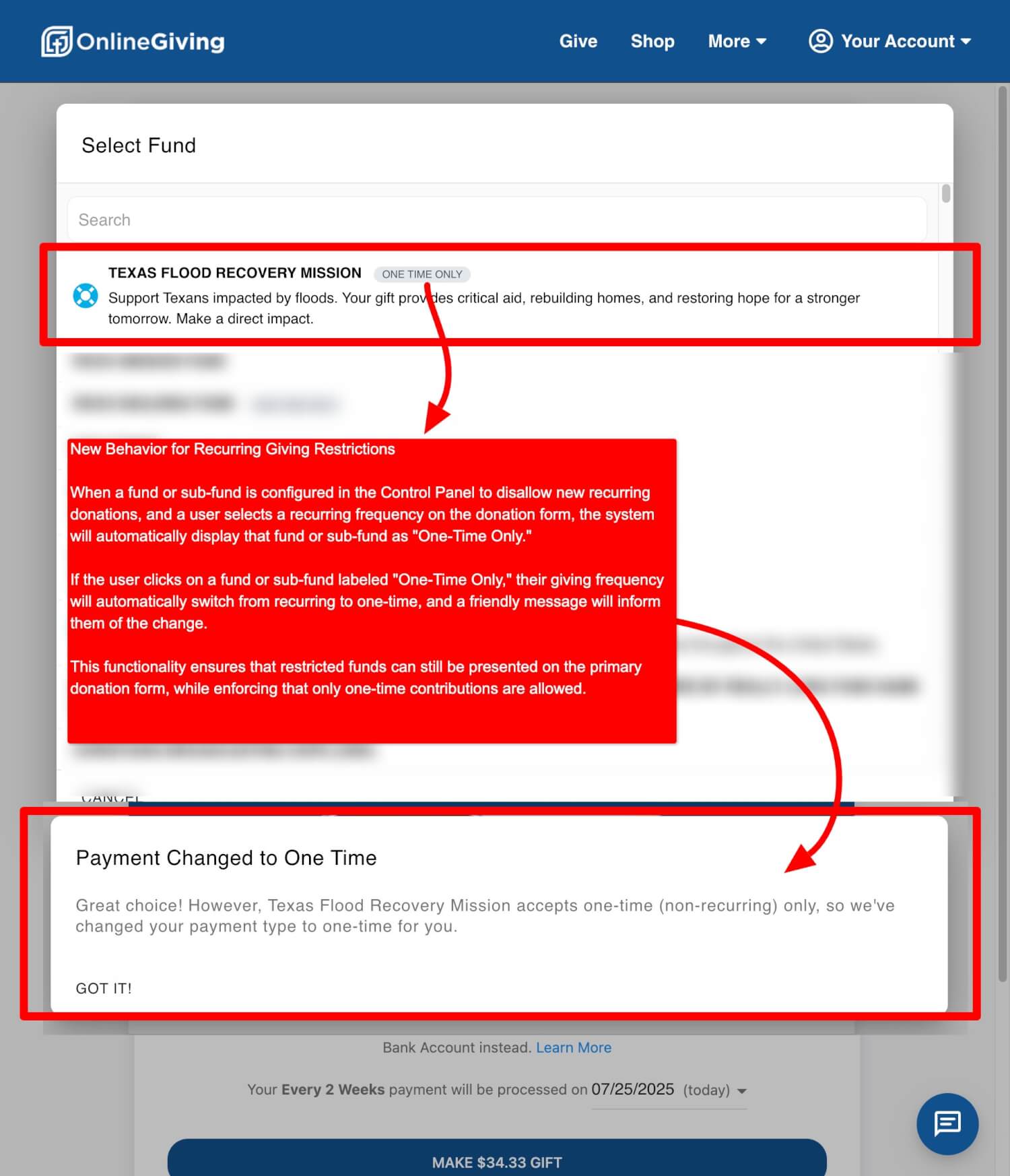
The fund will be labeled “One-Time Only” in the donation form.
-
If the donor has already selected a recurring frequency, the system will:
-
Automatically switch their gift type to one-time
-
Show a message that explains the change:
Payment Changed to One Time
“Great choice! However, [Fund Name] accepts one-time (non-recurring) only, so we've changed your payment type to one-time for you.”
-
This ensures clarity and prevents confusion.
How to Turn Off Recurring for a Fund
To update a fund:
-
Log into your Control Panel
-
Go to Giving > Funds
-
Click Edit on the fund or sub-fund you want to manage
-
Locate the Allow Recurring setting
-
Set it to “off” to disable recurring giving for that fund
This setting affects the primary donation form and custom giving pages.
Note: Existing recurring donations will continue as scheduled. This setting only applies to new gifts going forward.
In Summary
-
What’s New: You can now disable recurring giving on a fund-by-fund basis directly on the primary donation form.
-
When to Use It: Only for specific, time-bound, or one-time campaigns where recurring giving would be inappropriate.
-
Consider Custom Pages: This feature does not replace custom giving pages or forms — use those when a dedicated experience is needed.
-
How It Works: Donors are guided automatically, and the form adjusts if recurring is not supported.
-
Where to Find It: Control Panel → Giving → Funds → Edit → Allow Recurring.
-
Default Behavior: Recurring giving remains enabled unless manually turned off.
If you’re unsure whether this feature is right for a particular fund, we’re happy to help you think it through. As always, thank you for trusting OnlineGiving.org to power your mission.