Feature Updates 08/28/2020
Text Marketing > New Special Character Detection and SMS Message Segment Detection and Previewing
We are pleased to report an update is now live that enhances the character count and segment warning feature for the Text Marketing Auto Responders and Text Marketing Send Mass Text Message features located in the Online Giving control panel. The enhancement upgrades the message counter and segment detector with the ability to detect the likely encoding the cell phone carrier will use for sending out the SMS message.
When drafting an SMS message it's important to pay special attention to both the message length and type of characters being used. The standard encoding used by cell phone carriers is GSM which supports up to 160 characters per message. However, did you know? GSM does not support all keyboard characters. When special characters not supported by GSM are present in the message the carrier must send out the SMS with a USC2 encoding which downgrades the max length per segment from 160 (with GSM) to 70 characters (USC2).
It can be hard sometimes to be aware of special characters not supported by GSM. An example of this is the "—" character which is commonly used. Church administrators inadvertently using a special character (such as "—") could downgrade the entire message to USC2 encoding which would increase the overall sending cost as additional message segments would be required.
Almost all modern cell phones will automatically display segmented messages as a single message. However, the issue is church administrators inadvertently increasing outbound messaging costs by not being aware they are using special characters.
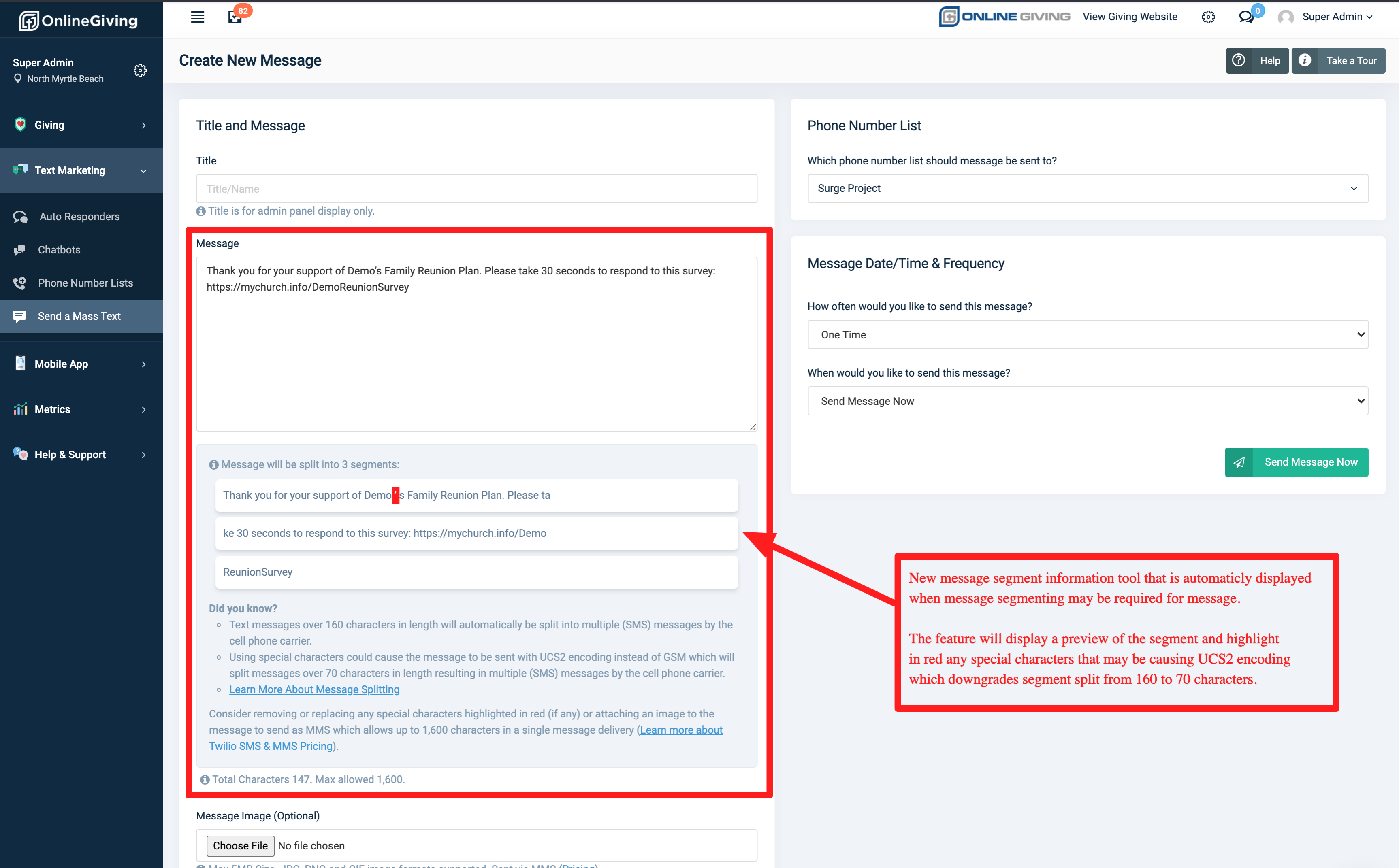
Prior to the update, a friendly message was displayed indicating that message segments may be required along with a message character count. We've upgraded the platform with the ability now to detect special characters and to highlight those in red. Additionally, we've enhanced the segment detection to know when GSM vs USC2 is required and to display a preview of how your messages will be segmented (split). The goal of the upgrades is to provide a clear and simple preview of how the message will most likely be processed by the upstream carrier.
Preview of Detection of Special Character:
Preview of Normal Message Segment with NO Special Characters: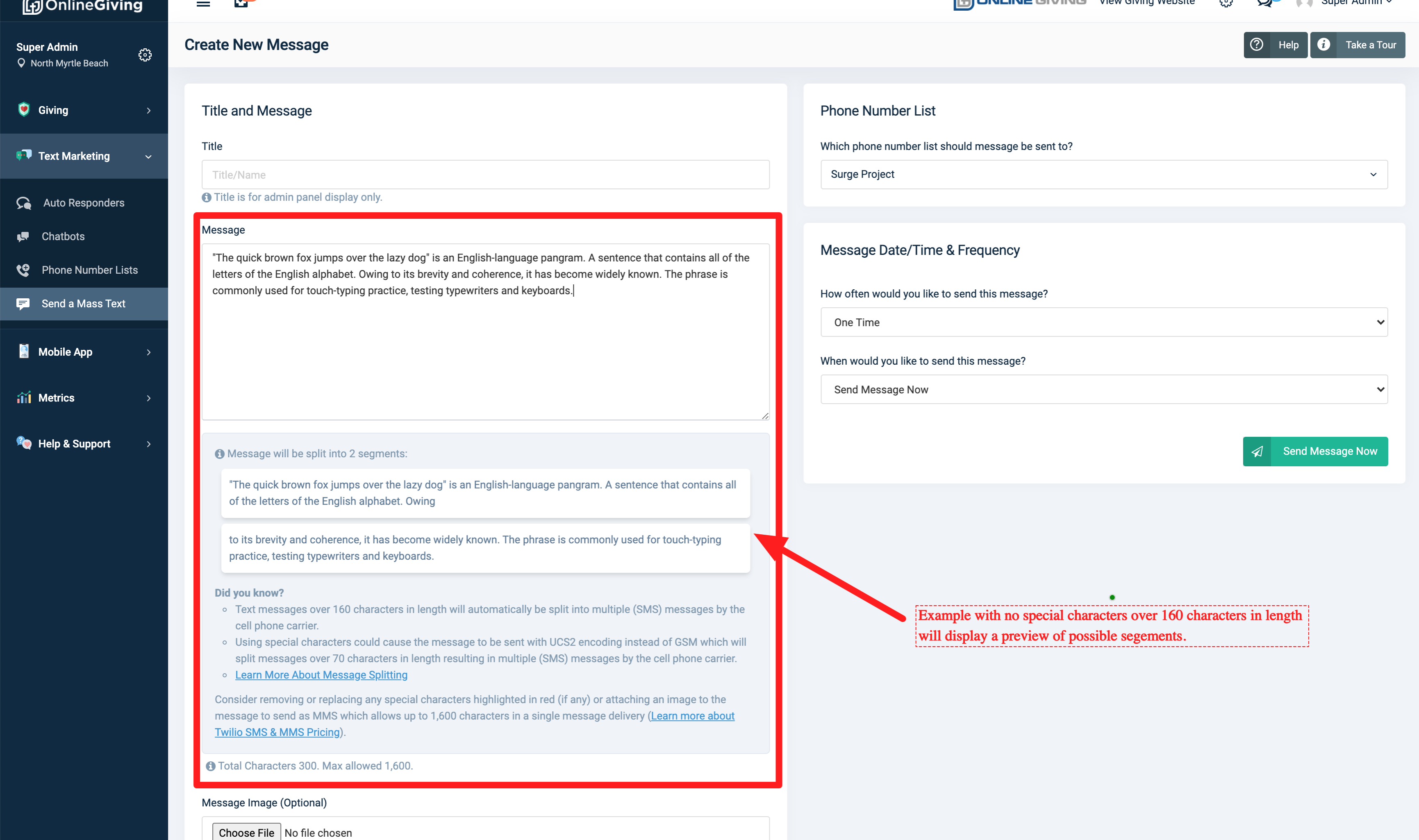
Optional Feature - MinistryPlatform Record ACH Rejected Refund with Original Donation Date/Time
We're pleased to report an optional feature update is now available for MinistryPlatform churches that adjust ACH Rejected refund donation recording into MinistryPlatform to have the date/time of the original donation. When the feature is enabled and an ACH Failed (Rejected) transaction is found or reported, Online Giving will then use the original donation date/time (plus 1 min) to record the refund (offset) donation (and distribution) record into MinistryPlatform. It's important to note that by default, Online Giving will record the refund (offset) donations into MinistryPlatform using the refund date/time as this is typically desired for deposit matching. However, based on feedback we found that a use case exists in which it can be more desirable to use the original donation date/time (plus 1 min to allow it to show lower in the list) for audit purposes. The feature is free to use for any MinistryPlatform church. Please feel free to reach out to support@onlinegiving.org should your church desire to enable the feature.