Feature Updates 10/17/2022
We're pleased to announce that "The 2022 #GivingTuesday Playbook" is now available in the OnlineGiving.org Knowledgebase under Stewardship Guides. Explore the #GivingTuesday guide that gives your stewardship team a playbook on how to use #GivingTuesday as a springboard to building your church’s generosity culture. Available free of charge to all OnlineGiving.org customers. Read "The 2022 #GivingTuesday Playbook" today in the OnlineGiving.org Control Panel > Knowledgebase Stewardship Guides section.
NEW Ability to Configure the OnlineGiving.org > My Invoices Page to Filter by List of Congregation IDs Globally
An optional feature is now live for MinistryPlatform churches using the OnlineGiving.org My Invoices feature. It's now possible for OnlineGiving.org support to configure a list of MP Congregation IDs that should be used to filter invoices that are displayed on the OnlineGiving.org My Invoices page.
The feature aims to allow regional-based multi-campus churches with multiple OnlineGiving.org giving websites to configure a website to only display MP Invoices from that congregation or MP Invoices with no congregation configured. Once enabled, the feature will filter the household MP Invoices for the signed-in user to display only invoices matching the configured MP Congregation IDs or invoices with no (blank) congregation.
Additionally, churches with secondary OnlineGiving.org accounts configured to a particular ministry with a different bank account may also find this helpful feature to prevent invoice payments on secondary OnlineGiving.org accounts under the secondary merchant processing account.
Kindly note this feature is disabled by default. To take advantage of this new optional feature, please reach out to support@onlinegiving.org.
NEW OnlineGiving.org Control Panel > Administrator Transaction Changes Now Tracked in "Change History" Section
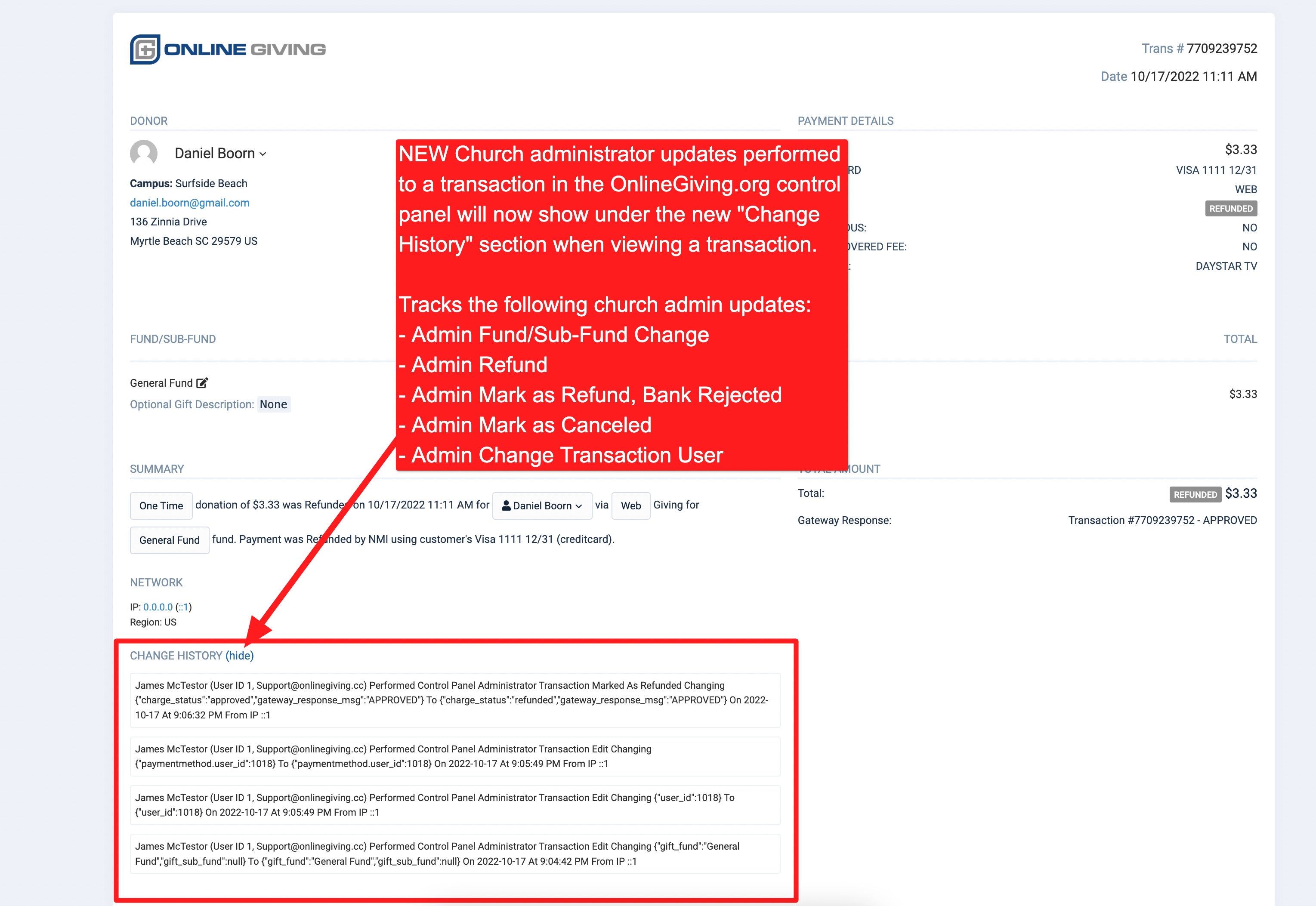
We're pleased to announce the new "Change History" section now displayed when viewing a transaction changed by a church administrator in the OnlineGiving.org control panel. Moving forward, in the event a church administrator updates a transaction the changes will be displayed under a new section called "Change History," which includes who performed the update and the old and new field values. Please note that if no changes are present, the "Change History" section is not displayed to save space.
NEW Church Donation Administrators May Now Change the Donor Associated with a Transaction in the OnlineGiving.org Control Panel
We're pleased to announce church donation administrators may now update a transaction in the OnlineGiving.org control panel to change the associated donor. To change a donor/user associated with a transaction, click on the displayed user and then select the "Change Donor" dropdown menu option. Our advanced search for donor feature will then be displayed, allowing a church administrator to locate the desired user by last name, or "last name, first name" or email or phone number. Simply select the desired new user from the search results and click the "Change User" button to save your changes. The feature is designed to update the associated user on the transaction and migrate the payment method and recurring schedule to the selected user. All changes performed by church administrators using this new powerful tool are tracked with our new transaction administrator change history feature.
