Feature Updates 11/05/2024
New Enhancements in Check Scanning Memo Line Detection
Responding to valuable user feedback, we have refined the memo detection functionality within the OnlineGiving.org Vision AI for check scanning. Previously, memo line detection focused solely on the lower left quadrant of a check. However, with recent updates to handle the diverse formatting found in bill pay checks, we expanded detection to include other possible memo line locations, such as the top left and center top areas. Unfortunately, this broader detection was overly sensitive, sometimes capturing extraneous details, which impacted the feature’s utility.
Today’s update recalibrates the sensitivity for memo line detection to be more precise, still scanning the lower left, top left, and top center areas, but with improved filtering. This stricter setting ensures only essential memo details are captured, prioritizing accuracy over excess information. In cases where routing or account numbers are near the memo line, the AI will now discard these as memo content, leaving the field blank for clarity.
This adjustment aims to deliver a more reliable memo capture that accommodates both bill pay and handwritten checks, minimizing errors without sacrificing memo line flexibility. While OCR and Vision AI have limitations, we are committed to continuous improvements based on real-world use cases and user feedback.
Enhanced Gift Description Handling in Task Manager
We’ve made it easier for church administrators to manage notifications by excluding certain entries from the Task Manager. Any transaction with a gift description from a scanned check memo, quick entry paper check, or cash donation entry will no longer generate a Task Manager alert, as administrators are typically already aware of these details.
Duplicate Check Detection for Batch Submissions
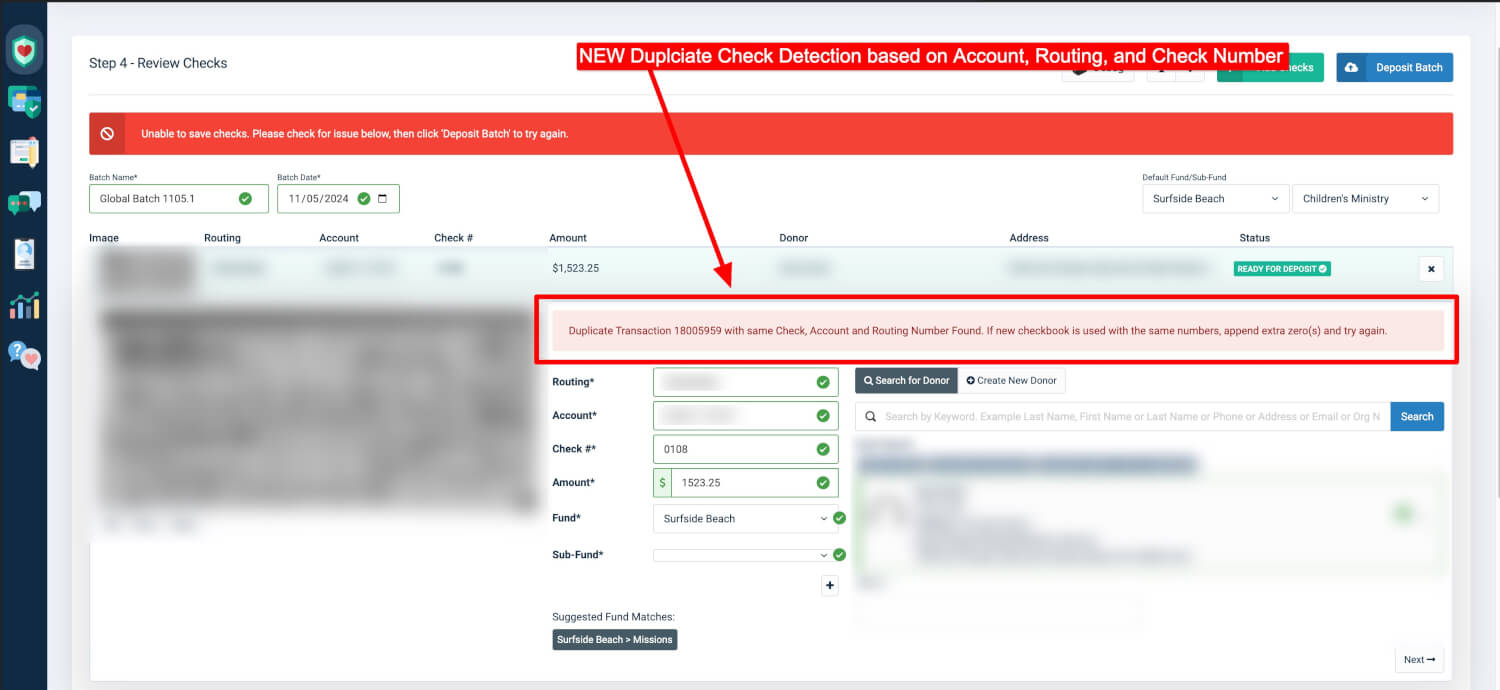
To further streamline check processing, we have introduced a duplicate check detection feature during batch submission. Now, when an administrator submits a scanned check batch, the system will automatically search for previously approved checks with the same account, routing, and check numbers. If a potential duplicate is identified, the administrator will receive a friendly notification, complete with the duplicate transaction ID for easy review.
This addition aims to preemptively address duplicate flags from upstream Check 21 gateways, helping to mitigate issues arising from reused check numbers in new checkbooks. The new detection allows administrators to verify and adjust check numbers if necessary, ensuring a smoother submission process.