Feature Updates 11/06/2023
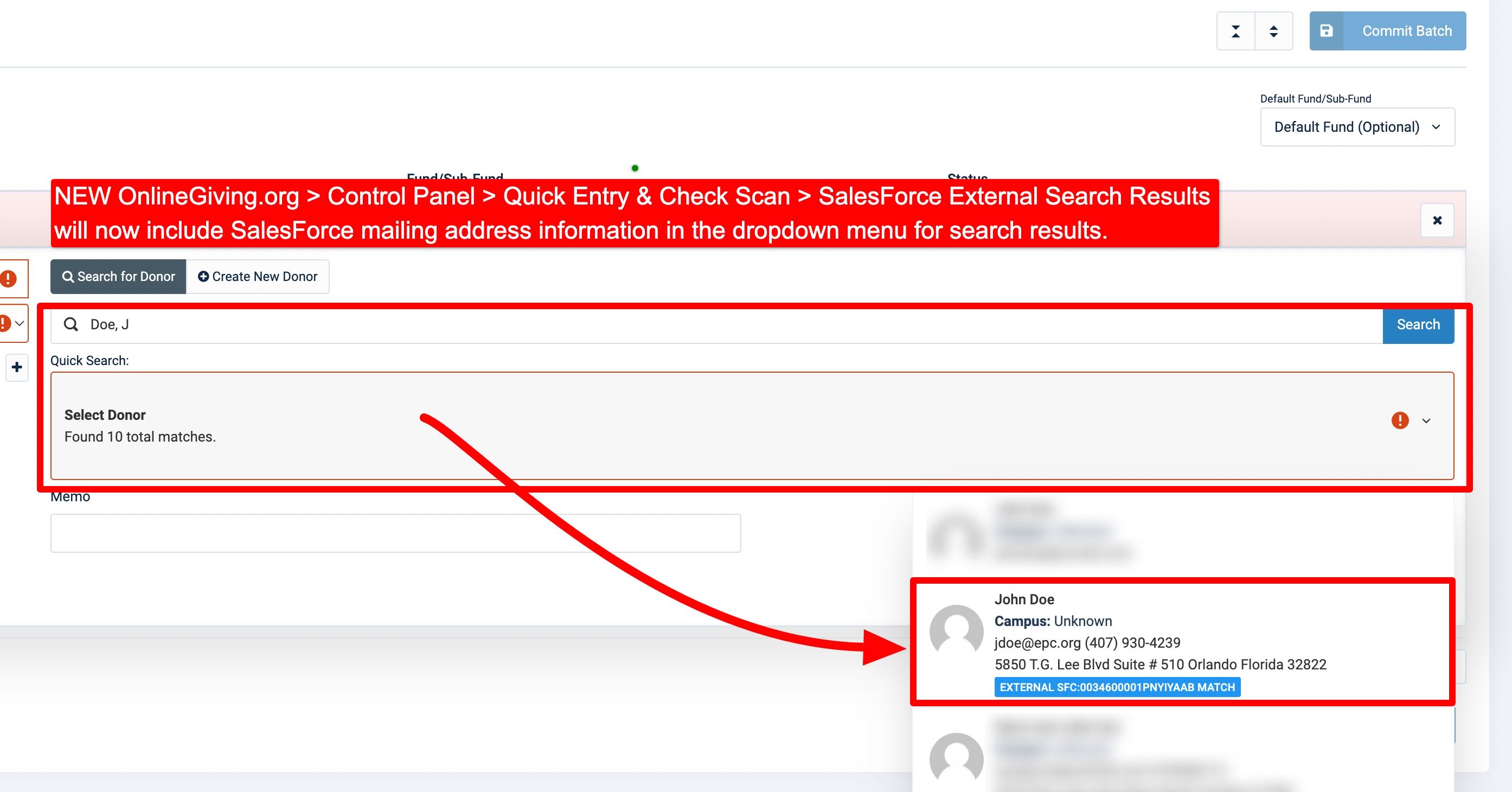
NEW OnlineGiving.org > Control Panel > QuickEntry & Scanned Check > SalesForce Donor Search Results Now Include Mailing Address
We're pleased to announce an update is now live to the OnlineGiving.org Control Panel > QuickEntry & Scanned Check > Search Donors > SalesForce External Search now displays the SalesForce match mailing address in the donor search results dropdown menu. The update aims to assist OnlineGiving.org SalesForce churches using the SalesForce Non-Profit Service Pack to locate external SalesForce visually matches with mail address information when working with the OnlineGiving.org QuickEntry and OnlineGiving.org Scanned Check features and duplicates or similar marches are present in the external system.
Pro Tip: SalesForce churches may also search by street address in the search input.
NEW OnlineGiving.org > Control Panel > Financial Batches > ShelbyNext Deposit CSV Export & ShelbyNext Funds/Sub-Funds Fields
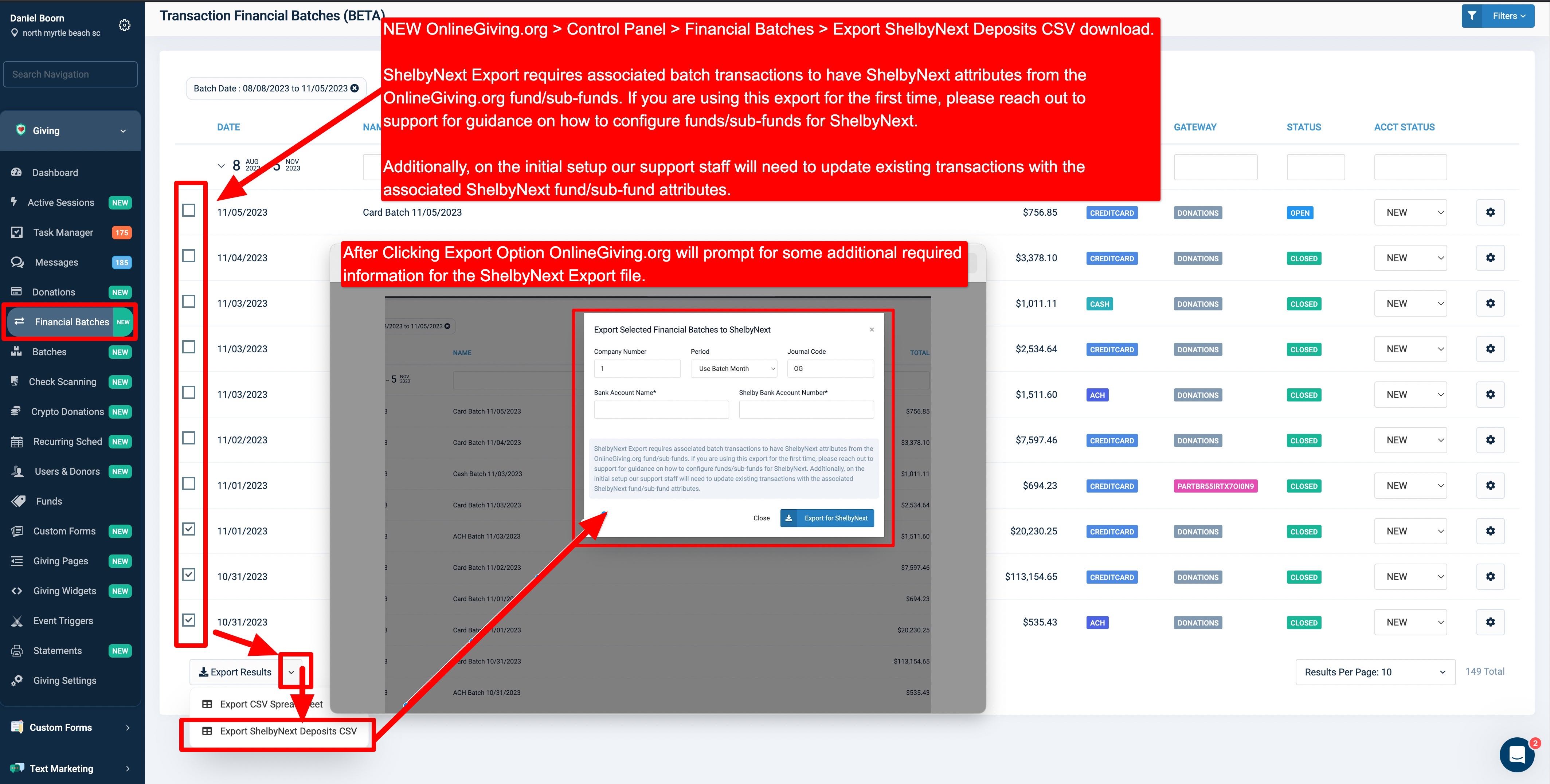
We're pleased to announce an update is now live to the OnlineGiving.org Control Panel > Financial Batches & Funds features to add support for exporting ShelbyNext Deposit CSV reports for importing into ShelbyNext for accounting purposes. Moving forward, when editing any OnlineGiving.org fund/sub-fund, a new set of optional fields/inputs are displayed for ShelbyNext churches to take advantage of, including Fund Number, Department Number, Account Number, and Account Sub. These new OnlineGiving.org fund/sub-fund ShelbyNext fields are included with new transactions, which are then used by the new ShelbyNext Deposit CSV Export feature.
Please note any OnlineGiving.org ShelbyNext church looking to take advantage of this new feature will want to edit their existing OnlineGiving.org funds/sub-funds and add the ShelbyNext fields. A zero value or blank value may be used for any ShelbyNext field that is not desired by the church when editing the fund/sub-fund. Then, once the funds/sub-funds have been updated, please reach out to support@onlinegiving.org so we may have our database administrator run a query to copy the new ShelbyNext fund/sub-fund information into existing transactions so that the church may take advantage of the new feature for exporting Financial Batches prior to the feature release date.
The new OnlineGiving.org > Control Panel > Financial Batch > ShelbyNext Deposit Export feature is located on the OnlineGiving.org Control Panel > Financial Batch page and allows church administrators to filter and select one or more Financial Batches using the new table row checkboxes and then click the Export Button > Export ShelbyNext Deposit option. Doing so will then display a modal of the additional required information, which can be different for each export that allows the church to enter the desired ShelbyNext Company Number, Period, Journal Code, Bank Account Name, and Shelby Bank Account Number for inclusion with the special deposit export spreadsheet. Please note a special feature exists for the Period options, which allows the ShelbyNext period to be set based on the month of the Financial Batch. e.g., for calendar year period accounting. Otherwise, for custom period reporting, the desired period can be selected.
Related Note - The existing OnlineGiving.org > Donations > Export to ShelbyNext feature was not affected by this update. It remains with its existing design, which uses the OnlineGiving.org Fund/Sub-Fund External ID field for the Donation Report. In the future, depending on church feedback. We may migrate the ShelbyNext Donations Export to take advantage of the new ShelbyNext Fund Number dedicated field (if desirable by ShelbyNext churches). However, as it stands, the existing design for the Donation ShelbyNext export works without any modifications being required. The new ShelbyNext fields are currently designed for the OnlineGiving.org Financial Batches Deposit export purposes.

NEW OnlineGiving.org > Control Panel > Financial Batches > Accounting Status Field
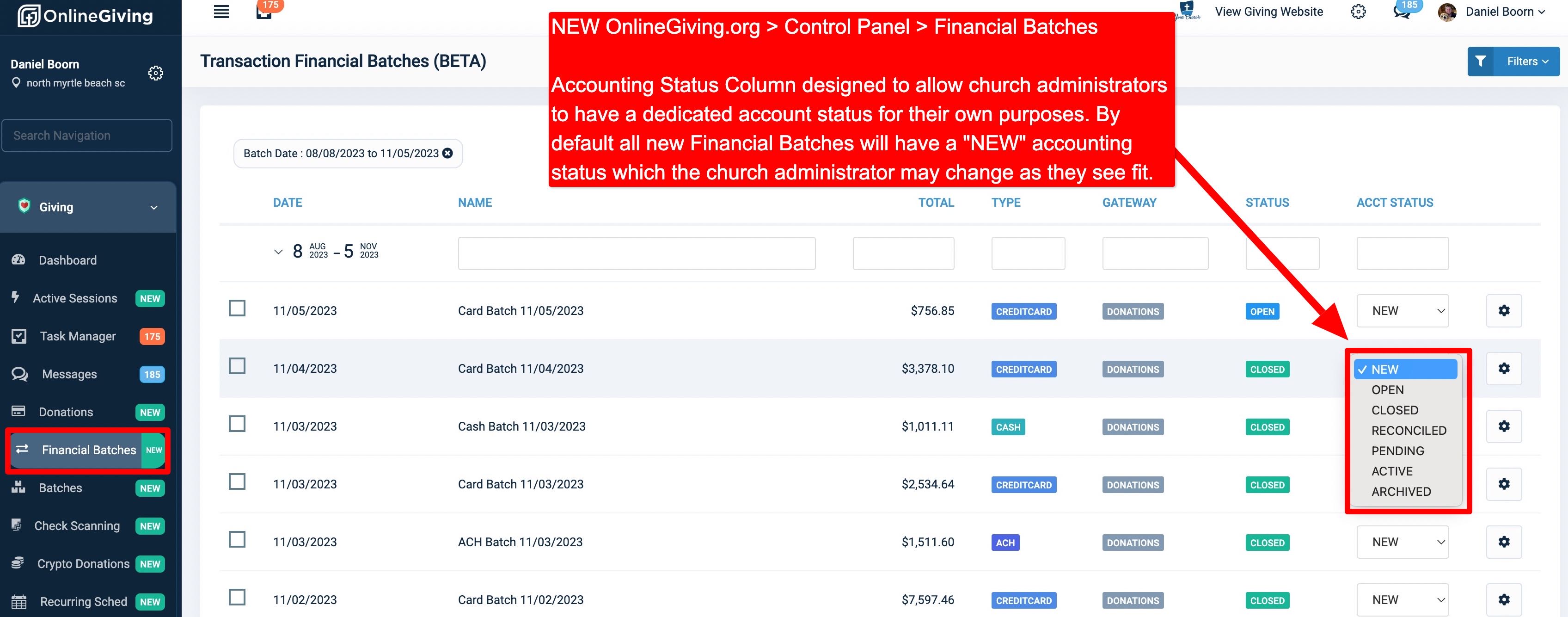
We're pleased to announce an update is now live to the OnlineGiving.org Control Panel > Financial Batches feature, which adds a new field named "Accounting Status." The update aims to provide church administrators with a dedicated accounting status field that they can adjust on a per-batch basis to match their own internal batch status. Please note the new "Accounting Status" feature is different from the default Financial Batch Status feature as the default Status is a system field managed directly by OnlineGiving.org. By default, a Financial Batch will remain open until after 2 days to allow time for transaction changes before OnlineGiving.org closes the batch. Only closed batches should be used for accounting purposes. Moving forward, all new Financial Batches will have a default Accounting Status of "NEW," allowing the church administrator to adjust the status as they see fit to match their own processes.
NEW OnlineGiving.org > Mobile App > StudioC Public Key Analytical Tracking
We're pleased to announce an update is now live to the OnlineGiving.org mobile app for StudioC churches in anticipation of the upcoming StudioC support of analytic public key tracking support. Please note at the time of this feature release, StudioC is still in development on dedicated analytic public key support. Once StudioC releases official support, OnlineGiving.org StudioC mobile app churches may supply OnlineGiving.org support with the StudioC analytics public key to enable the feature. Once enabled, the OnlineGiving.org mobile app will record analytical tracking events for recording message views, message clicks, badge clicks, badge call-to-action clicks, and more.