Feature Updates 11/13/2020
MinistryPlatform App/Widget Event Calendar Updated to Honor the MP Events Force Login Field
An update is now live to MinistryPlatform churches using the OnlineGiving.org mobile application or website widgets. We've updated the MP event calendar to honor the "Force_Login" field for events. If the MP event is configured with "Force_Login" = False, the software will now enable guest mode for the event registration and not require a login.
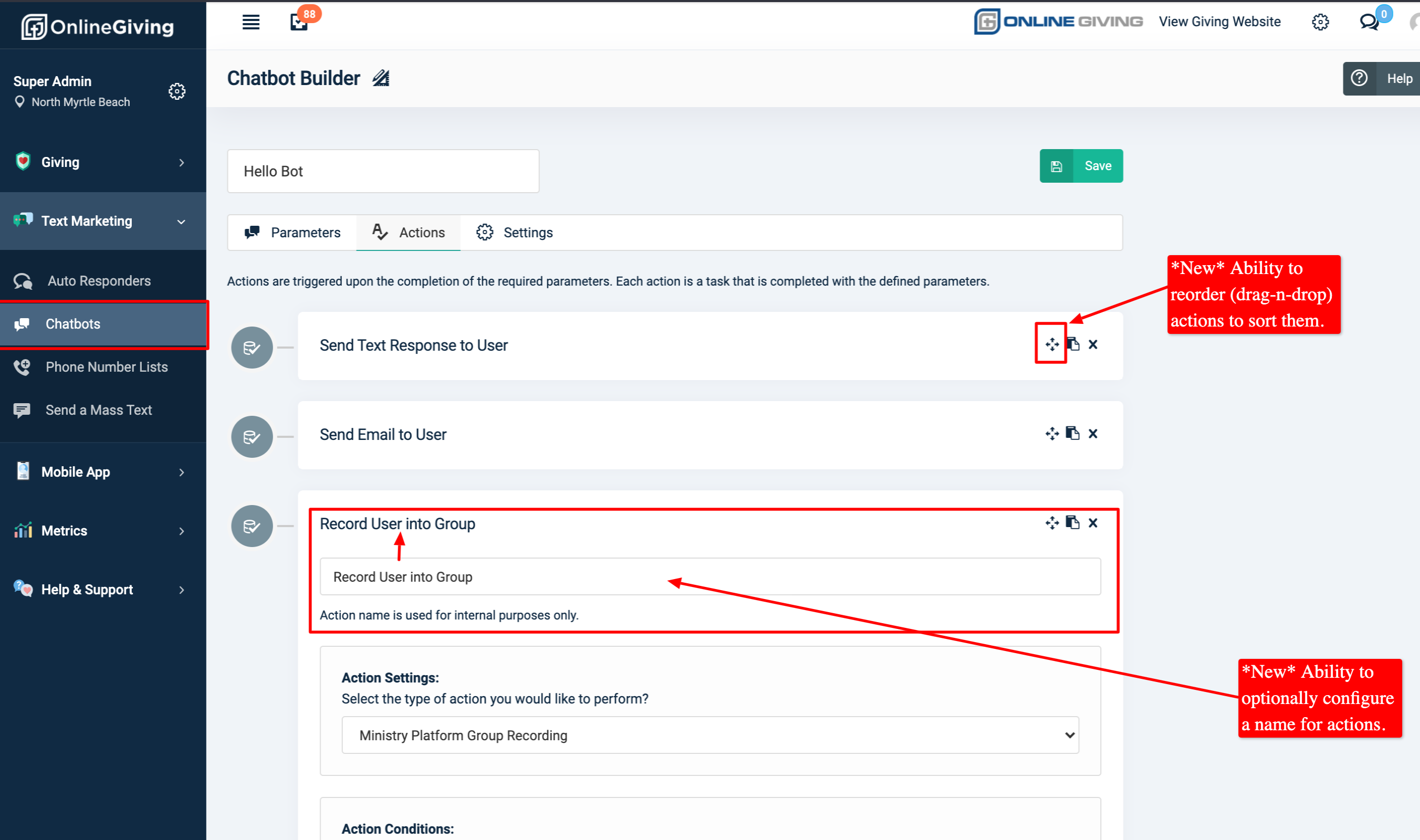
Chatbot Builder Enhanced with Ability to Name and Sort Actions
We're pleased to announce an update is now live that enhances the Chatbot Builder located in the Online Giving Control Panel with the ability to name and sort Actions. The goal of the update is to allow church administrators to apply custom names to Actions and to order them as they see fit for internal organization purposes. For your convenience, we've included a screenshot below previewing the updates -
Preview of the Actions Name and Sort Feature
Mobile Application Rich Text Component Enhanced with More Text Markup Options:
We're pleased to report an update is now live that enhances the Mobile App Rich Text component in the Online Giving Control Panel > Mobile App > App Designer with a new feature-rich TinyMCE editor. The new TinyMCE editor allows a significant number of additional text markup options which will allow church administrators greater flexibility for displaying Rich Text in the mobile application. Additionally, we've enhanced the editor and mobile application to allow website linking from the rich-text components. We ask that church administrators be very careful what they copy/paste into custom HTML as the update allows great flexibility but also trust the administrator to not inadvertently inject any 3rd party JavaScript into the application.
Mobile Application Custom HTML Component Now Allows Style Attributes:
An update is now live for the Online Giving Control Panel > Mobile App > App Designer and Mobile Application that allows church administrators to apply custom style attributes using the Custom HTML component. Prior to the update, the style attribute was not allowed. With great freedom comes great responsibility. We ask that church administrators be very careful what they copy/paste into custom HTML as the update allows great flexibility but also trust the administrator to not inadvertently inject any 3rd party JavaScript into the application.
App Designer > New Latest Series Component
We're pleased to announce an update is now live to the App Designer that adds a new drag-n-drop component called "Latest Series". The "Latest Series" component is designed to be similar to the "Latest Message" component but will display the series image and link to the series message picker when clicked/tapped in the mobile application.
App Designer > YouTube XML Feed Support Added for RSS Links
We're pleased to report the App Designer RSS Feed link type option has been enhanced to support YouTube XML for both YouTube Channels and YouTube Playlists. Kindly see below for example links.
To display a YouTube Playlist in the RSS Links feature use the link structure below:
https://www.youtube.com/feeds/videos.xml?playlist_id=
Where:
- is the YouTube Playlist ID
- Example: https://www.youtube.com/feeds/videos.xml?playlist_id=PLZaWP5YZiLiV_JkHRZIvc2PW7HBaBW006
To display a YouTube Chanel in the RSS Links feature use the link structure below:
https://www.youtube.com/feeds/videos.xml?channel_id=
Where:
- is the YouTube Channel ID
- Please note if you have a named channel you can look up your Channel ID on this website.
- Example: https://www.youtube.com/feeds/videos.xml?channel_id=UCcqTIvnV7BaUIjl688qugyA
It's important to note -Mobile app users may need to close the open app on your device from the mobile device app switcher to view the latest changes. For iOS devices, swipe up and hold from the bottom of the screen to view app switcher (tasks manager), then swipe up on the open app to close, then open the app again to view the latest changes. For older iOS devices, double-tap the home button to view the app switcher. For Android devices, tap the navigation button, then swipe up on the open app to close, then open the app again to view the latest changes.