Feature Updates 11/14/2022
OnlineGiving.org MinistryPlatform Mobile App > Add Group Meeting > New Group Meeting Title Now Auto Populated
We're pleased to report an update is now live that enhances the OnlineGiving.org MinistryPlatform Mobile App > Add Group Meeting feature to automatically populate the new Group Meeting title with the group name. For example, if the group name were "Men's Group," the auto-populated new group meeting title would be "Men's Group Meeting." Mobile app group administrators may still overwrite and change the name as desired. The update's goal is a simple time-saving auto-population that helps keep standard group meeting naming conventions.
It's important to note that mobile app users may need to close the open app from the mobile device app switcher to view the latest changes. For iOS devices, swipe up and hold from the bottom of the screen to view the app switcher (tasks manager), then swipe up on the open app to close, then open the app again to view the latest changes. For older iOS devices, double-tap the home button to view the app switcher. For Android devices, tap the navigation button, swipe up on the open app to close, and then open the app to view the latest changes.
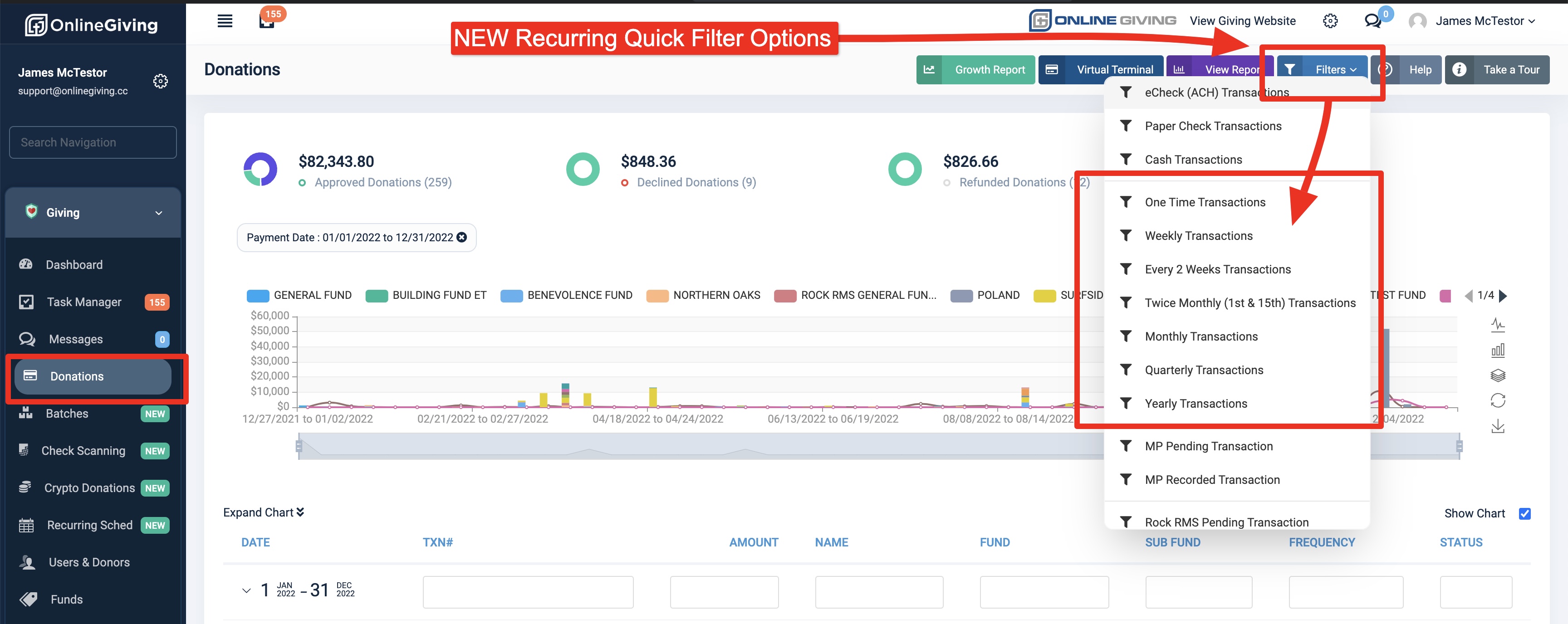
New Recurring Quick Filter Options in the OnlineGiving.org Control Panel > Donations (Transactions) > Quick Filters Dropdown Menu
We're pleased to report an update is now live for the OnlineGiving.org Control Panel > Donations (Transactions> Filters dropdown menu to allow a church administrator options to filter transactions by gift type (frequency) such as One Time, Weekly, Monthly, etc.