Feature Updates 11/26/2024
NEW OnlineGiving.org Enhanced Custom Form Management
We're excited to announce updates to the Manage Custom Forms index page, bringing powerful new tools to help you manage forms quickly and efficiently.
Key Enhancements
Inline Editing for Individual Updates
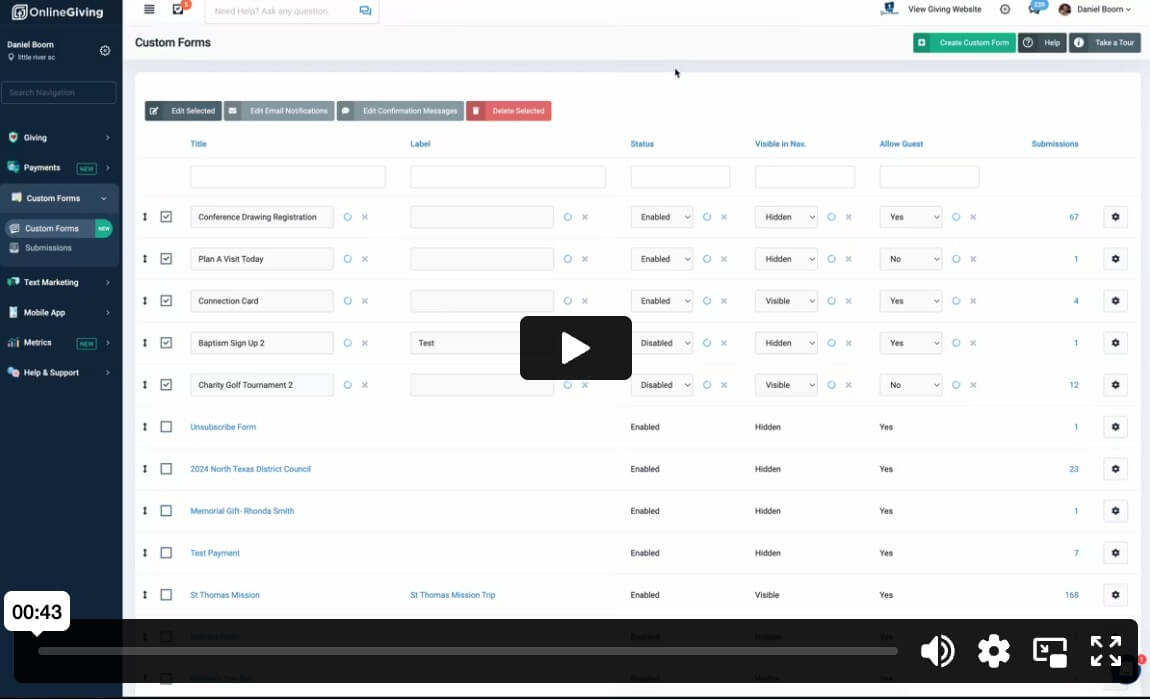
Hover over any column in the table to reveal an edit icon, allowing you to make quick, inline edits to fields like Edit Name, Edit Label, Disable, Disable on Date, Visible in Navigation, and Allow Guest—all without leaving the page.
Bulk Action Buttons for Multiple Forms
When 2 or more custom forms are selected using checkboxes, a set of buttons will appear, enabling you to:
- Bulk Edit in the Table: Update multiple form settings simultaneously.
- Bulk Edit Email Notifications: Make changes to email notifications for all selected forms in one step.
- Bulk Edit Confirmation Messages: Streamline updates to confirmation messages across selected forms.
- Bulk Delete Forms: Securely delete selected forms with an admin confirmation step for added safety.
These enhancements are designed for quick and efficient edits while keeping the full Edit Custom Form functionality available for advanced settings and options.
We’re here to help simplify your workflows and save you time, so you can focus on what matters most!