Feature Updates 12/01/2025
Rock RMS Integration Enhancement: Dedicated Financial Transaction Detail for Cover-the-Fee Amounts
OnlineGiving.org has released an enhancement to the Rock RMS integration that allows organizations to separately record the “cover-the-fee” portion of a donor’s gift as its own Financial Transaction Detail within Rock RMS.
Preview of Contribution with Cover-the-Fee Portion Recorded into Dedicated Rock RMS Account ID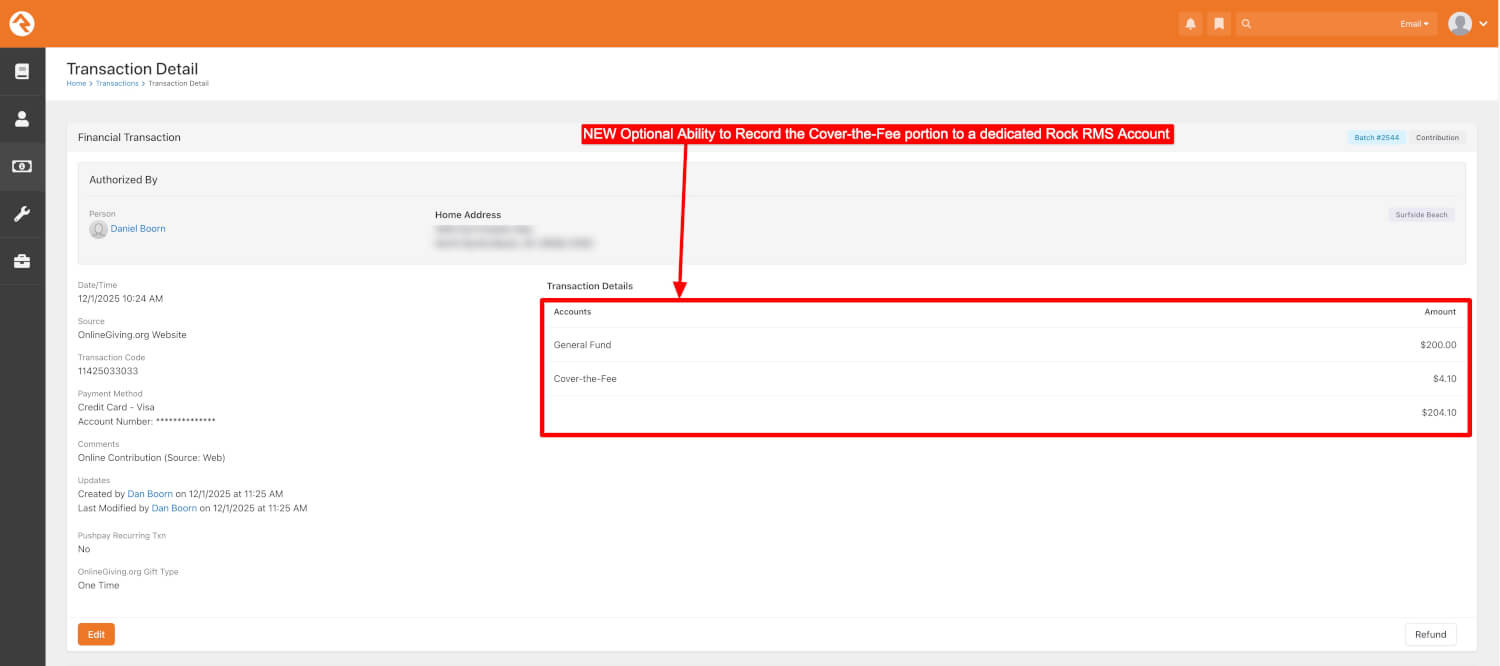
Overview
This update provides the ability to optionally:
-
Record the core donation amount as one Financial Transaction Detail.
-
Record the cover-the-fee amount as a second, separate Financial Transaction Detail.
-
Map the cover-the-fee portion to a dedicated Rock RMS Account ID defined in the OnlineGiving.org Control Panel.
This structure improves financial clarity, reporting accuracy, and reconciliation workflows.
What’s New
Optional Configuration Setting
A new Control Panel setting allows churches to:
- Store a dedicated Rock RMS Account ID to receive the cover-the-fee portion.
Disabled by default. To enable please email support@onlinegiving.org with the desired Rock RMS Account ID for Cover-the-Fee portion
How Rock RMS Transactions Are Created (when enabled)
When the feature is enabled and the donor elects to cover the fee:
-
A single Rock RMS Financial Transaction is created.
-
Two Financial Transaction Detail records are included:
-
One for the core donation amount, linked to the donor’s selected giving fund.
-
One for the cover-the-fee amount, linked to the dedicated Rock RMS Account ID.
-
This ensures the full donation total is represented while allowing the cover-the-fee portion to be tracked independently.
Updates to the Rock RMS Transaction Display (when enabled)
When viewing a transaction inside Rock RMS:
-
The core donation and the cover-the-fee portion appear as separate line items under Transaction Details.
-
Each line item displays its respective amount and associated account.
This provides clear visibility and auditing transparency.
Additional Notes
-
Once this feature is enabled, all future donations where donors choose to cover the fee will have the fee portion directed into the dedicated global Rock RMS cover-the-fee account for easy tracking.
-
Existing transactions prior to activation are not affected.
How to Enable This Feature
To have this option activated for your organization, please contact: support@onlinegiving.org