Feature Updates 12/02/2025
MinistryPlatform Contact Log Integration for Bulk Text Marketing
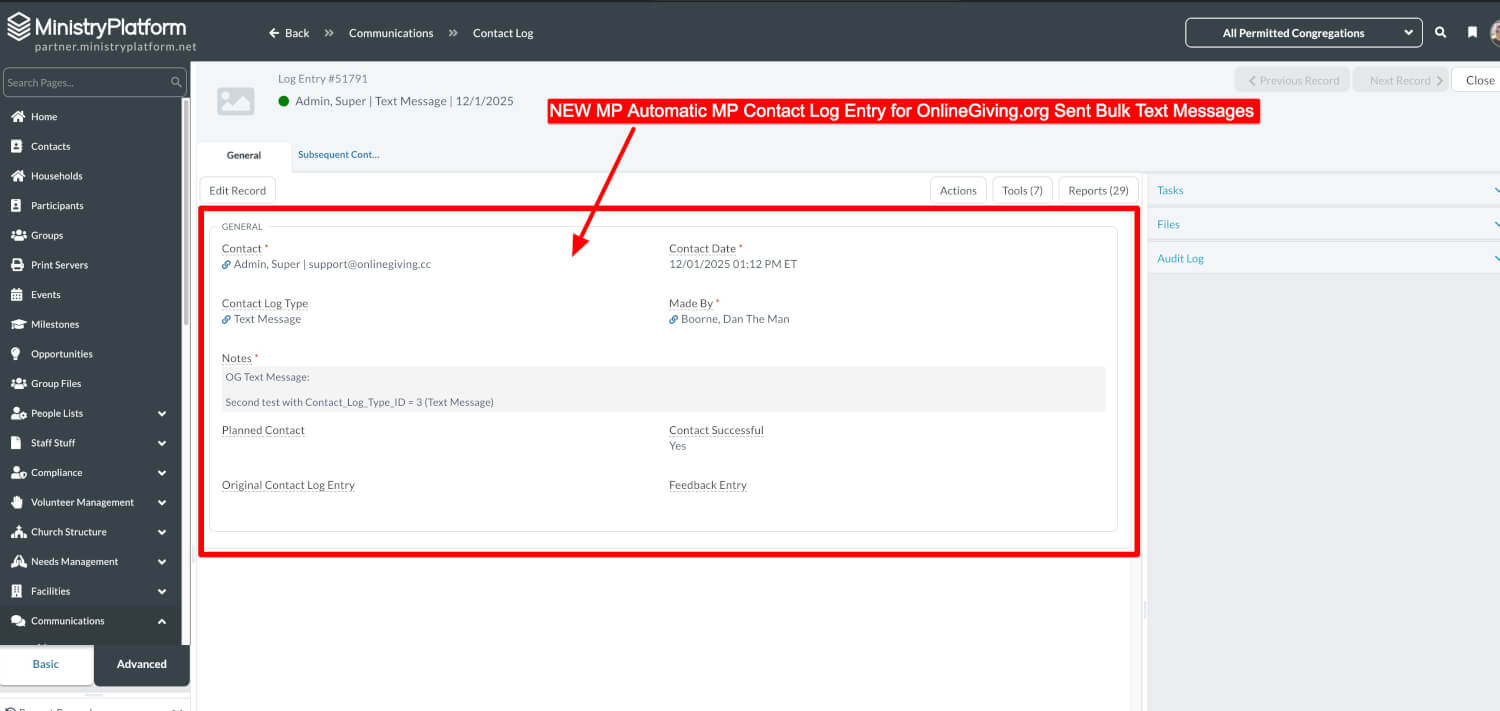
We’re excited to introduce automatic Contact Log recording in MinistryPlatform for all bulk text messages sent through OnlineGiving.org using phone lists linked to an MP Publication.
This enhancement ensures your staff can quickly see when a text message was sent to a member—right inside their MinistryPlatform Contact record. There is nothing to set up, and your existing workflow does not change.
Moving forward, any text campaign scheduled with a phone list synced from an MP Publication will automatically create Contact Log entries for matching MinistryPlatform Contacts.
What’s New
Automatic Contact Log Entries
Whenever you send a bulk text message using an MP Publication–synced phone list, OnlineGiving.org will automatically:
-
Match the phone number to the correct MinistryPlatform Contact
-
Create a Contact Log entry using the “Text Message” Contact Log Type (#3)
-
Include the full message content and timestamp
Your communication history in MinistryPlatform stays complete, accurate, and fully up to date—without any manual entry.
How Contact Matching Works
To ensure each message logs to the correct person, our system follows this matching pathway:
-
Looks for a matching OnlineGiving.org user profile by mobile phone
-
If found, uses the linked MinistryPlatform Contact
-
If not found, searches MinistryPlatform Contacts by mobile phone
-
If multiple MP contacts share a phone number:
-
Uses the Head of Household
-
If no Head of Household exists, uses the oldest contact record
-
This process ensures messages are matched as accurately as possible.
How It Works
If your phone list is synced from an MP Publication:
-
Send your bulk text message as you normally do
-
Recipients receive the message immediately
-
Within seconds, Contact Log entries are created in MinistryPlatform
-
Your staff can view the logs directly within each contact’s record
Each Contact Log Entry Includes:
-
The matched MinistryPlatform Contact
-
The full text message that was sent
-
The date and time of the message
-
Labeled as a text message contact
What Is and Isn’t Logged
Logged:
-
Bulk text messages sent through Send Mass Text
Not Logged:
-
Auto-replies
-
Chatbot responses
-
Individual two-way text conversations
Only new messages (after the release) are logged.
Optional Settings
If your church uses a different Contact Log Type for text messages, our support team can customize this for you. Just contact us at support@onlinegiving.org.
Frequently Asked Questions
Do I need to turn this on?
No. It activates automatically when you use MP Publication–synced phone lists.
Will this change how I send messages?
No. Your sending process stays exactly the same.
What if a phone number doesn’t match a MinistryPlatform Contact?
The text message still sends successfully; it simply won’t create a Contact Log entry.
Does this cost extra?
No. It’s included at no additional charge.
Support
If you have questions or need assistance: Email: support@onlinegiving.org