Feature Updates 12/16/2020
*NEW* Custom Forms > Now Support Notification & Integration Actions
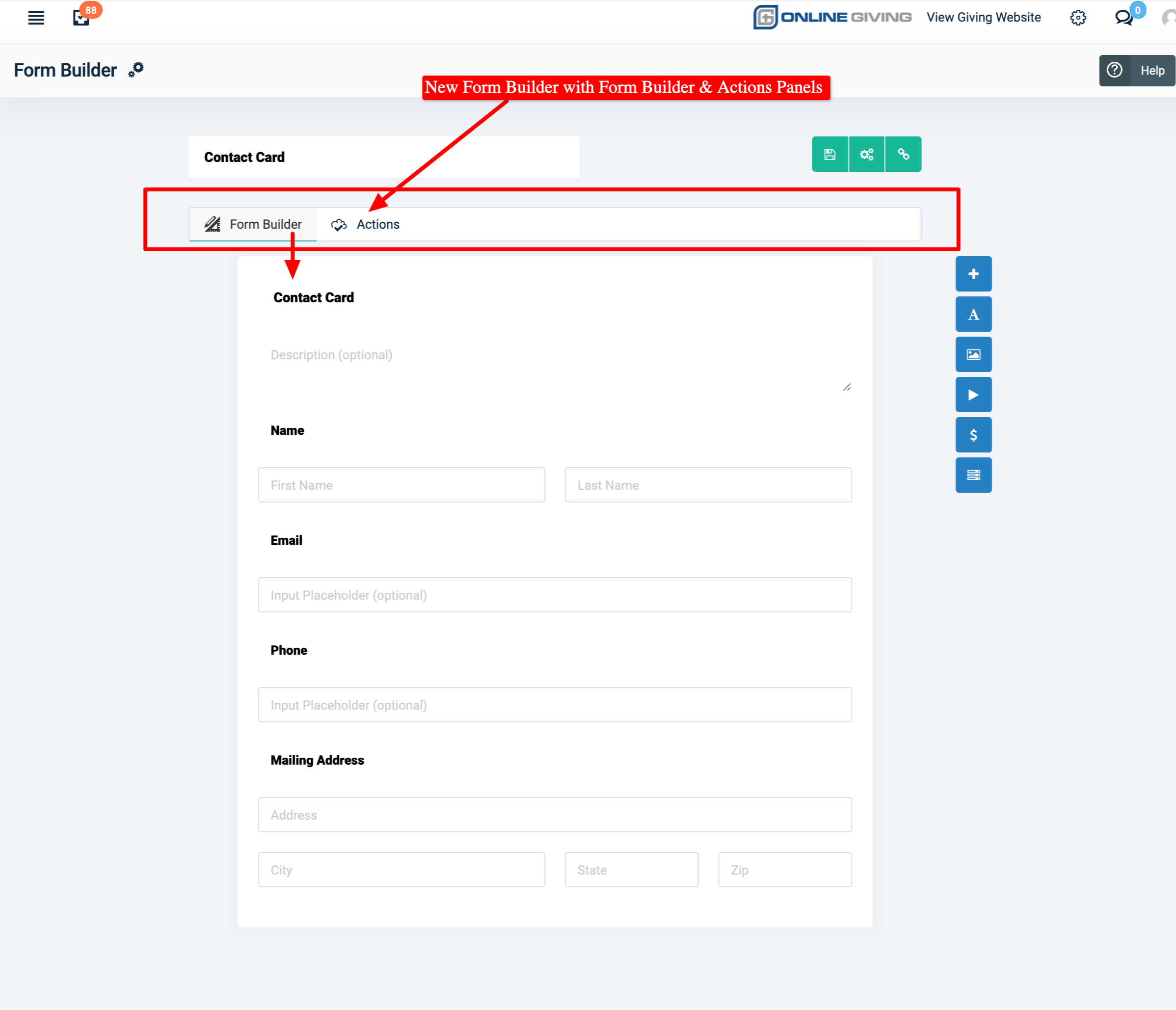
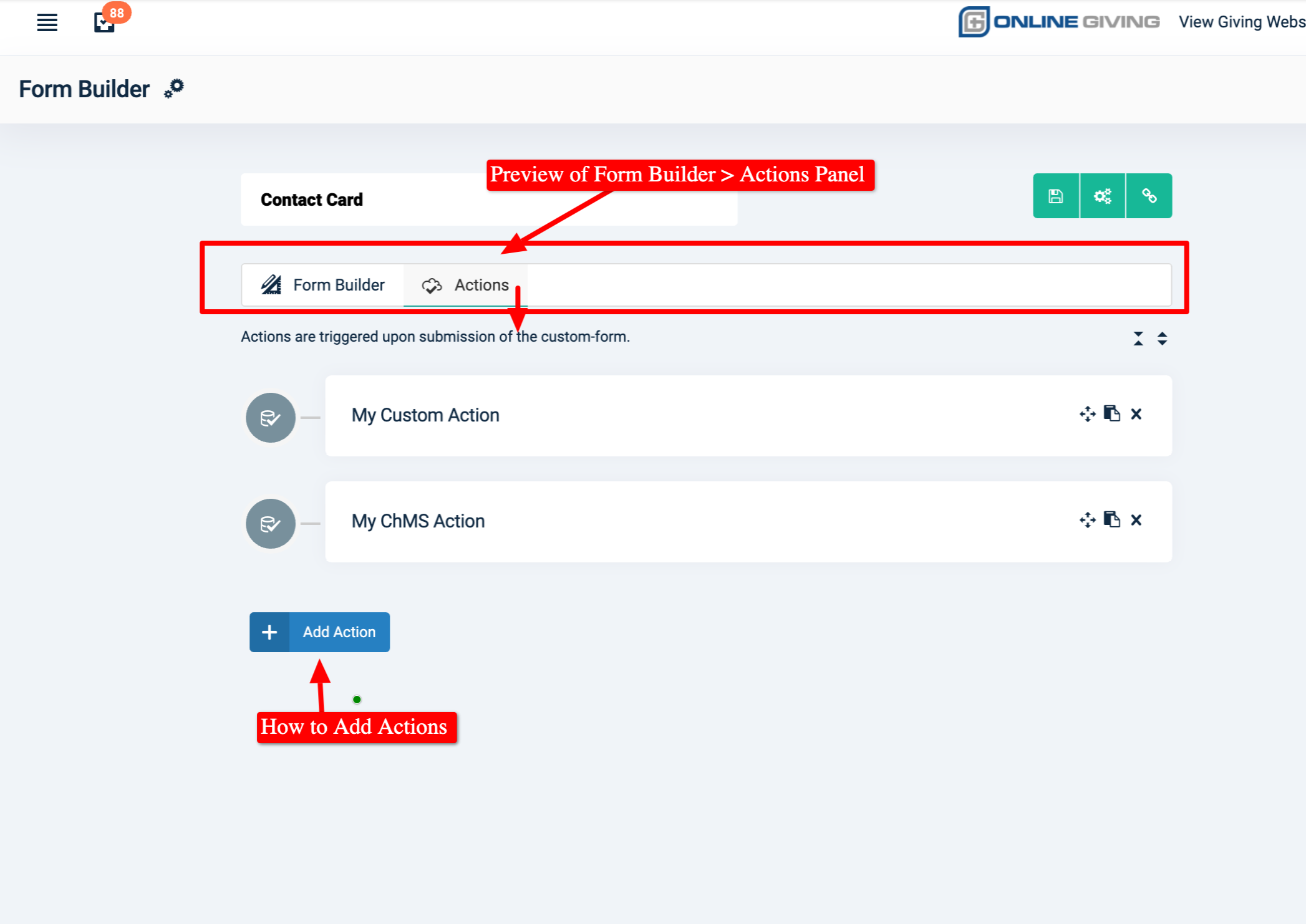
We're pleased to report the popular Online Giving Control Panel > Custom Form Builder feature has been enhanced with notification and integration Actions! Like the Chatbot, church administrators may now optionally configure Online Giving Custom Forms to have one or more Actions performed when a form is submitted. We have carefully redesigned the Custom Form Builder with an enhanced interface that includes a new "Actions" panel. A wide range of custom-form actions have been developed and are now ready for church use (see additional release notes below for features). Actions can also be conditionally triggered based on form submission data which allows for an even more custom integration option.
Preview of Updated Custom Form Builder:
*NEW* Custom Forms > Action > Rock RMS Integrations Available
We're pleased to report a new Custom Form Action feature for integrating form submissions into Rock RMS. The following Rock RMS integrations Custom Form Actions are now available:
- Rock RMS Match/Create Person - Action will match or create a Rock RMS person based on the custom form fields containing first name, last name, and email address.
- Rock RMS Add Person to Group - Action will add a matched (or newly created) person to a Rock RMS group with a defined Group Role.
- Rock RMS Create Workflow - Action will create a new Rock RMS workflow entry and feed the workflow with the matched Rock RMS person and form submission data.
Did you know? The OnlineGiving.org chatbot also has the Rock RMS integrations above.
*NEW* Custom Forms > Action > MinistryPlatform Integrations Available
We're pleased to report a new Custom Form Action feature for integrating form submissions into MinistryPlatform. The following MinistryPlatform integrations Custom Form Actions are now available:
- MinistryPlatform Create/Match Contact - Action will match or create an MP contact based on the form submission first name, last name, email address, and phone number.
- MinistryPlatform Event Participation Recording - Action will record an MP Event Participation record for the configured MP Event with the church supplied "Registered" or "Interested" status.
- MinistryPlatform Group Recording - Action will add a participant to a configured MP Group with a church supplied Group Role and optionally Notes containing custom-form submission data.
- MinistryPlatform Send Communication Message - Action can be conditionally triggered based on form question answer to send an MP Communication message.
- MinistryPlatform Subscribe to Publication - Action can be conditionally triggered based on form question to subscribe MP contact to an MP Publication.
- MinistryPlatform Unsubscribe from Publication - Action can be conditionally triggered based on form question to unsubscribe MP contact from an MP Publication.
- MinistryPlatform Create Milestone - Action will create an MP Milestone for the matched MP contact with the configured MP Milestone, MP Program, and optionally the MP Event.
- MinistryPlatform Created Opportunity Response - Action will create an MP Opportunity Response for the matched MP contact for the configured MP Opportunity, MP event and allows for comments to be recorded using form submission data.
- MinistryPlatform Set Household Campus (Congregation) - Action can be conditionally triggered to update a matching MP contact household congregation based on form submission data.
- MinistryPlatform Add/Update Household Address - Action will add or update the matching MP Contact household address after verifying the address is valid with Google Maps.
- MinistryPlatform Create Feedback Entry - Action can be conditionally triggered to create an MP Feedback Entry for the matched MP contact with the church configured Entry Title, Feedback Type, MP Program, Visibility Level, Entry Description (supports form submission data), and Ongoing Need status.
- MinistryPlatform Create Pledge - Action will create a new pledge for the matched MP contact, including the church configured MP Pledge Campaign, MP Pledge status, MP Pledge Notes (supports form submission data) and will automatically calculate the installment information on form submission data.
Did you know? The OnlineGiving.org chatbot also has the MinistryPlatform integrations above.
*NEW* Custom Forms > Action > Planning Center Add Person to Workflow
We're pleased to report a new Custom Form Action feature for integrating form submissions into Planning Center. Church administrators may now configure the custom-form action "Planning Center Add Person to Workflow" to have the matched Planning Center Person added to a Planning Center Workflow. The church can configure which specific workflow, which includes the ability to include Workflow Card Notes that contain form submission data. This can be used for all types of scenarios such as baptisms sign-ups, Christ acceptance, and much more.
Did you know? The OnlineGiving.org chatbot also has the Planning Center integration above.
*NEW* Custom Forms > Action > Church Community Builder (CCB) Integrations Available
We're pleased to report a new Custom Form Action feature for integrating form submissions into Church Community Builder (CCB). The following CCB integrations Custom Form Actions are now available:
- CCB Match/Create Person - Action will match or create a CCB person based on the form submission first name, last name, email address, and phone number.
- CCB Add Individual to Process Queue - Action will add the matched CCB person to a church configured CCB Process Queue, including CCB Queue Notes containing form submission data.
Did you know? The OnlineGiving.org chatbot also has the Church Community Builder (CCB) integrations above.
*NEW* Custom Forms > Action > Send Text Message to User
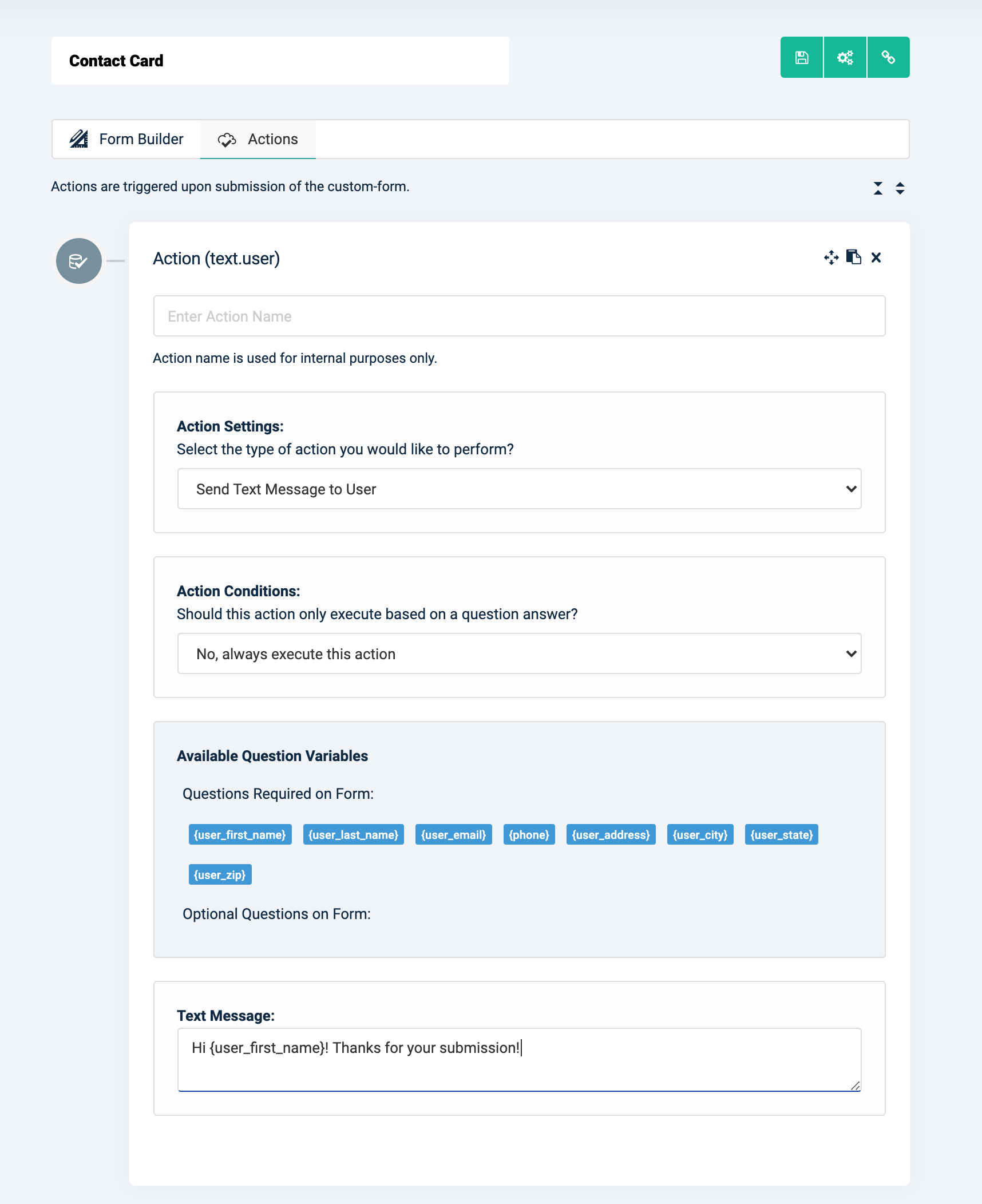
We're pleased to report a new Custom Form Action > Send Text Message to User is now live. Church administrators may use this custom-form action to send a text message after form submission to the matching (or signed in) user's profile phone number. The action supports using custom-form question variables for populating the text message with question answers from the form submission. Kindly see below for a preview.
Preview of "Send Text Message to User" Custom Form Action:
*NEW* Custom Forms > Action > Send Text Message to Specific Phone Number
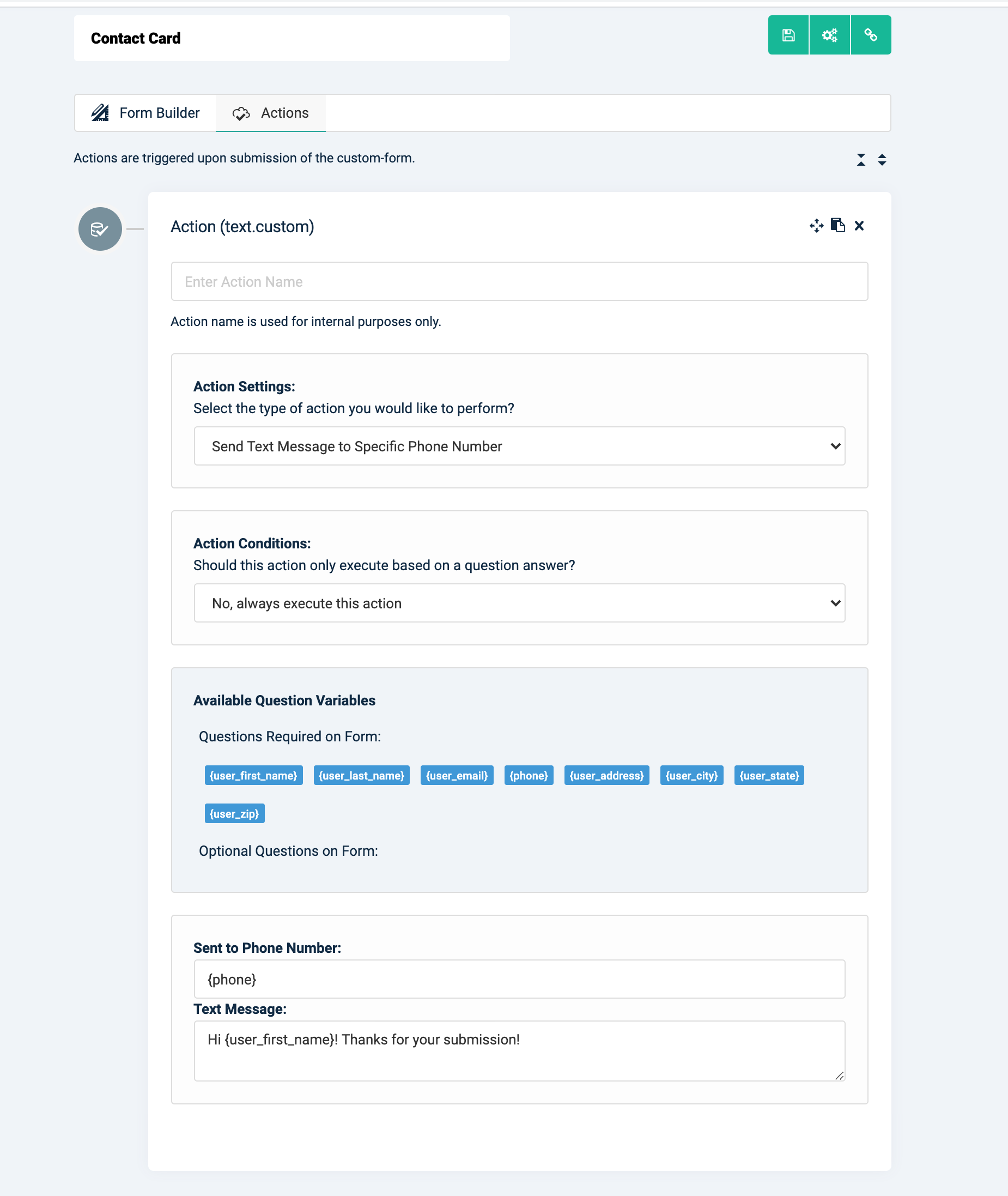
We're pleased to report a new Custom Form Action > Send Text Message to Specific Phone Number is now live. Church administrators may use this custom-form action to send a text message after form submission to a church admin supplied the mobile phone number. Church administrators may enter a valid US phone number or a "Question Variable" into the "Send to Phone Number" setting (see below). The action supports using custom-form question variables for populating the text message with question answers from the form submission. Kindly see below for a preview.
Preview of "Send Text message to Specific Phone Number" Custom Form Action:
*NEW* Custom Forms > Action > Send Email to User
We're pleased to report a new Custom Form Action > Send Email to User is now live. Church administrators may use this custom-form action to send an email message after form submission to the matching (or signed in) user's profile email address. The action supports using custom-form question variables for populating the email subject and body with question answers from the form submission. Kindly see below for a preview.
Preview of "Send Email to User" Custom Form Action:

*NEW* Custom Forms > Action > Send Email to Specific Email Address
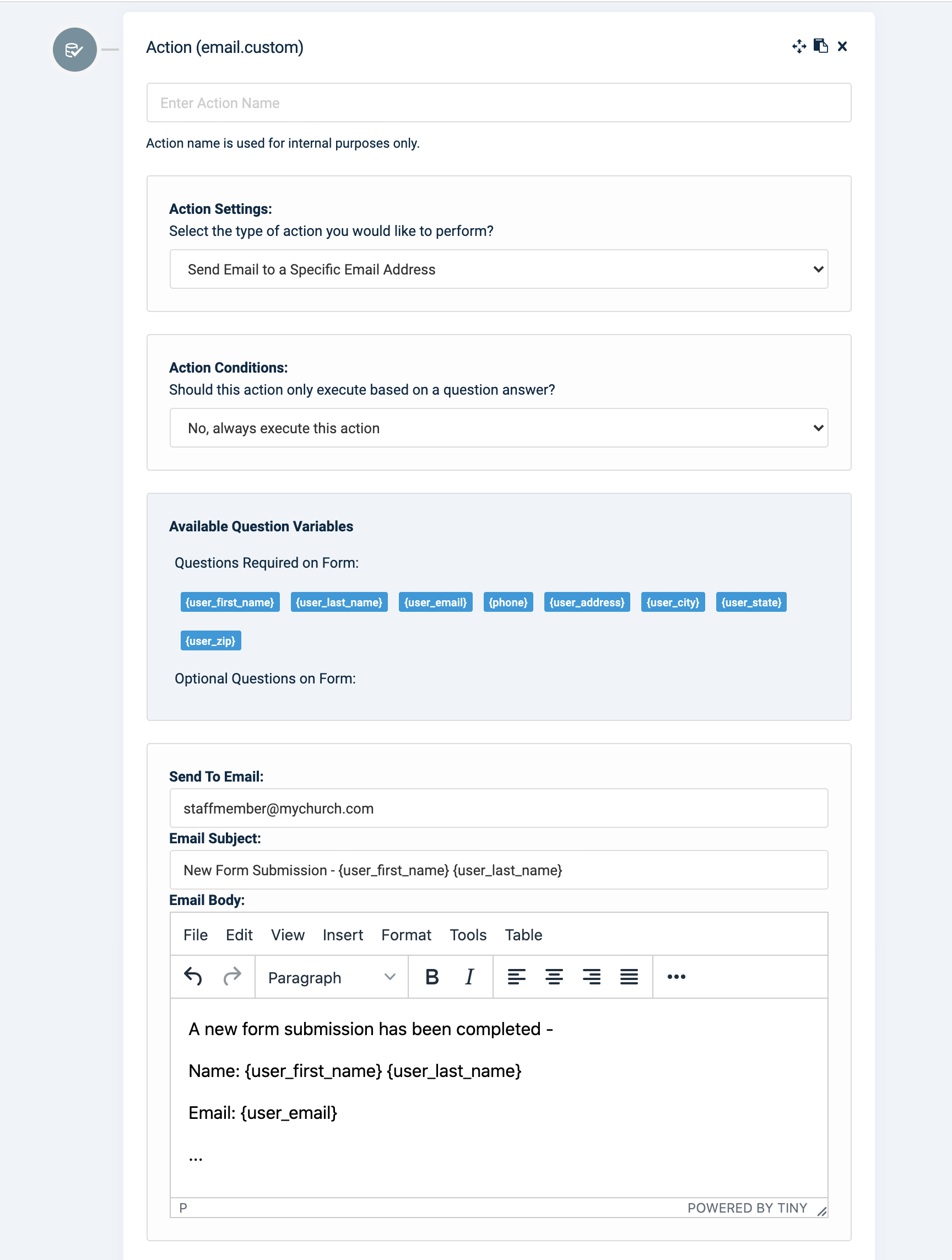
We're pleased to report a new Custom Form Action >Send Email to Specific Email Address is now live. Church administrators may use this custom-form action to send an email message after form submission to a church admin supplied the email address. Church administrators may enter a valid email address "Send to Email" setting (see below). The action supports using custom-form question variables for populating the email subject and body with question answers from the form submission. Kindly see below for a preview.
Preview of "Send Email to Specific Email Address" Custom Form Action:
*NEW* Chatbot Builder > Missing Required Parameter Variables Highlighted in Red
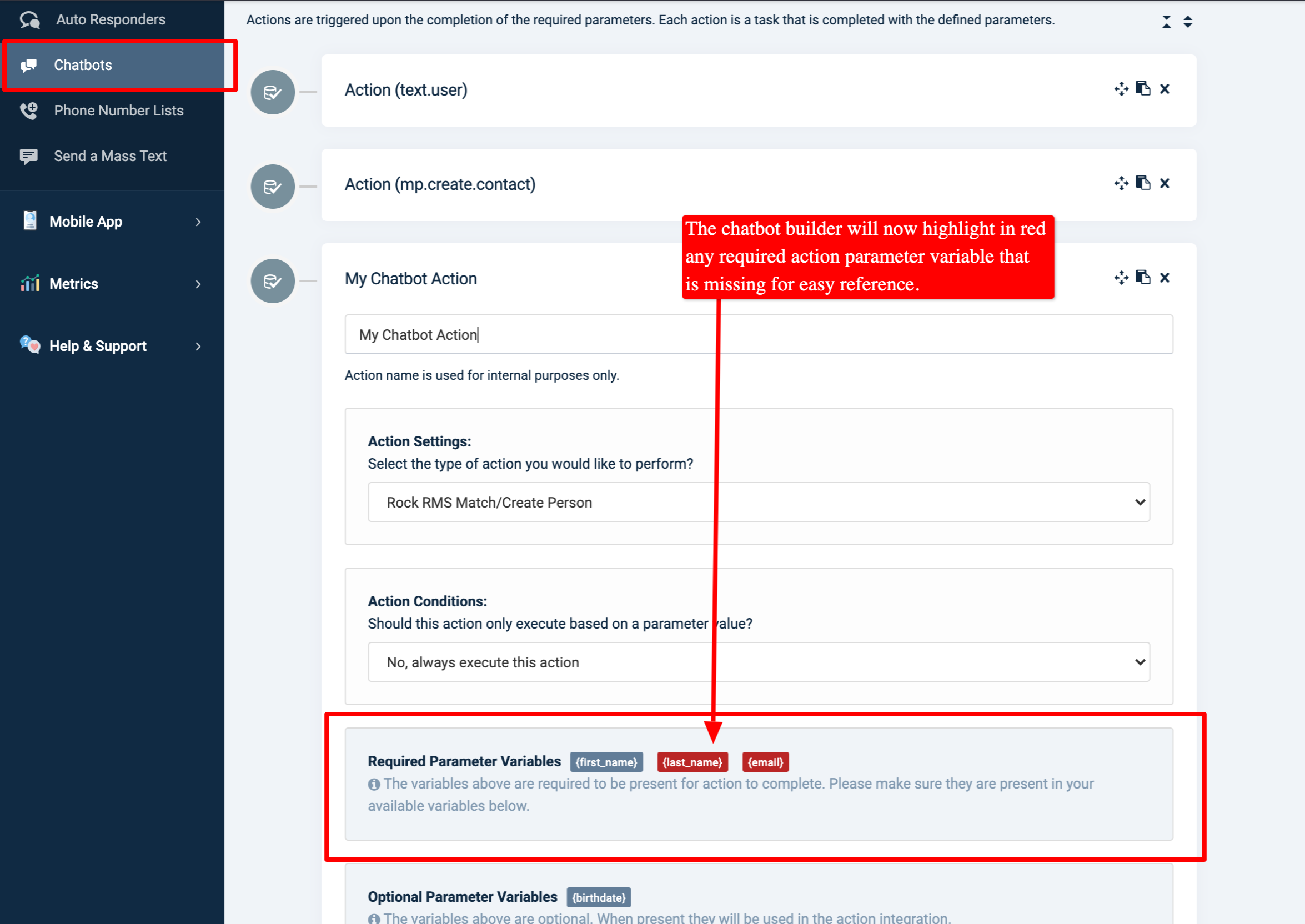
An update is now live that enhances the Online Giving Control Panel > Chatbot > Actions feature to will now highlight any required action parameter variable in red when it is missing (not present) in the chatbot parameters (questions). The updated goal is to allow quick visual cues to missing parameters required to perform the desired action. Kindly see below for a preview of the feature.
Preview of Missing Chatbot Action Parameters Highlighted in Red:
*NEW* Chatbot Builder > Parameter Variables Drag-n-Drop
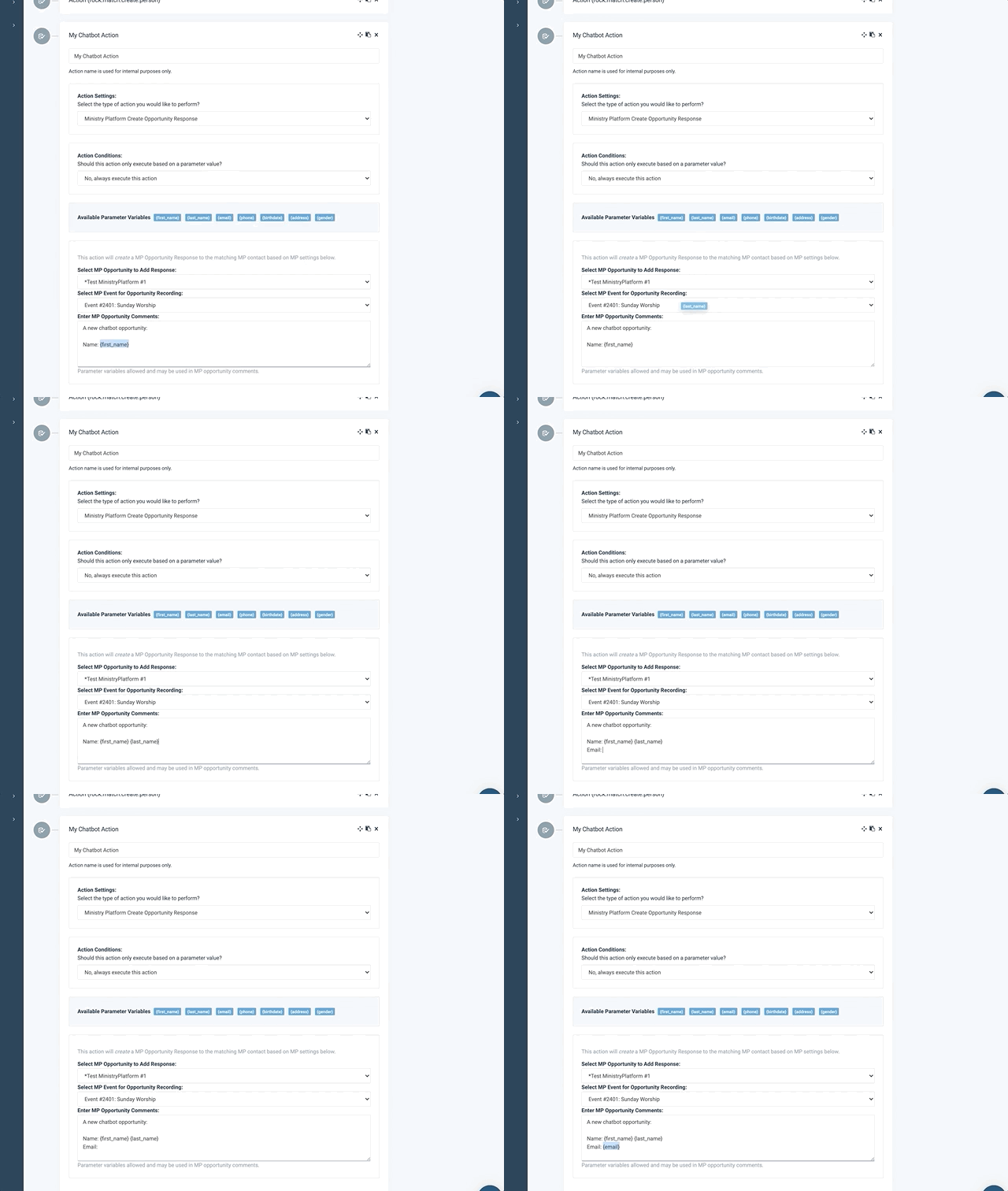
An update is now live, enhancing the Online Giving Control Panel > Chatbot > Actions > Parameter Variables feature. Church administrators may now drag and drop chatbot parameter variables for an even easier experience configuring chatbot actions. Kindly see below for a preview of the feature in action.
Preview of Event Trigger Template Variables Drag-n-Drop:
*NEW* Event Trigger > Template Variables Drag-n-Drop
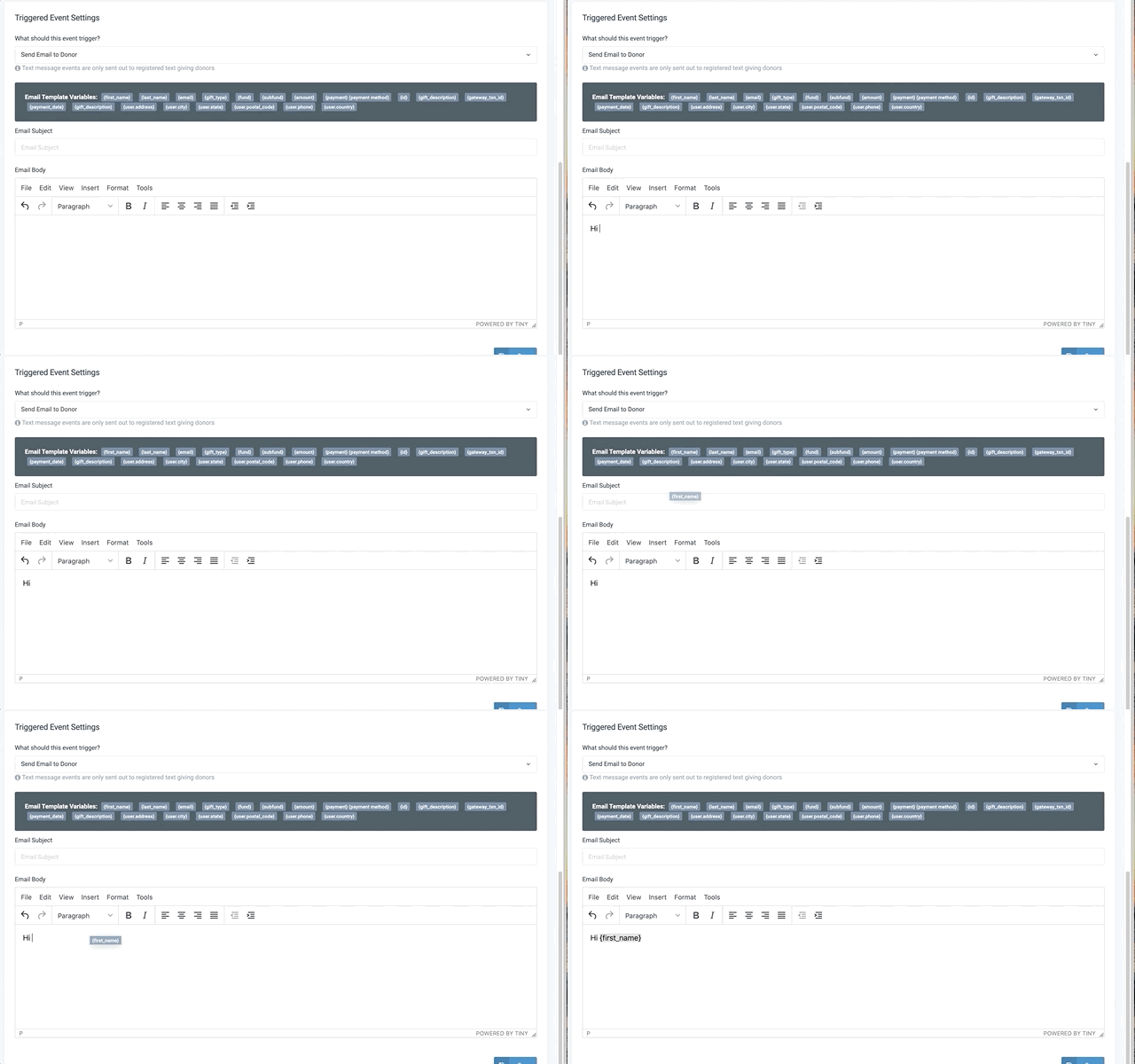
An update is now live that enhances the Online Giving Control Panel > Event Triggers feature. Church administrators may now drag and drop template variables for an even easier experience in creating event trigger email and text message notifications. Kindly see below for a preview of the feature in action.
Preview of Event Trigger Template Variables Drag-n-Drop: